
文章目录
- 目录:openharmony\device\hisilicon\hispark_pegasus\sdk_liteos\build\config\usr_config.mk。 找到这里# CONFIG_FACTORY_TEST_SUPPORT is not set# end of Factory Test Settings## BSP Settings#CONFIG_I2C_SUPPORT=y 《《《打开编译IIC驱动,改成这样# CONFIG_I2S_SUPPORT is not set# CONFIG_SPI_SUPPORT is not set# CONFIG_DMA_SUPPORT is not set# CONFIG_SDIO_SUPPORT is not set# CONFIG_SPI_DMA_SUPPORT is not set# CONFIG_UART_DMA_SUPPORT is not setCONFIG_PWM_SUPPORT=yCONFIG_PWM_HOLD_AFTER_REBOOT=yCONFIG_AT_SUPPORT=yCONFIG_FILE_SYSTEM_SUPPORT=yCONFIG_UART0_SUPPORT=yCONFIG_UART1_SUPPORT=y# CONFIG_UART2_SUPPORT is not set# end of BSP Settings
- 目录:openharmony3\applications\sample\wifi-iot\app\BUILD.gn。 import("//build/lite/config/component/lite_component.gni")lite_component("app") { features = [ "robot_demo:robot_demo", "robot_demo/ssd1306:oled_ssd1306", ]} 注意:官方样例使用说明 https://gitee.com/hihope_iot/hispark-pegasus-smart-car 里面的 BUILD.gn 未将 oled_ssd1306 加入编译,不加入会报错。
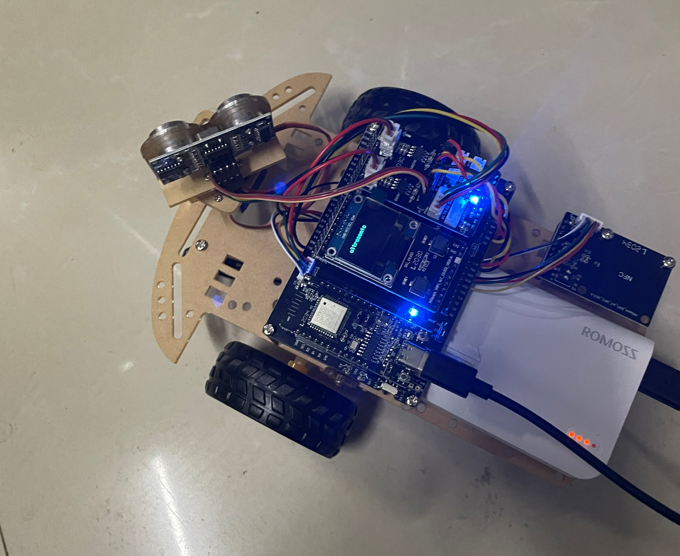
- 测试成功!
-
- 报错提示: [OHOS ERROR] riscv32-unknown-elf-ld: ohos/libs/libhal_iothardware.a(libhal_iothardware.hal_iot_i2c.o): in function `IoTI2cInit':[OHOS ERROR] hal_iot_i2c.c:(.text.IoTI2cInit+0x10): undefined reference to `hi_i2c_init' 解决办法: 目录:openharmony\device\hisilicon\hispark_pegasus\sdk_liteos\build\config\usr_config.mk。 找到这里# CONFIG_FACTORY_TEST_SUPPORT is not set# end of Factory Test Settings## BSP Settings#CONFIG_I2C_SUPPORT=y 《《《打开编译IIC驱动,改成这样# CONFIG_I2S_SUPPORT is not set# CONFIG_SPI_SUPPORT is not set# CONFIG_DMA_SUPPORT is not set# CONFIG_SDIO_SUPPORT is not set# CONFIG_SPI_DMA_SUPPORT is not set# CONFIG_UART_DMA_SUPPORT is not setCONFIG_PWM_SUPPORT=yCONFIG_PWM_HOLD_AFTER_REBOOT=yCONFIG_AT_SUPPORT=yCONFIG_FILE_SYSTEM_SUPPORT=yCONFIG_UART0_SUPPORT=yCONFIG_UART1_SUPPORT=y# CONFIG_UART2_SUPPORT is not set# end of BSP Settings
- 报错提示: [OHOS ERROR] ssd1306_test.c:(.text.Ssd1306TestTask+0x3c): undefined reference to `ssd1306_Init'[OHOS ERROR] riscv32-unknown-elf-ld: ssd1306_test.c:(.text.Ssd1306TestTask+0x46): undefined reference to `ssd1306_Fill'[OHOS ERROR] riscv32-unknown-elf-ld: ssd1306_test.c:(.text.Ssd1306TestTask+0x52): undefined reference to `ssd1306_SetCursor' 解决办法: 目录:openharmony3\applications\sample\wifi-iot\app\BUILD.gn。 import("//build/lite/config/component/lite_component.gni")lite_component("app") { features = [ "robot_demo:robot_demo", "robot_demo/ssd1306:oled_ssd1306", ]}
- 可能原因:使用了双头Type-C数据线供电,导致无法供电,因为开发板没有受电端诱骗芯片。 想了解更多内容,请访问: 51CTO和华为官方合作共建的鸿蒙技术社区 https://ost.51cto.com

https://gitee.com/hihope_iot/hispark-pegasus-smart-car.git
git clone https://gitee.com/hihope_iot/hispark-pegasus-smart-car.git
目录:hispark-pegasus-smart-car\智能循迹避障小车样例代码\robot_demo
拷贝到:openharmony\applications\sample\wifi-iot\app\
拷贝到:openharmony\applications\sample\wifi-iot\app\
目录:openharmony\device\hisilicon\hispark_pegasus\sdk_liteos\build\config\usr_config.mk。
找到这里
# CONFIG_FACTORY_TEST_SUPPORT is not set
# end of Factory Test Settings
#
# BSP Settings
#
CONFIG_I2C_SUPPORT=y 《《《打开编译IIC驱动,改成这样
# CONFIG_I2S_SUPPORT is not set
# CONFIG_SPI_SUPPORT is not set
# CONFIG_DMA_SUPPORT is not set
# CONFIG_SDIO_SUPPORT is not set
# CONFIG_SPI_DMA_SUPPORT is not set
# CONFIG_UART_DMA_SUPPORT is not set
CONFIG_PWM_SUPPORT=y
CONFIG_PWM_HOLD_AFTER_REBOOT=y
CONFIG_AT_SUPPORT=y
CONFIG_FILE_SYSTEM_SUPPORT=y
CONFIG_UART0_SUPPORT=y
CONFIG_UART1_SUPPORT=y
# CONFIG_UART2_SUPPORT is not set
# end of BSP Settings
目录:openharmony3\applications\sample\wifi-iot\app\BUILD.gn。
import("//build/lite/config/component/lite_component.gni")
lite_component("app") {
 features = [
 "robot_demo:robot_demo",
 "robot_demo/ssd1306:oled_ssd1306",
 ]
}
注意:官方样例使用说明 https://gitee.com/hihope_iot/hispark-pegasus-smart-car 里面的 BUILD.gn 未将 oled_ssd1306 加入编译,不加入会报错。
hb set
.(英文字符)
.(英文字符)
复制②.选择wifiiot_hispark_pegasus
③.执行编译
hb build -f
点击select fine
选择该路径:openharmony\out\hispark_pegasus\wifiiot_hispark_pegasus 下的Hi3861_loader_signed.bin和Hi3861_wifiiot_app_allinone.bin
选择该路径:openharmony\out\hispark_pegasus\wifiiot_hispark_pegasus 下的Hi3861_loader_signed.bin和Hi3861_wifiiot_app_allinone.bin
复制 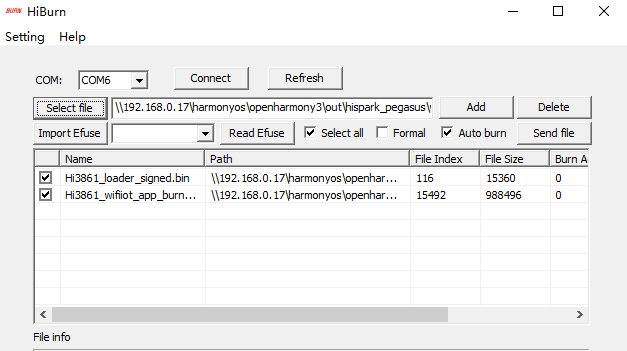
点击Connect
开始烧录。
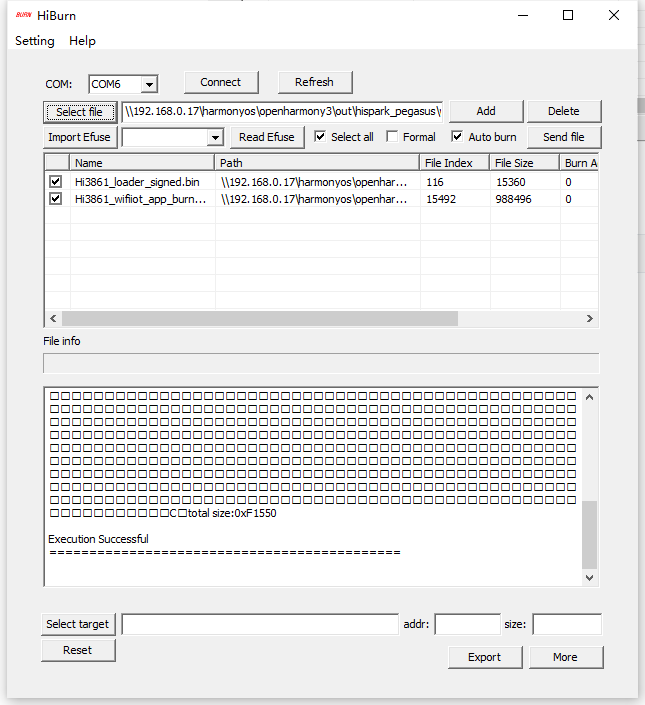
测试成功!
报错提示:
[OHOS ERROR] riscv32-unknown-elf-ld: ohos/libs/libhal_iothardware.a(libhal_iothardware.hal_iot_i2c.o): in function `IoTI2cInit':
[OHOS ERROR] hal_iot_i2c.c:(.text.IoTI2cInit+0x10): undefined reference to `hi_i2c_init'

解决办法:
目录:openharmony\device\hisilicon\hispark_pegasus\sdk_liteos\build\config\usr_config.mk。
找到这里
# CONFIG_FACTORY_TEST_SUPPORT is not set
# end of Factory Test Settings
#
# BSP Settings
#
CONFIG_I2C_SUPPORT=y 《《《打开编译IIC驱动,改成这样
# CONFIG_I2S_SUPPORT is not set
# CONFIG_SPI_SUPPORT is not set
# CONFIG_DMA_SUPPORT is not set
# CONFIG_SDIO_SUPPORT is not set
# CONFIG_SPI_DMA_SUPPORT is not set
# CONFIG_UART_DMA_SUPPORT is not set
CONFIG_PWM_SUPPORT=y
CONFIG_PWM_HOLD_AFTER_REBOOT=y
CONFIG_AT_SUPPORT=y
CONFIG_FILE_SYSTEM_SUPPORT=y
CONFIG_UART0_SUPPORT=y
CONFIG_UART1_SUPPORT=y
# CONFIG_UART2_SUPPORT is not set
# end of BSP Settings
报错提示:
[OHOS ERROR] ssd1306_test.c:(.text.Ssd1306TestTask+0x3c): undefined reference to `ssd1306_Init'
[OHOS ERROR] riscv32-unknown-elf-ld: ssd1306_test.c:(.text.Ssd1306TestTask+0x46): undefined reference to `ssd1306_Fill'
[OHOS ERROR] riscv32-unknown-elf-ld: ssd1306_test.c:(.text.Ssd1306TestTask+0x52): undefined reference to `ssd1306_SetCursor'
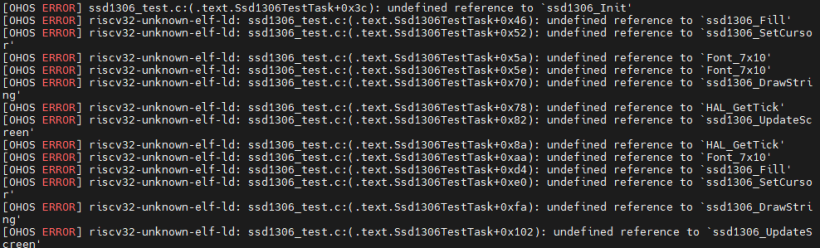
解决办法:
目录:openharmony3\applications\sample\wifi-iot\app\BUILD.gn。
import("//build/lite/config/component/lite_component.gni")
lite_component("app") {
 features = [
 "robot_demo:robot_demo",
 "robot_demo/ssd1306:oled_ssd1306",
 ]
}
可能原因:使用了双头Type-C数据线供电,导致无法供电,因为开发板没有受电端诱骗芯片。

© 版权声明
文章版权归作者所有,未经允许请勿转载。








