
文章目录
- 鸿蒙官方推荐使用Js或eTS方式来开发APP应用UI,但在开发过程中有可能会遇到JSUI无法实现的功能,例如地图导航、定制化视频播放器,那么这种场景下如何实现功能,这个需求就带来如下问题: 1.一个页面是否能同时使用JavaUI和JSUI,JSUI来实现简单功能,JavaUI来实现定制化功能。 2.一个工程是否支持不同的UI语法,比如PageA使用JSUI,PageB使用JavaUI。 带着问题我们来回顾一下鸿蒙开发支持的UI开发方式。
- 使用xml方式描述UI界面布局,应用中所有的用户界面元素都是由Component和ComponentContainer对象构成。Component是绘制在屏幕上的一个对象,用户能与之交互。ComponentContainer是一个用于容纳其他Component和ComponentContainer对象的容器。Java UI框架提供了一部分Component和ComponentContainer的具体子类,即创建用户界面(UI)的各类组件,包括一些常用的组件(比如:文本、按钮、图片、列表等)和常用的布局(比如:DirectionalLayout和DependentLayout)。用户可通过组件进行交互操作,并获得响应。
- 基于JS扩展的类Web开发范式的方舟开发框架是一种跨设备的高性能UI开发框架,支持声明式编程和跨设备多态UI。 采用类HTML和CSS Web编程语言作为页面布局和页面样式的开发语言,页面业务逻辑则支持ECMAScript规范的JavaScript语言。方舟开发框架提供的类Web编程范式,可以让开发者避免编写UI状态切换的代码,视图配置信息更加直观。
- 使用基于TS扩展的声明式开发范式的方舟开发框架,采用更接近自然语义的编程方式,让开发者可以直观地描述UI界面,不必关心框架如何实现UI绘制和渲染,实现极简高效开发。从组件、动效和状态管理三个维度来提供UI能力,还提供了系统能力接口,实现系统能力的极简调用。 根据Ability的分类来考虑,JsUI继承自AceAbility,而JavaUI使用xml方式进行渲染,它继承自Ability,所以在同一界面上使用两个语言在页面渲染器就已经决定了,JavaUI和JSUI不能在同一Page中使用。 那么问题2是否可行呢,答案是可以的。因为PageA和PageB可以用2个不同的Ability来渲染实现。 需要实现PageA是应用主页面,使用JSUI实现,PageA上有个按钮跳转到PageB,PageB展示地图导航页面,PageB使用JavaUI实现 如图: JSUI自带有router功能,可以通过router.push进行跳转,但这仅限于JSUI的不通页面,对于上述场景行不通。 那么只能使用ability的startAbility能力来实现不同ability之前的跳转。 使用AceInternalAbility来接收页面的跳转请求,然后通过ability的startAbility方法跳转到另一个ability,流程图如下:
- MainAbility.java: @Override public void onStart(Intent intent) { …… // 注册AceInternalAbility,接收首页按钮请求 TransInternalAbility.getInstance().register(this); super.onStart(intent); }} TransInternalAbility.java: private static final String BUNDLE_NAME = "cn.pmagroup.ble.pmap30"; private static final String MAP_ABILITY_NAME = "cn.pmagroup.ble.pmap30.ability.MapAbility"; private static final String ABILITY_NAME = "cn.pmagroup.ble.pmap30.ability.TransInternalAbility"; private static final int SUCCESS = 0; private static final int ERROR = 1; private static final int PULL_MAP_PAGE = 1001; // 定义日志标签 private static final HiLogLabel LABEL = new HiLogLabel(HiLog.LOG_APP, 0, "MY_TAG"); private static TransInternalAbility instance; private Ability ability; private TransInternalAbility() { super(BUNDLE_NAME, ABILITY_NAME); } public static TransInternalAbility getInstance() { if (instance == null) { synchronized (TransInternalAbility.class) { if (instance == null) { instance = new TransInternalAbility(); } } } return instance; } public static void register(Ability ability) { HiLog.info(LABEL, "DataHandlerAbility: register"); if (ability == null) { HiLog.info(LABEL, "register abilityContext is null"); } else { HiLog.info(LABEL, "register " + ability.getBundleName()); if (instance == null) { instance = new TransInternalAbility(); } instance.onRegister(ability); } } /** * init Internal ability */ public void onRegister(Ability ability) { this.ability = ability; this.setInternalAbilityHandler(this::onRemoteRequest); } private boolean onRemoteRequest(int code, MessageParcel data, MessageParcel reply, MessageOption option) { HiLog.info(LABEL, "DataHandlerAbility: onRemoteRequest"); String dataString = data.readString(); switch (code) { case PULL_MAP_PAGE: { reply.writeString("{ code: 0 }"); // 拉起地图导航JavaUI ability this.pullMapPage(); break; } default: { reply.writeString("service not defined"); return false; } } return true; } // 拉起地图导航JavaUI ability private void pullMapPage() { Intent intent = new Intent(); Operation operation = new Intent.OperationBuilder().withBundleName(BUNDLE_NAME) .withAbilityName(MAP_ABILITY_NAME).build(); intent.setOperation(operation); this.ability.startAbilityForResult(intent, PULL_MAP_PAGE); }} MapAbility.java: private static final HiLogLabel LABEL = new HiLogLabel(HiLog.LOG_APP, 0, "MAP_ABILITY"); @Override public void onStart(Intent intent) { super.onStart(intent); super.setMainRoute(MapAbilitySlice.class.getName()); }} MapAbilitySlice.java: private static final int TOAST_DURATION = 3500; private static final String BUNDLE_NAME = "cn.pmagroup.ble.pmap30"; private static final String CONTROL_ABILITY = "cn.pmagroup.ble.pmap30.ability.MainAbility"; private static final int VP2PX_VALUE = 64; private static final HiLogLabel LABEL = new HiLogLabel(HiLog.LOG_APP, 0, "MAP_ABILITY_SLICE"); @Override public void onStart(Intent intent) { super.onStart(intent); super.setUIContent(ResourceTable.Layout_map_ability); this.initComponents(); } private void initComponents() { Button btnGoBack = (Button) findComponentById(ResourceTable.Id_btn_goBack); ShapeElement background = new ShapeElement(); background.setRgbColor(new RgbColor(0, 125, 255)); background.setCornerRadius(25); btnGoBack.setBackground(background); // 在组件中增加对点击事件的检测 btnGoBack.setClickedListener(component -> { // 此处添加按钮被点击需要执行的操作 LogUtil.debug("JavaUI", "btnGoBack click"); this.showToast(this, "返回控制页面"); this.goBack2ControlPage(); }); } private void goBack2ControlPage() { Intent intent = new Intent(); Operation operation = new Intent.OperationBuilder().withBundleName(BUNDLE_NAME) .withAbilityName(CONTROL_ABILITY).build(); intent.setOperation(operation); startAbility(intent); } @Override public void onActive() { super.onActive(); } @Override public void onForeground(Intent intent) { super.onForeground(intent); }} map_ability.xml(Layout文件): <DirectionalLayout xmlns:ohos="http://schemas.huawei.com/res/ohos" ohos:height="match_parent" ohos:width="match_parent" ohos:alignment="center" ohos:orientation="vertical"> <Text ohos:id="$+id:text_helloworld" ohos:height="match_content" ohos:width="match_content" ohos:background_element="$graphic:background_ability_test" ohos:layout_alignment="horizontal_center" ohos:text="$string:testability_HelloWorld" ohos:text_size="40vp" /> <Button ohos:id="$+id:btn_goBack" ohos:height="40vp" ohos:width="match_parent" ohos:text="返回" ohos:text_size="20vp" ohos:focus_border_enable="true" /></DirectionalLayout> 想了解更多关于开源的内容,请访问: 51CTO 开源基础软件社区 https://ost.51cto.com。

鸿蒙官方推荐使用Js或eTS方式来开发APP应用UI,但在开发过程中有可能会遇到JSUI无法实现的功能,例如地图导航、定制化视频播放器,那么这种场景下如何实现功能,这个需求就带来如下问题:
1.一个页面是否能同时使用JavaUI和JSUI,JSUI来实现简单功能,JavaUI来实现定制化功能。
2.一个工程是否支持不同的UI语法,比如PageA使用JSUI,PageB使用JavaUI。
带着问题我们来回顾一下鸿蒙开发支持的UI开发方式。
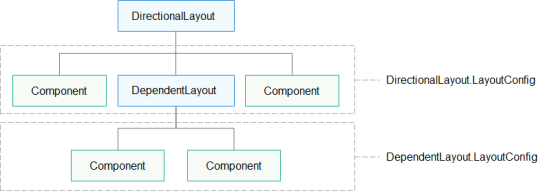
使用xml方式描述UI界面布局,应用中所有的用户界面元素都是由Component和ComponentContainer对象构成。Component是绘制在屏幕上的一个对象,用户能与之交互。ComponentContainer是一个用于容纳其他Component和ComponentContainer对象的容器。Java UI框架提供了一部分Component和ComponentContainer的具体子类,即创建用户界面(UI)的各类组件,包括一些常用的组件(比如:文本、按钮、图片、列表等)和常用的布局(比如:DirectionalLayout和DependentLayout)。用户可通过组件进行交互操作,并获得响应。
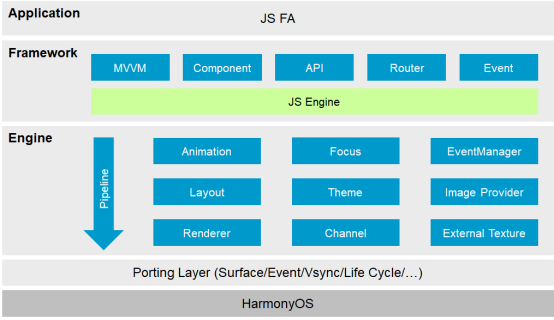
基于JS扩展的类Web开发范式的方舟开发框架是一种跨设备的高性能UI开发框架,支持声明式编程和跨设备多态UI。 采用类HTML和CSS Web编程语言作为页面布局和页面样式的开发语言,页面业务逻辑则支持ECMAScript规范的JavaScript语言。方舟开发框架提供的类Web编程范式,可以让开发者避免编写UI状态切换的代码,视图配置信息更加直观。
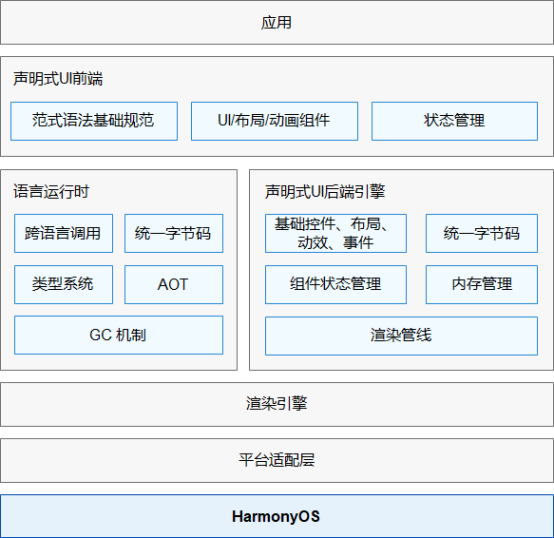
使用基于TS扩展的声明式开发范式的方舟开发框架,采用更接近自然语义的编程方式,让开发者可以直观地描述UI界面,不必关心框架如何实现UI绘制和渲染,实现极简高效开发。从组件、动效和状态管理三个维度来提供UI能力,还提供了系统能力接口,实现系统能力的极简调用。
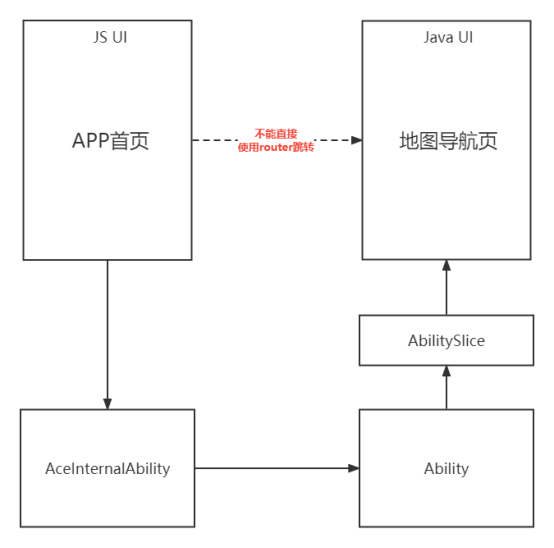
根据Ability的分类来考虑,JsUI继承自AceAbility,而JavaUI使用xml方式进行渲染,它继承自Ability,所以在同一界面上使用两个语言在页面渲染器就已经决定了,JavaUI和JSUI不能在同一Page中使用。
那么问题2是否可行呢,答案是可以的。因为PageA和PageB可以用2个不同的Ability来渲染实现。
需要实现PageA是应用主页面,使用JSUI实现,PageA上有个按钮跳转到PageB,PageB展示地图导航页面,PageB使用JavaUI实现
如图:

JSUI自带有router功能,可以通过router.push进行跳转,但这仅限于JSUI的不通页面,对于上述场景行不通。
那么只能使用ability的startAbility能力来实现不同ability之前的跳转。
使用AceInternalAbility来接收页面的跳转请求,然后通过ability的startAbility方法跳转到另一个ability,流程图如下:
MainAbility.java:
@Override
 public void onStart(Intent intent) {
 ……
 // 注册AceInternalAbility,接收首页按钮请求
 TransInternalAbility.getInstance().register(this);
 super.onStart(intent);
 }
}
TransInternalAbility.java:
private static final String BUNDLE_NAME = "cn.pmagroup.ble.pmap30";
 private static final String MAP_ABILITY_NAME = "cn.pmagroup.ble.pmap30.ability.MapAbility";
 private static final String ABILITY_NAME = "cn.pmagroup.ble.pmap30.ability.TransInternalAbility";
 private static final int SUCCESS = 0;
 private static final int ERROR = 1;
 private static final int PULL_MAP_PAGE = 1001;
 // 定义日志标签
 private static final HiLogLabel LABEL = new HiLogLabel(HiLog.LOG_APP, 0, "MY_TAG");
 private static TransInternalAbility instance;
 private Ability ability;
 private TransInternalAbility() {
 super(BUNDLE_NAME, ABILITY_NAME);
 }
 public static TransInternalAbility getInstance() {
 if (instance == null) {
 synchronized (TransInternalAbility.class) {
 if (instance == null) {
 instance = new TransInternalAbility();
 }
 }
 }
 return instance;
 }
 public static void register(Ability ability) {
 HiLog.info(LABEL, "DataHandlerAbility: register");
 if (ability == null) {
 HiLog.info(LABEL, "register abilityContext is null");
 } else {
 HiLog.info(LABEL, "register " + ability.getBundleName());
 if (instance == null) {
 instance = new TransInternalAbility();
 }
 instance.onRegister(ability);
 }
 }
 /**
 * init Internal ability
 */
 public void onRegister(Ability ability) {
 this.ability = ability;
 this.setInternalAbilityHandler(this::onRemoteRequest);
 }
 private boolean onRemoteRequest(int code, MessageParcel data, MessageParcel reply, MessageOption option) {
 HiLog.info(LABEL, "DataHandlerAbility: onRemoteRequest");
 String dataString = data.readString();
 switch (code) {
 case PULL_MAP_PAGE: {
 reply.writeString("{ code: 0 }");
 // 拉起地图导航JavaUI ability
 this.pullMapPage();
 break;
 }
 default: {
 reply.writeString("service not defined");
 return false;
 }
 }
 return true;
 }
 // 拉起地图导航JavaUI ability
 private void pullMapPage() {
 Intent intent = new Intent();
 Operation operation = new Intent.OperationBuilder().withBundleName(BUNDLE_NAME)
 .withAbilityName(MAP_ABILITY_NAME).build();
 intent.setOperation(operation);
 this.ability.startAbilityForResult(intent, PULL_MAP_PAGE);
 }
}
MapAbility.java:
private static final HiLogLabel LABEL = new HiLogLabel(HiLog.LOG_APP, 0, "MAP_ABILITY");
 @Override
 public void onStart(Intent intent) {
 super.onStart(intent);
 super.setMainRoute(MapAbilitySlice.class.getName());
 }
}
MapAbilitySlice.java:
private static final int TOAST_DURATION = 3500;
 private static final String BUNDLE_NAME = "cn.pmagroup.ble.pmap30";
 private static final String CONTROL_ABILITY = "cn.pmagroup.ble.pmap30.ability.MainAbility";
 private static final int VP2PX_VALUE = 64;
 private static final HiLogLabel LABEL = new HiLogLabel(HiLog.LOG_APP, 0, "MAP_ABILITY_SLICE");
 @Override
 public void onStart(Intent intent) {
 super.onStart(intent);
 super.setUIContent(ResourceTable.Layout_map_ability);
 this.initComponents();
 }
 private void initComponents() {
 Button btnGoBack = (Button) findComponentById(ResourceTable.Id_btn_goBack);
 ShapeElement background = new ShapeElement();
 background.setRgbColor(new RgbColor(0, 125, 255));
 background.setCornerRadius(25);
 btnGoBack.setBackground(background);
 // 在组件中增加对点击事件的检测
 btnGoBack.setClickedListener(component -> {
 // 此处添加按钮被点击需要执行的操作
 LogUtil.debug("JavaUI", "btnGoBack click");
 this.showToast(this, "返回控制页面");
 this.goBack2ControlPage();
 });
 }
 private void goBack2ControlPage() {
 Intent intent = new Intent();
 Operation operation = new Intent.OperationBuilder().withBundleName(BUNDLE_NAME)
 .withAbilityName(CONTROL_ABILITY).build();
 intent.setOperation(operation);
 startAbility(intent);
 }
 @Override
 public void onActive() {
 super.onActive();
 }
 @Override
 public void onForeground(Intent intent) {
 super.onForeground(intent);
 }
}
map_ability.xml(Layout文件):
<DirectionalLayout
 xmlns:ohos="http://schemas.huawei.com/res/ohos"
 ohos:height="match_parent"
 ohos:width="match_parent"
 ohos:alignment="center"
 ohos:orientation="vertical">
 <Text
 ohos:id="$+id:text_helloworld"
 ohos:height="match_content"
 ohos:width="match_content"
 ohos:background_element="$graphic:background_ability_test"
 ohos:layout_alignment="horizontal_center"
 ohos:text="$string:testability_HelloWorld"
 ohos:text_size="40vp"
 />
 <Button
 ohos:id="$+id:btn_goBack"
 ohos:height="40vp"
 ohos:width="match_parent"
 ohos:text="返回"
 ohos:text_size="20vp"
 ohos:focus_border_enable="true"
 />
</DirectionalLayout>
© 版权声明
文章版权归作者所有,未经允许请勿转载。








