在DAYU200运行基于ArkUI-eTS的智能晾晒系统页面
文章目录
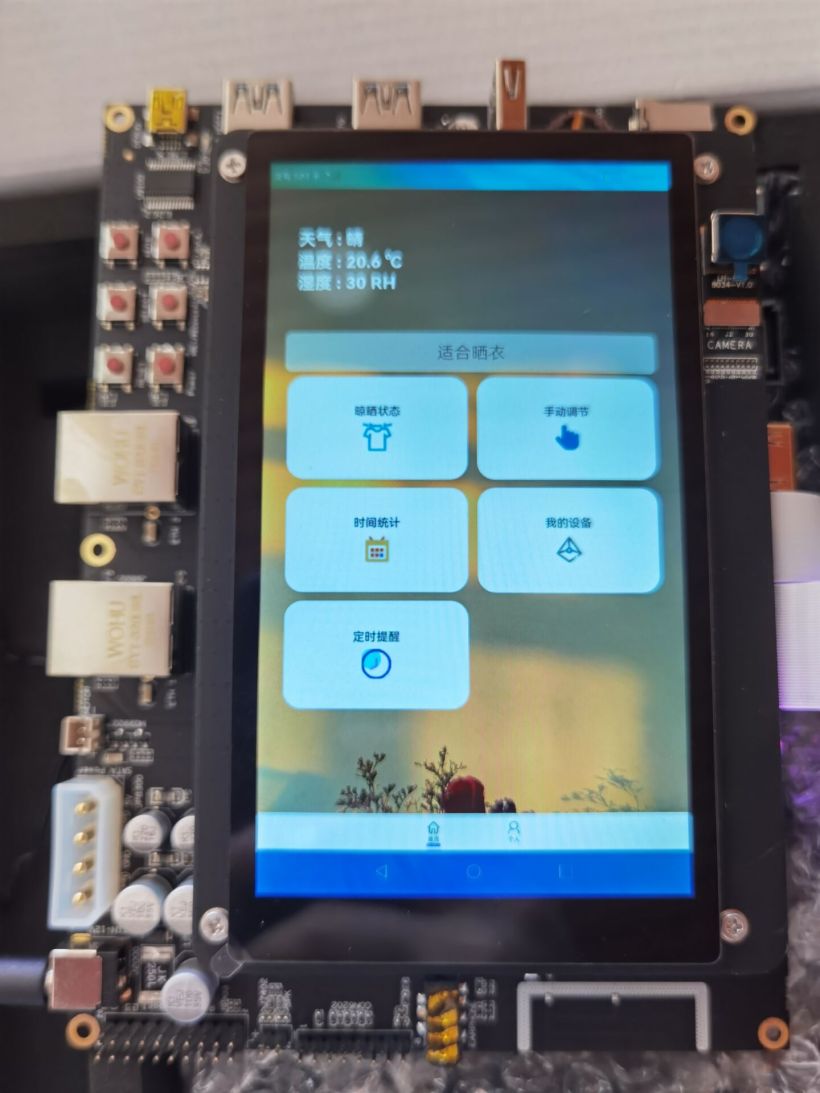
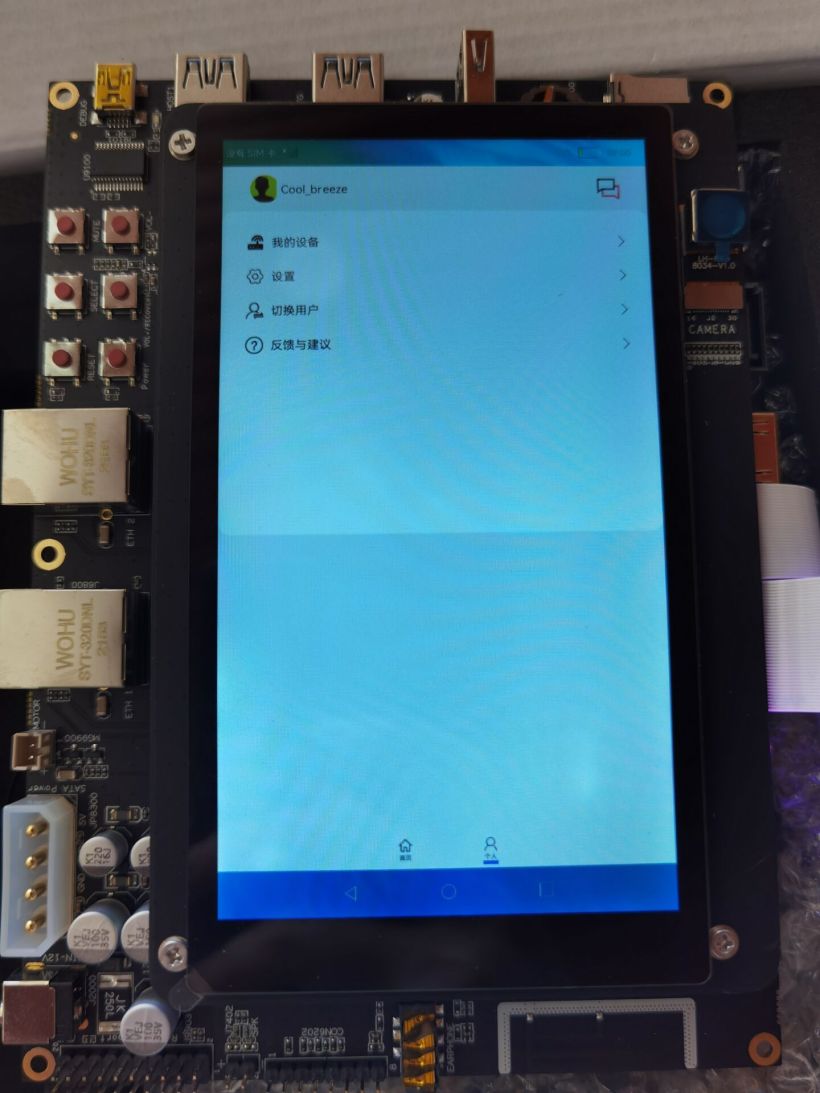
- ArkUI-eTS目前已经能够多种设备运行,同时也为我们提供了越来越丰富的组件和硬件开发能力。本次主要是写一个智能晾晒系统的页面来在DAYU200上面进行运行测试。 eTS入门或获取eTS官方API文档可参照本人另外帖子:ArkUI_eTS手把手入门。
- DevEco Studio for OpenHarmony3.0.0.900。 OpenHarmony版本:3.1_Release。 开发板:DAYU200 ( 基于openHarmony3.1_Release版本 )。
-
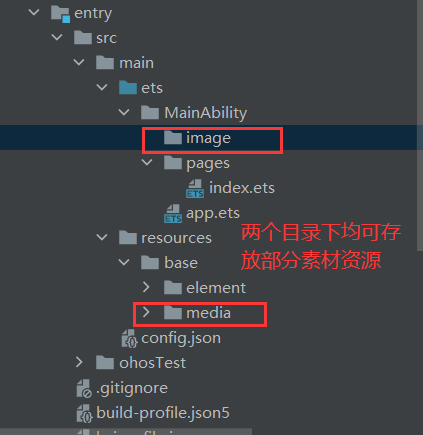
- 创建工程完成后,工程目录如下: 随后,需在“MainAbility”目录下创建“image”目录用于存放部分页面素材资源。 (右击“MainAbility”文件名-“New”-“Directory”-输入“image”进行创建)。 创建完成后,工程目录结构如下:(同时我们知道“image”目录和“resources-base-media”均可存放部分素材资源)。
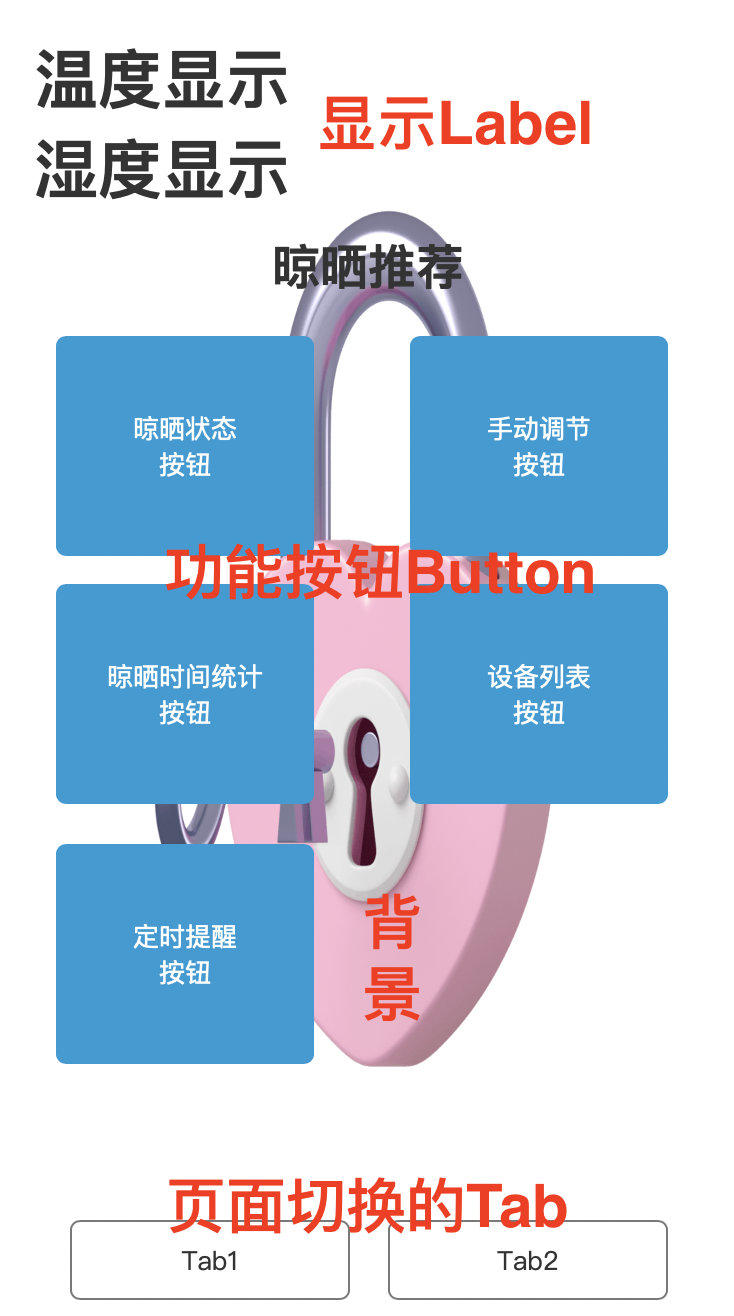
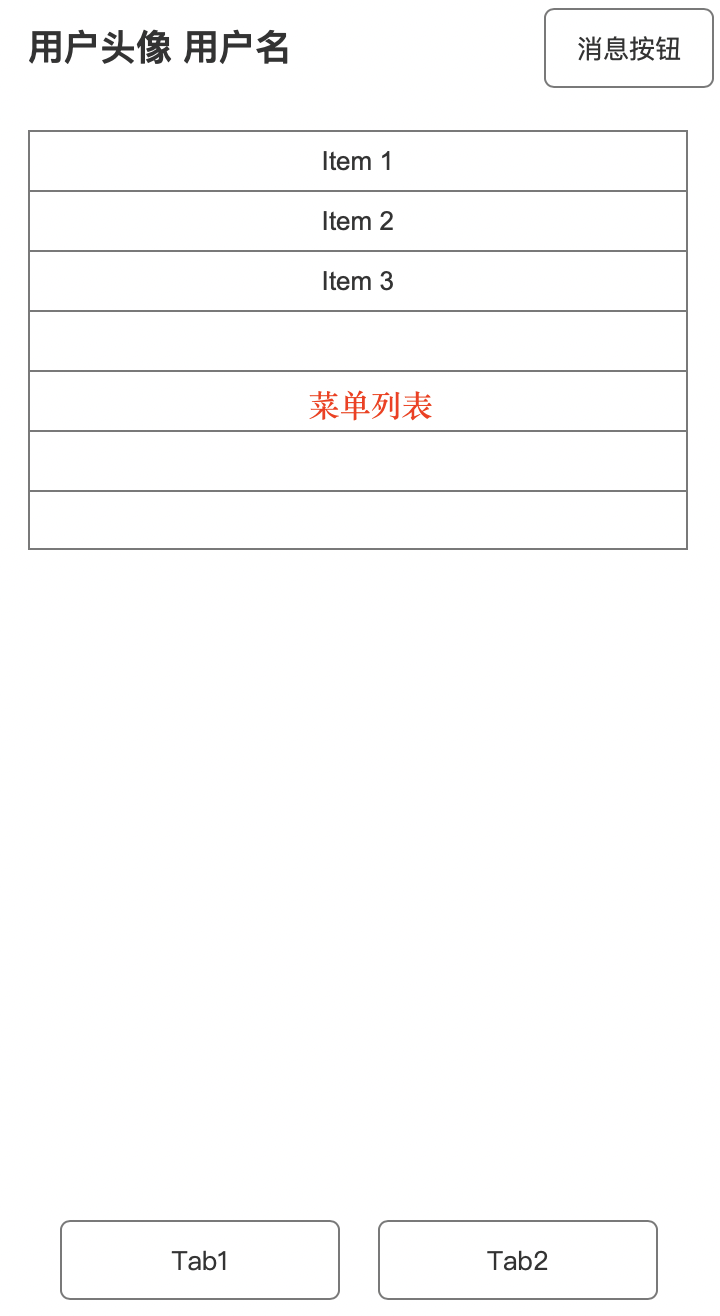
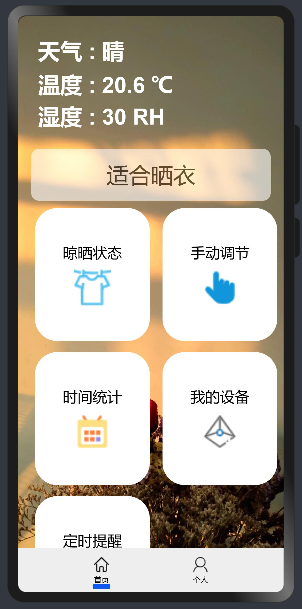
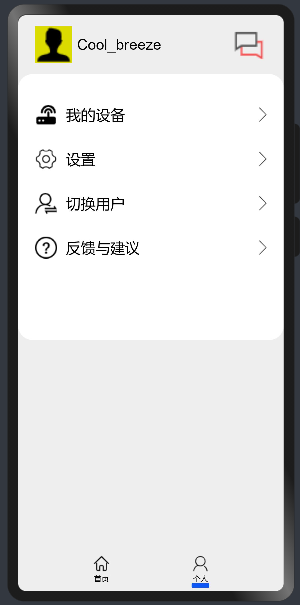
- 主页面结构: 副页面结构:
- ...... build() { Column() { Tabs() { TabContent() { Column() { Flex() { Text('天气 : ' + this.weather) Text('温度 : ' + this.temp + ' ℃') Text('湿度 : ' + this.humidity + ' RH') } Flex() { Text(this.sub) # 环境情况 } // 1 Row({ space: 2 }) { Button() { Column() { Text('晾晒状态') Image($r("app.media.drying")) } } Button() { Column() { Text('手动调节') Image($r("app.media.hand")) } } } // 2 Row({ space: 2 }) { Button() { Column() { Text('时间统计') Image($r("app.media.time")) } } Button() { Column() { Text('我的设备') Image($r("app.media.IoT")) } } } // 3 Row({ space: 2 }) { Button() { Column() { Text('定时提醒') Image($r("app.media.clock")) } } } } }.tabBar({ icon: ("/image/home.png"), text: '首页' }) .backgroundImage('/image/background.jpg', ImageRepeat.NoRepeat) .backgroundImageSize(ImageSize.Cover) TabContent() { Column() { Flex() { Row({ space: 2 }) { Image('/image/user.png') Text(this.user_name) } Image('/image/message.png') } Flex() { Flex(){ Row({ space: 2 }) { Image('/image/mech.png') Text('我的设备') } Image('/image/right.png') } Flex(){ Row({ space: 2 }) { Image('/image/set.png') Text('设置') }.width('50%').height(50) Image('/image/right.png') } Flex(){ Row({ space: 2 }) { Image('/image/change_user.png') Text('切换用户') } Image('/image/right.png') }.width('90%').height(50).margin({top:10}) Flex(){ Row({ space: 2 }) { Image('/image/help.png') Text('反馈与建议') } Image('/image/right.png') } } } }.tabBar({ icon: $r("app.media.me"), text: '个人' }) } } }......
- // @ts-nocheck@Entry@Componentstruct Index { private controller: TabsController = new TabsController() private weather: string = '晴' private temp: number = 20.6 private humidity: number = 30 private sub: string = '适合晒衣' private user_name: string = 'Cool_breeze' build() { Column() { Tabs({ barPosition: BarPosition.End, controller: this.controller }) { TabContent() { Column() { Flex({ direction: FlexDirection.Column, justifyContent: FlexAlign.Center }) { Text('天气 : ' + this.weather) .fontSize(30) .fontWeight(FontWeight.Bold) .fontColor(Color.White) Text('温度 : ' + this.temp + ' ℃') .fontSize(30) .fontColor(Color.White) .fontWeight(FontWeight.Bold) .margin({ top: 5 }) Text('湿度 : ' + this.humidity + ' RH') .fontSize(30) .fontColor(Color.White) .fontWeight(FontWeight.Bold) .margin({ top: 5 }) } .height('25%') .width('85%') Flex({ direction: FlexDirection.Column, alignItems: ItemAlign.Center, justifyContent: FlexAlign.Center }) { Text(this.sub) .fontSize(30) } .opacity(0.6) .backgroundColor(Color.White) .width('90%') .height(70) .borderRadius(10) Row({ space: 2 }) { Button({ type: ButtonType.Normal }) { Column() { Text('晾晒状态') .fontSize(20) Image($r("app.media.drying")) .width(50) .height(50) .margin({ top: 10 }) } } .height('100%') .width('48%') .borderRadius(30) .backgroundColor(Color.White) .margin({ right: 15 }) Button({ type: ButtonType.Normal }) { Column() { Text('手动调节') .fontSize(20) Image($r("app.media.hand")) .width(50) .height(50) .margin({ top: 10 }) } } .height('100%') .width('48%') .borderRadius(30) .backgroundColor(Color.White) } .width('90%') .height(180) .margin({ left: 10, top: 10}) //2 Row({ space: 2 }) { Button({ type: ButtonType.Normal }) { Column() { Text('时间统计') .fontSize(20) Image($r("app.media.time")) .width(50) .height(50) .margin({ top: 10 }) } } .height('100%') .width('48%') .borderRadius(30) .backgroundColor(Color.White) .margin({ right: 15 }) Button({ type: ButtonType.Normal }) { Column() { Text('我的设备') .fontSize(20) Image($r("app.media.IoT")) .width(50) .height(50) .margin({ top: 10 }) } } .height('100%') .width('48%') .borderRadius(30) .backgroundColor(Color.White) } .width('90%') .height(180) .margin({ top: 15, left: '10' }) //3 Row({ space: 2 }) { Button({ type: ButtonType.Normal }) { Column() { Text('定时提醒') .fontSize(20) Image($r("app.media.clock")) .width(50) .height(50) .margin({ top: 10 }) } } .height('100%') .width('48%') .borderRadius(30) .backgroundColor(Color.White) .margin({ right: 15 }) } .width('90%') .height(180) .margin({ top: 15, left: '10' }) } .height('100%') .width('100%') }.tabBar({ icon: ("/image/home.png"), text: '首页' }) .backgroundImage('/image/background.jpg', ImageRepeat.NoRepeat) .backgroundImageSize(ImageSize.Cover) TabContent() { Column() { Flex({ direction: FlexDirection.Row, alignItems: ItemAlign.Center, justifyContent: FlexAlign.SpaceBetween }) { Row({ space: 2 }) { Image('/image/user.png') .clip(new Circle({ width: 50, height: 50 })) .width(50) .height(50) .backgroundColor('#dbdb00') .margin({ left: 5 }) Text(this.user_name) .fontSize(20) .margin({ left: 5 }) }.width('50%').height(50) Image('/image/message.png') .height(40) .width(50) .margin({ right: 5 }) } .width('90%') .height(60) .margin({top:10}) Flex({direction: FlexDirection.Column,alignItems:ItemAlign.Center}) { Flex({ direction: FlexDirection.Row, alignItems: ItemAlign.Center, justifyContent: FlexAlign.SpaceBetween }){ Row({ space: 2 }) { Image('/image/mech.png') .width(30) .height(30) .margin({ left: 5 }) Text('我的设备') .fontSize(20) .margin({ left: 10 }) }.width('50%').height(50) Image('/image/right.png') .height(20) .width(15) .margin({ right: 5 }) }.width('90%').height(50).margin({top:30}) Flex({ direction: FlexDirection.Row, alignItems: ItemAlign.Center, justifyContent: FlexAlign.SpaceBetween }){ Row({ space: 2 }) { Image('/image/set.png') .width(30) .height(30) .margin({ left: 5 }) Text('设置') .fontSize(20) .margin({ left: 10 }) }.width('50%').height(50) Image('/image/right.png') .height(20) .width(15) .margin({ right: 5 }) }.width('90%').height(50).margin({top:10}) Flex({ direction: FlexDirection.Row, alignItems: ItemAlign.Center, justifyContent: FlexAlign.SpaceBetween }){ Row({ space: 2 }) { Image('/image/change_user.png') .width(30) .height(30) .margin({ left: 5 }) Text('切换用户') .fontSize(20) .margin({ left: 10 }) }.width('50%').height(50) Image('/image/right.png') .height(20) .width(15) .margin({ right: 5 }) }.width('90%').height(50).margin({top:10}) Flex({ direction: FlexDirection.Row, alignItems: ItemAlign.Center, justifyContent: FlexAlign.SpaceBetween }){ Row({ space: 2 }) { Image('/image/help.png') .width(30) .height(30) .margin({ left: 5 }) Text('反馈与建议') .fontSize(20) .margin({ left: 10 }) }.width('50%').height(50) Image('/image/right.png') .height(20) .width(15) .margin({ right: 5 }) }.width('90%').height(50).margin({top:10}) } .height('50%') .width('100%') .borderRadius(20) .margin({top:10}) .backgroundColor(Color.White) } .height('100%') .width('100%') }.tabBar({ icon: $r("app.media.me"), text: '个人' }) } .vertical(false) .barWidth(300) .barHeight(60) .backgroundColor('#eeeeee') .width('100%') } .width('100%') .height('100%') }}
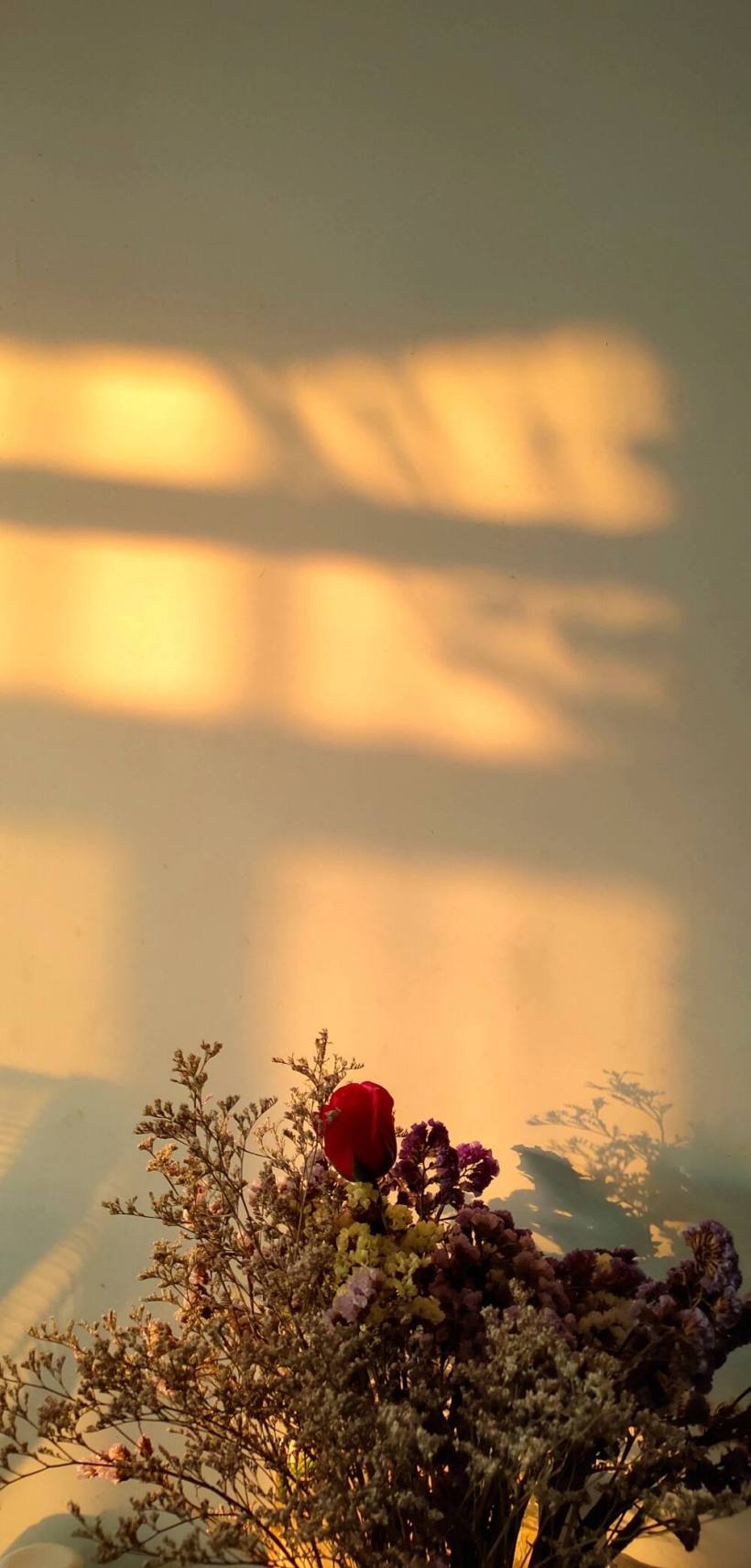
- 背景素材:
-
- 原始版本链接(能够运行在DAYU200上的版本可下载本贴下方资源代码)。
- https://ost.51cto.com/show/14309。
- 基于此晾晒系统界面和DAYU200开发板。 (1)连接Hi3861智能家居套件获取真实环境数据。 (2)调用天气API,使DAYU200联网后能够实时获取天气预报信息,从而更好的实现晾晒功能。 (3)若DAYU200本身摄像头条件不允许,可连外接摄像头或利用Hi3516 AI Camera开发套件的功能更加智能的实时监控衣物晾晒状态。 (4)同时除了硬件功能完善,也要对软件部分兼容性和功能进行升级,不仅能够将程序运行在DAYU200开发板上,也能够在所有HarmonyOS设备上运行。 文章相关附件可以点击下面的原文链接前往下载: https://ost.51cto.com/resource/2132。 想了解更多关于开源的内容,请访问: 51CTO 开源基础软件社区 https://ost.51cto.com。

ArkUI-eTS目前已经能够多种设备运行,同时也为我们提供了越来越丰富的组件和硬件开发能力。本次主要是写一个智能晾晒系统的页面来在DAYU200上面进行运行测试。
eTS入门或获取eTS官方API文档可参照本人另外帖子:ArkUI_eTS手把手入门。
- DevEco Studio for OpenHarmony3.0.0.900。
- OpenHarmony版本:3.1_Release。
- 开发板:DAYU200 ( 基于openHarmony3.1_Release版本 )。
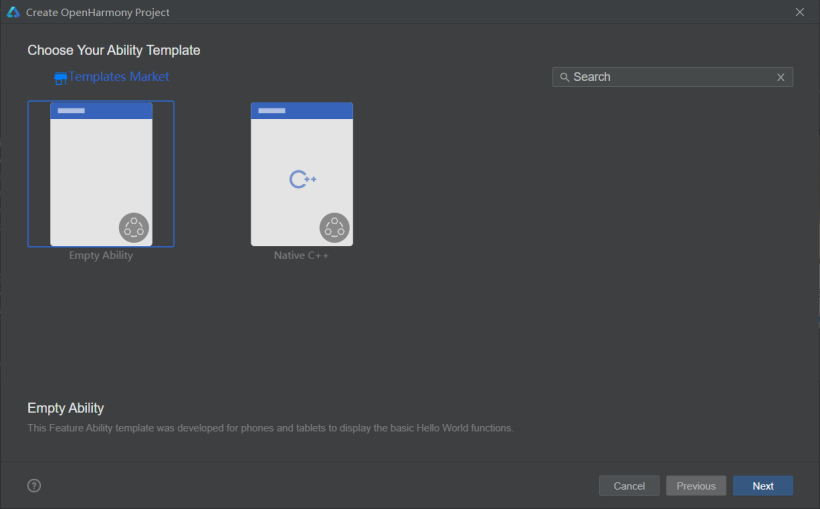
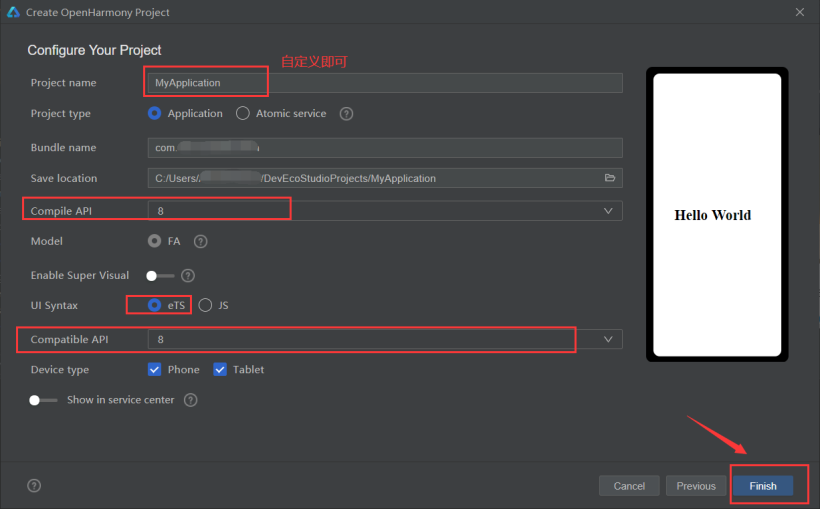
创建工程完成后,工程目录如下:

随后,需在“MainAbility”目录下创建“image”目录用于存放部分页面素材资源。
(右击“MainAbility”文件名-“New”-“Directory”-输入“image”进行创建)。
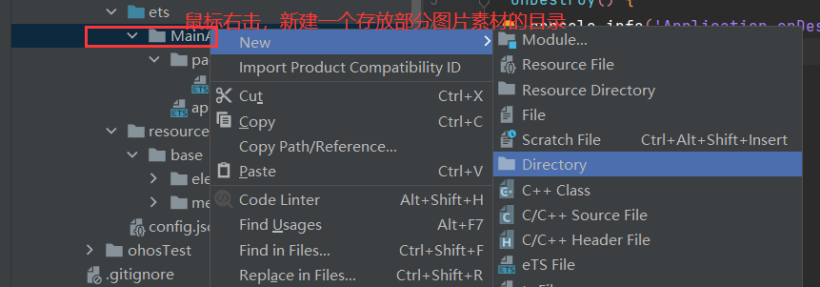
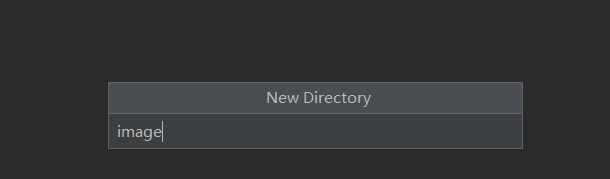
创建完成后,工程目录结构如下:(同时我们知道“image”目录和“resources-base-media”均可存放部分素材资源)。
主页面结构:
副页面结构:
......
 build() {
 Column() {
 Tabs() {
 TabContent() {
 Column() {
 Flex() {
 Text('天气 : ' + this.weather)
 Text('温度 : ' + this.temp + ' ℃')
 Text('湿度 : ' + this.humidity + ' RH')
 }
 Flex() {
 Text(this.sub) # 环境情况
 }
 // 1
 Row({ space: 2 }) {
 Button() {
 Column() {
 Text('晾晒状态')
 Image($r("app.media.drying"))
 }
 }
 Button() {
 Column() {
 Text('手动调节')
 Image($r("app.media.hand"))
 }
 }
 }
 // 2
 Row({ space: 2 }) {
 Button() {
 Column() {
 Text('时间统计')
 Image($r("app.media.time"))
 }
 }
 Button() {
 Column() {
 Text('我的设备')
 Image($r("app.media.IoT"))
 }
 }
 }
 // 3
 Row({ space: 2 }) {
 Button() {
 Column() {
 Text('定时提醒')
 Image($r("app.media.clock"))
 }
 }
 }
 }
 }.tabBar({ icon: ("/image/home.png"), text: '首页' })
 .backgroundImage('/image/background.jpg', ImageRepeat.NoRepeat)
 .backgroundImageSize(ImageSize.Cover)
 TabContent() {
 Column() {
 Flex() {
 Row({ space: 2 }) {
 Image('/image/user.png')
 Text(this.user_name)
 }
 Image('/image/message.png')
 }
 Flex() {
 Flex(){
 Row({ space: 2 }) {
 Image('/image/mech.png')
 Text('我的设备')
 }
 Image('/image/right.png')
 }
 Flex(){
 Row({ space: 2 }) {
 Image('/image/set.png')
 Text('设置')
 }.width('50%').height(50)
 Image('/image/right.png')
 }
 Flex(){
 Row({ space: 2 }) {
 Image('/image/change_user.png')
 Text('切换用户')
 }
 Image('/image/right.png')
 }.width('90%').height(50).margin({top:10})
 Flex(){
 Row({ space: 2 }) {
 Image('/image/help.png')
 Text('反馈与建议')
 }
 Image('/image/right.png')
 }
 }
 }
 }.tabBar({ icon: $r("app.media.me"), text: '个人' })
 }
 }
 }
......
build() {
Column() {
Tabs() {
TabContent() {
Column() {
Flex() {
Text('天气 : ' + this.weather)
Text('温度 : ' + this.temp + ' ℃')
Text('湿度 : ' + this.humidity + ' RH')
}
Flex() {
Text(this.sub) # 环境情况
}
// 1
Row({ space: 2 }) {
Button() {
Column() {
Text('晾晒状态')
Image($r("app.media.drying"))
}
}
Button() {
Column() {
Text('手动调节')
Image($r("app.media.hand"))
}
}
}
// 2
Row({ space: 2 }) {
Button() {
Column() {
Text('时间统计')
Image($r("app.media.time"))
}
}
Button() {
Column() {
Text('我的设备')
Image($r("app.media.IoT"))
}
}
}
// 3
Row({ space: 2 }) {
Button() {
Column() {
Text('定时提醒')
Image($r("app.media.clock"))
}
}
}
}
}.tabBar({ icon: ("/image/home.png"), text: '首页' })
.backgroundImage('/image/background.jpg', ImageRepeat.NoRepeat)
.backgroundImageSize(ImageSize.Cover)
TabContent() {
Column() {
Flex() {
Row({ space: 2 }) {
Image('/image/user.png')
Text(this.user_name)
}
Image('/image/message.png')
}
Flex() {
Flex(){
Row({ space: 2 }) {
Image('/image/mech.png')
Text('我的设备')
}
Image('/image/right.png')
}
Flex(){
Row({ space: 2 }) {
Image('/image/set.png')
Text('设置')
}.width('50%').height(50)
Image('/image/right.png')
}
Flex(){
Row({ space: 2 }) {
Image('/image/change_user.png')
Text('切换用户')
}
Image('/image/right.png')
}.width('90%').height(50).margin({top:10})
Flex(){
Row({ space: 2 }) {
Image('/image/help.png')
Text('反馈与建议')
}
Image('/image/right.png')
}
}
}
}.tabBar({ icon: $r("app.media.me"), text: '个人' })
}
}
}
......
// @ts-nocheck
@Entry
@Component
struct Index {
 private controller: TabsController = new TabsController()
 private weather: string = '晴'
 private temp: number = 20.6
 private humidity: number = 30
 private sub: string = '适合晒衣'
 private user_name: string = 'Cool_breeze'
 build() {
 Column() {
 Tabs({ barPosition: BarPosition.End, controller: this.controller }) {
 TabContent() {
 Column() {
 Flex({ direction: FlexDirection.Column, justifyContent: FlexAlign.Center }) {
 Text('天气 : ' + this.weather)
 .fontSize(30)
 .fontWeight(FontWeight.Bold)
 .fontColor(Color.White)
 Text('温度 : ' + this.temp + ' ℃')
 .fontSize(30)
 .fontColor(Color.White)
 .fontWeight(FontWeight.Bold)
 .margin({ top: 5 })
 Text('湿度 : ' + this.humidity + ' RH')
 .fontSize(30)
 .fontColor(Color.White)
 .fontWeight(FontWeight.Bold)
 .margin({ top: 5 })
 }
 .height('25%')
 .width('85%')
 Flex({ direction: FlexDirection.Column, alignItems: ItemAlign.Center, justifyContent: FlexAlign.Center }) {
 Text(this.sub)
 .fontSize(30)
 }
 .opacity(0.6)
 .backgroundColor(Color.White)
 .width('90%')
 .height(70)
 .borderRadius(10)
 Row({ space: 2 }) {
 Button({ type: ButtonType.Normal }) {
 Column() {
 Text('晾晒状态')
 .fontSize(20)
 Image($r("app.media.drying"))
 .width(50)
 .height(50)
 .margin({ top: 10 })
 }
 }
 .height('100%')
 .width('48%')
 .borderRadius(30)
 .backgroundColor(Color.White)
 .margin({ right: 15 })
 Button({ type: ButtonType.Normal }) {
 Column() {
 Text('手动调节')
 .fontSize(20)
 Image($r("app.media.hand"))
 .width(50)
 .height(50)
 .margin({ top: 10 })
 }
 }
 .height('100%')
 .width('48%')
 .borderRadius(30)
 .backgroundColor(Color.White)
 }
 .width('90%')
 .height(180)
 .margin({ left: 10, top: 10})
 //2
 Row({ space: 2 }) {
 Button({ type: ButtonType.Normal }) {
 Column() {
 Text('时间统计')
 .fontSize(20)
 Image($r("app.media.time"))
 .width(50)
 .height(50)
 .margin({ top: 10 })
 }
 }
 .height('100%')
 .width('48%')
 .borderRadius(30)
 .backgroundColor(Color.White)
 .margin({ right: 15 })
 Button({ type: ButtonType.Normal }) {
 Column() {
 Text('我的设备')
 .fontSize(20)
 Image($r("app.media.IoT"))
 .width(50)
 .height(50)
 .margin({ top: 10 })
 }
 }
 .height('100%')
 .width('48%')
 .borderRadius(30)
 .backgroundColor(Color.White)
 }
 .width('90%')
 .height(180)
 .margin({ top: 15, left: '10' })
 //3
 Row({ space: 2 }) {
 Button({ type: ButtonType.Normal }) {
 Column() {
 Text('定时提醒')
 .fontSize(20)
 Image($r("app.media.clock"))
 .width(50)
 .height(50)
 .margin({ top: 10 })
 }
 }
 .height('100%')
 .width('48%')
 .borderRadius(30)
 .backgroundColor(Color.White)
 .margin({ right: 15 })
 }
 .width('90%')
 .height(180)
 .margin({ top: 15, left: '10' })
 }
 .height('100%')
 .width('100%')
 }.tabBar({ icon: ("/image/home.png"), text: '首页' })
 .backgroundImage('/image/background.jpg', ImageRepeat.NoRepeat)
 .backgroundImageSize(ImageSize.Cover)
 TabContent() {
 Column() {
 Flex({ direction: FlexDirection.Row, alignItems: ItemAlign.Center, justifyContent: FlexAlign.SpaceBetween }) {
 Row({ space: 2 }) {
 Image('/image/user.png')
 .clip(new Circle({ width: 50, height: 50 }))
 .width(50)
 .height(50)
 .backgroundColor('#dbdb00')
 .margin({ left: 5 })
 Text(this.user_name)
 .fontSize(20)
 .margin({ left: 5 })
 }.width('50%').height(50)
 Image('/image/message.png')
 .height(40)
 .width(50)
 .margin({ right: 5 })
 }
 .width('90%')
 .height(60)
 .margin({top:10})
 Flex({direction: FlexDirection.Column,alignItems:ItemAlign.Center}) {
 Flex({ direction: FlexDirection.Row, alignItems: ItemAlign.Center, justifyContent: FlexAlign.SpaceBetween }){
 Row({ space: 2 }) {
 Image('/image/mech.png')
 .width(30)
 .height(30)
 .margin({ left: 5 })
 Text('我的设备')
 .fontSize(20)
 .margin({ left: 10 })
 }.width('50%').height(50)
 Image('/image/right.png')
 .height(20)
 .width(15)
 .margin({ right: 5 })
 }.width('90%').height(50).margin({top:30})
 Flex({ direction: FlexDirection.Row, alignItems: ItemAlign.Center, justifyContent: FlexAlign.SpaceBetween }){
 Row({ space: 2 }) {
 Image('/image/set.png')
 .width(30)
 .height(30)
 .margin({ left: 5 })
 Text('设置')
 .fontSize(20)
 .margin({ left: 10 })
 }.width('50%').height(50)
 Image('/image/right.png')
 .height(20)
 .width(15)
 .margin({ right: 5 })
 }.width('90%').height(50).margin({top:10})
 Flex({ direction: FlexDirection.Row, alignItems: ItemAlign.Center, justifyContent: FlexAlign.SpaceBetween }){
 Row({ space: 2 }) {
 Image('/image/change_user.png')
 .width(30)
 .height(30)
 .margin({ left: 5 })
 Text('切换用户')
 .fontSize(20)
 .margin({ left: 10 })
 }.width('50%').height(50)
 Image('/image/right.png')
 .height(20)
 .width(15)
 .margin({ right: 5 })
 }.width('90%').height(50).margin({top:10})
 Flex({ direction: FlexDirection.Row, alignItems: ItemAlign.Center, justifyContent: FlexAlign.SpaceBetween }){
 Row({ space: 2 }) {
 Image('/image/help.png')
 .width(30)
 .height(30)
 .margin({ left: 5 })
 Text('反馈与建议')
 .fontSize(20)
 .margin({ left: 10 })
 }.width('50%').height(50)
 Image('/image/right.png')
 .height(20)
 .width(15)
 .margin({ right: 5 })
 }.width('90%').height(50).margin({top:10})
 }
 .height('50%')
 .width('100%')
 .borderRadius(20)
 .margin({top:10})
 .backgroundColor(Color.White)
 }
 .height('100%')
 .width('100%')
 }.tabBar({ icon: $r("app.media.me"), text: '个人' })
 }
 .vertical(false)
 .barWidth(300)
 .barHeight(60)
 .backgroundColor('#eeeeee')
 .width('100%')
 }
 .width('100%')
 .height('100%')
 }
}
@Entry
@Component
struct Index {
private controller: TabsController = new TabsController()
private weather: string = '晴'
private temp: number = 20.6
private humidity: number = 30
private sub: string = '适合晒衣'
private user_name: string = 'Cool_breeze'
build() {
Column() {
Tabs({ barPosition: BarPosition.End, controller: this.controller }) {
TabContent() {
Column() {
Flex({ direction: FlexDirection.Column, justifyContent: FlexAlign.Center }) {
Text('天气 : ' + this.weather)
.fontSize(30)
.fontWeight(FontWeight.Bold)
.fontColor(Color.White)
Text('温度 : ' + this.temp + ' ℃')
.fontSize(30)
.fontColor(Color.White)
.fontWeight(FontWeight.Bold)
.margin({ top: 5 })
Text('湿度 : ' + this.humidity + ' RH')
.fontSize(30)
.fontColor(Color.White)
.fontWeight(FontWeight.Bold)
.margin({ top: 5 })
}
.height('25%')
.width('85%')
Flex({ direction: FlexDirection.Column, alignItems: ItemAlign.Center, justifyContent: FlexAlign.Center }) {
Text(this.sub)
.fontSize(30)
}
.opacity(0.6)
.backgroundColor(Color.White)
.width('90%')
.height(70)
.borderRadius(10)
Row({ space: 2 }) {
Button({ type: ButtonType.Normal }) {
Column() {
Text('晾晒状态')
.fontSize(20)
Image($r("app.media.drying"))
.width(50)
.height(50)
.margin({ top: 10 })
}
}
.height('100%')
.width('48%')
.borderRadius(30)
.backgroundColor(Color.White)
.margin({ right: 15 })
Button({ type: ButtonType.Normal }) {
Column() {
Text('手动调节')
.fontSize(20)
Image($r("app.media.hand"))
.width(50)
.height(50)
.margin({ top: 10 })
}
}
.height('100%')
.width('48%')
.borderRadius(30)
.backgroundColor(Color.White)
}
.width('90%')
.height(180)
.margin({ left: 10, top: 10})
//2
Row({ space: 2 }) {
Button({ type: ButtonType.Normal }) {
Column() {
Text('时间统计')
.fontSize(20)
Image($r("app.media.time"))
.width(50)
.height(50)
.margin({ top: 10 })
}
}
.height('100%')
.width('48%')
.borderRadius(30)
.backgroundColor(Color.White)
.margin({ right: 15 })
Button({ type: ButtonType.Normal }) {
Column() {
Text('我的设备')
.fontSize(20)
Image($r("app.media.IoT"))
.width(50)
.height(50)
.margin({ top: 10 })
}
}
.height('100%')
.width('48%')
.borderRadius(30)
.backgroundColor(Color.White)
}
.width('90%')
.height(180)
.margin({ top: 15, left: '10' })
//3
Row({ space: 2 }) {
Button({ type: ButtonType.Normal }) {
Column() {
Text('定时提醒')
.fontSize(20)
Image($r("app.media.clock"))
.width(50)
.height(50)
.margin({ top: 10 })
}
}
.height('100%')
.width('48%')
.borderRadius(30)
.backgroundColor(Color.White)
.margin({ right: 15 })
}
.width('90%')
.height(180)
.margin({ top: 15, left: '10' })
}
.height('100%')
.width('100%')
}.tabBar({ icon: ("/image/home.png"), text: '首页' })
.backgroundImage('/image/background.jpg', ImageRepeat.NoRepeat)
.backgroundImageSize(ImageSize.Cover)
TabContent() {
Column() {
Flex({ direction: FlexDirection.Row, alignItems: ItemAlign.Center, justifyContent: FlexAlign.SpaceBetween }) {
Row({ space: 2 }) {
Image('/image/user.png')
.clip(new Circle({ width: 50, height: 50 }))
.width(50)
.height(50)
.backgroundColor('#dbdb00')
.margin({ left: 5 })
Text(this.user_name)
.fontSize(20)
.margin({ left: 5 })
}.width('50%').height(50)
Image('/image/message.png')
.height(40)
.width(50)
.margin({ right: 5 })
}
.width('90%')
.height(60)
.margin({top:10})
Flex({direction: FlexDirection.Column,alignItems:ItemAlign.Center}) {
Flex({ direction: FlexDirection.Row, alignItems: ItemAlign.Center, justifyContent: FlexAlign.SpaceBetween }){
Row({ space: 2 }) {
Image('/image/mech.png')
.width(30)
.height(30)
.margin({ left: 5 })
Text('我的设备')
.fontSize(20)
.margin({ left: 10 })
}.width('50%').height(50)
Image('/image/right.png')
.height(20)
.width(15)
.margin({ right: 5 })
}.width('90%').height(50).margin({top:30})
Flex({ direction: FlexDirection.Row, alignItems: ItemAlign.Center, justifyContent: FlexAlign.SpaceBetween }){
Row({ space: 2 }) {
Image('/image/set.png')
.width(30)
.height(30)
.margin({ left: 5 })
Text('设置')
.fontSize(20)
.margin({ left: 10 })
}.width('50%').height(50)
Image('/image/right.png')
.height(20)
.width(15)
.margin({ right: 5 })
}.width('90%').height(50).margin({top:10})
Flex({ direction: FlexDirection.Row, alignItems: ItemAlign.Center, justifyContent: FlexAlign.SpaceBetween }){
Row({ space: 2 }) {
Image('/image/change_user.png')
.width(30)
.height(30)
.margin({ left: 5 })
Text('切换用户')
.fontSize(20)
.margin({ left: 10 })
}.width('50%').height(50)
Image('/image/right.png')
.height(20)
.width(15)
.margin({ right: 5 })
}.width('90%').height(50).margin({top:10})
Flex({ direction: FlexDirection.Row, alignItems: ItemAlign.Center, justifyContent: FlexAlign.SpaceBetween }){
Row({ space: 2 }) {
Image('/image/help.png')
.width(30)
.height(30)
.margin({ left: 5 })
Text('反馈与建议')
.fontSize(20)
.margin({ left: 10 })
}.width('50%').height(50)
Image('/image/right.png')
.height(20)
.width(15)
.margin({ right: 5 })
}.width('90%').height(50).margin({top:10})
}
.height('50%')
.width('100%')
.borderRadius(20)
.margin({top:10})
.backgroundColor(Color.White)
}
.height('100%')
.width('100%')
}.tabBar({ icon: $r("app.media.me"), text: '个人' })
}
.vertical(false)
.barWidth(300)
.barHeight(60)
.backgroundColor('#eeeeee')
.width('100%')
}
.width('100%')
.height('100%')
}
}
背景素材:
原始版本链接(能够运行在DAYU200上的版本可下载本贴下方资源代码)。
https://ost.51cto.com/show/14309。
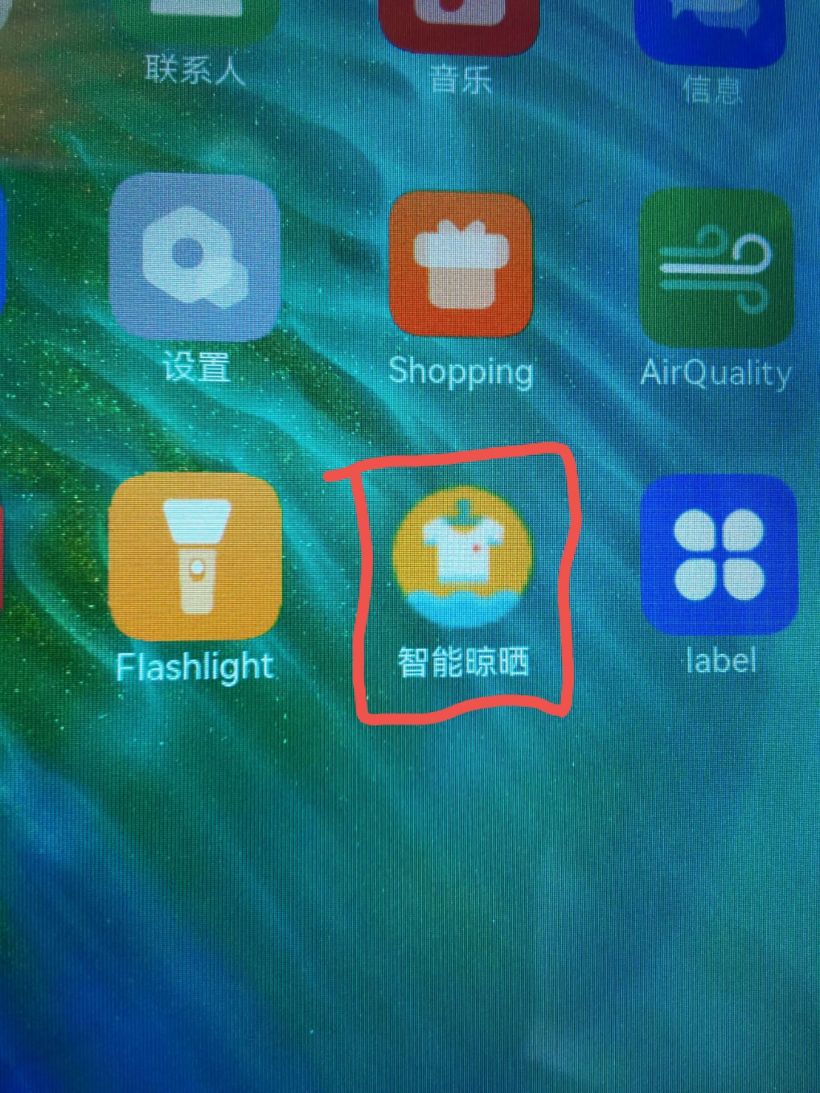
基于此晾晒系统界面和DAYU200开发板。
(1)连接Hi3861智能家居套件获取真实环境数据。
(2)调用天气API,使DAYU200联网后能够实时获取天气预报信息,从而更好的实现晾晒功能。
(3)若DAYU200本身摄像头条件不允许,可连外接摄像头或利用Hi3516 AI Camera开发套件的功能更加智能的实时监控衣物晾晒状态。
(4)同时除了硬件功能完善,也要对软件部分兼容性和功能进行升级,不仅能够将程序运行在DAYU200开发板上,也能够在所有HarmonyOS设备上运行。
文章相关附件可以点击下面的原文链接前往下载:
© 版权声明
文章版权归作者所有,未经允许请勿转载。








