OpenHarmony - ArkUI(TS)声明式开发之画板
文章目录
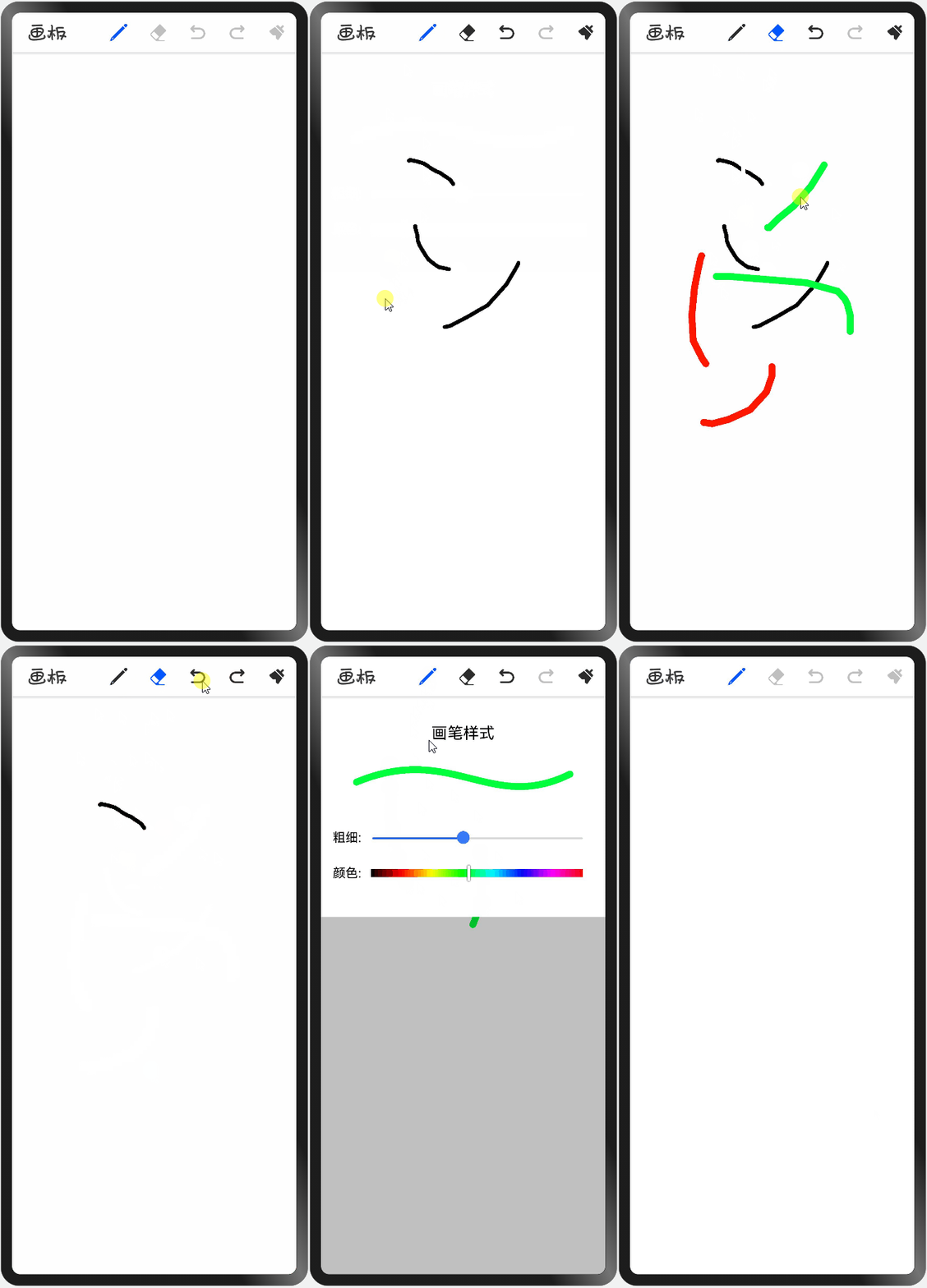
- 本项目基于OpenHarmony的ArkUI框架:TS扩展的声明式开发范式,关于语法和概念直接看官网官方文档地址:基于TS扩展的声明式开发范式,因为OpenHarmony的API相对于HarmonyOS的API,功能上比较完善和成熟的,有些新的技术也早早接触到,所以本项目直接使用OpenHarmony SDK开发。 工具版本: DevEco Studio 3.0 Beta4。 SDK版本: 3.1.6.6(API Version 8 Release)。 项目功能: 1、画笔功能:可设置画笔粗细和颜色;2、橡皮擦功能:可设置粗细;3、撤回和回撤功能;4:清空画板功能。
- 画布组件canvas:画布组件,用于自定义绘制图形。 方法/属性 解释 beginPath() 创建一个新的绘制路径 moveTo() 路径从当前点移动到指定点 lineTo() 从当前点到指定点进行路径连接 stroke() 进行边框绘制操作 clearRect() 清空画布 strokeStyle 属性:设置描边的颜色 lineWidth 属性:设置绘制线条的宽度 globalCompositeOperation 属性:设置合成操作的方式
-
- 使用onTouch方法,监听触摸事件,手指按下:使用方法moveTo记录起点,手指移动:使用方法beginPath创建新的路径,lineTo记录移动的点,并绘制。 (代码片段,详细请查看源码): /** * 触摸事件 */onTouchEvent(event: TouchEvent) { // x坐标 const x = event.touches[0].x // y坐标 const y = event.touches[0].y switch (event.type) { case TouchType.Down: // 手指按下 { // 创建一个新的绘制路径 this.crc.beginPath() // 设置起点坐标 this.crc.moveTo(x, y) } break; case TouchType.Move: // 手指移动 case TouchType.Up: // 手指抬起 { // 设置移动点 this.crc.lineTo(x, y) // 进行路径绘制 this.crc.stroke() } break; default: break; }}
- 设置绘制属性:globalCompositeOperation。 画笔设置此属性值: source-over (默认值 在现有绘制内容上显示新绘制内容),橡皮擦设置此属性值: destination-out ( 在新绘制内容外显示现有绘制内容)。 // 新内容在之前内容的之上this.crc.globalCompositeOperation = 'source-over'// 新内容与之前内容相交位置变透明this.crc.globalCompositeOperation = 'destination-out'
- 数据类,记录每次绘制的信息,线颜色、宽度、坐标点集合,每次画完保存到数组中。 /** * 绘制信息 * @param lineColor 线颜色 * @param lineWidth 线宽度 * @param listCoord 坐标点集合 */export class DrawInfoModel { // 是否为画笔,是:画笔,否:橡皮擦 // 根据此字段设置绘制属性:合成操作globalCompositeOperation isPen: boolean; // 线颜色 lineColor: string; // 线宽度 lineWidth: number; // 坐标点集合 listCoord: Array<Coord>; constructor(isPen: boolean, lineColor: string, lineWidth: number, listCoord: Array<Coord>) { this.isPen = isPen; this.lineColor = lineColor; this.lineWidth = lineWidth; this.listCoord = listCoord; }}/** * 坐标点 * @param x 坐标点x * @param y 坐标点y */export class Coord { // 坐标点x x: number; // 坐标点y y: number; constructor(x: number, y: number) { this.x = x; this.y = y; }} 每次绘制的信息,保存在数组中,在点击撤回时,撤回数+1;回撤时,撤回数-1,并截取数组,清空画布,遍历数组绘制笔画信息。 (代码片段,详细请查看源码): /** * 撤回 */revocation() { this.listTempXY = this.listAllXY ...... // 根据撤回的个数,截取数组 this.listTempXY = this.listTempXY.slice(0, this.listTempXY.length - this.revocationNumber) // 清空画布 this.crc.clearRect(0, 0, this.canvasWidth, this.canvasHeight) // 拼接笔画路径 for (const drawInfo of this.listTempXY) { // 创建一个新的绘制路径 this.crc.beginPath() // 设置线颜色 this.crc.strokeStyle = drawInfo.lineColor // 设置线宽度 this.crc.lineWidth = drawInfo.lineWidth // 设置绘制的坐标点 for (let i = 0;i < drawInfo.listCoord.length; i++) { const coord = drawInfo.listCoord[i] // 第一个设置为起点 if (i === 0) { this.crc.moveTo(coord.x, coord.y) } else { this.crc.lineTo(coord.x, coord.y) } } // 进行路径绘制 this.crc.stroke() }}
- 此项目并没有特别复杂的地方,注释也很详细,以上列出的代码都是实现主要的功能,其他细节请查看源码,最后不得不感慨声明式语法的强大和简洁性,完成此功能相对于使用JS来实现效率提升很高,也希望鸿蒙社区越来越好,融入更多的热爱者。 想了解更多关于开源的内容,请访问: 51CTO 开源基础软件社区 https://ost.51cto.com。

本项目基于OpenHarmony的ArkUI框架:TS扩展的声明式开发范式,关于语法和概念直接看官网官方文档地址:基于TS扩展的声明式开发范式,因为OpenHarmony的API相对于HarmonyOS的API,功能上比较完善和成熟的,有些新的技术也早早接触到,所以本项目直接使用OpenHarmony SDK开发。
工具版本: DevEco Studio 3.0 Beta4。
SDK版本: 3.1.6.6(API Version 8 Release)。
项目功能: 1、画笔功能:可设置画笔粗细和颜色;2、橡皮擦功能:可设置粗细;3、撤回和回撤功能;4:清空画板功能。
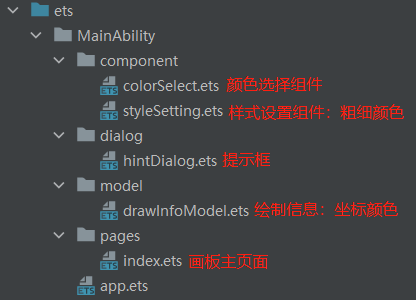
画布组件canvas:画布组件,用于自定义绘制图形。
|
方法/属性 |
解释 |
|
beginPath() |
创建一个新的绘制路径 |
|
moveTo() |
路径从当前点移动到指定点 |
|
lineTo() |
从当前点到指定点进行路径连接 |
|
stroke() |
进行边框绘制操作 |
|
clearRect() |
清空画布 |
|
strokeStyle |
属性:设置描边的颜色 |
|
lineWidth |
属性:设置绘制线条的宽度 |
|
globalCompositeOperation |
属性:设置合成操作的方式 |
使用onTouch方法,监听触摸事件,手指按下:使用方法moveTo记录起点,手指移动:使用方法beginPath创建新的路径,lineTo记录移动的点,并绘制。
(代码片段,详细请查看源码):
/**
 * 触摸事件
 */
onTouchEvent(event: TouchEvent) {
 // x坐标
 const x = event.touches[0].x
 // y坐标
 const y = event.touches[0].y
 switch (event.type) {
 case TouchType.Down: // 手指按下
 {
 // 创建一个新的绘制路径
 this.crc.beginPath()
 // 设置起点坐标
 this.crc.moveTo(x, y)
 }
 break;
 case TouchType.Move: // 手指移动
 case TouchType.Up: // 手指抬起
 {
 // 设置移动点
 this.crc.lineTo(x, y)
 // 进行路径绘制
 this.crc.stroke()
 }
 break;
 default:
 break;
 }
}
设置绘制属性:globalCompositeOperation。
画笔设置此属性值: source-over (默认值 在现有绘制内容上显示新绘制内容),橡皮擦设置此属性值: destination-out ( 在新绘制内容外显示现有绘制内容)。
// 新内容在之前内容的之上
this.crc.globalCompositeOperation = 'source-over'
// 新内容与之前内容相交位置变透明
this.crc.globalCompositeOperation = 'destination-out'
数据类,记录每次绘制的信息,线颜色、宽度、坐标点集合,每次画完保存到数组中。
/**
 * 绘制信息
 * @param lineColor 线颜色
 * @param lineWidth 线宽度
 * @param listCoord 坐标点集合
 */
export class DrawInfoModel {
 // 是否为画笔,是:画笔,否:橡皮擦
 // 根据此字段设置绘制属性:合成操作globalCompositeOperation
 isPen: boolean;
 // 线颜色
 lineColor: string;
 // 线宽度
 lineWidth: number;
 // 坐标点集合
 listCoord: Array<Coord>;
 constructor(isPen: boolean, lineColor: string, lineWidth: number, listCoord: Array<Coord>) {
 this.isPen = isPen;
 this.lineColor = lineColor;
 this.lineWidth = lineWidth;
 this.listCoord = listCoord;
 }
}
/**
 * 坐标点
 * @param x 坐标点x
 * @param y 坐标点y
 */
export class Coord {
 // 坐标点x
 x: number;
 // 坐标点y
 y: number;
 constructor(x: number, y: number) {
 this.x = x;
 this.y = y;
 }
}
每次绘制的信息,保存在数组中,在点击撤回时,撤回数+1;回撤时,撤回数-1,并截取数组,清空画布,遍历数组绘制笔画信息。
(代码片段,详细请查看源码):
/**
 * 撤回
 */
revocation() {
 this.listTempXY = this.listAllXY
 ......
 // 根据撤回的个数,截取数组
 this.listTempXY = this.listTempXY.slice(0, this.listTempXY.length - this.revocationNumber)
 // 清空画布
 this.crc.clearRect(0, 0, this.canvasWidth, this.canvasHeight)

 // 拼接笔画路径
 for (const drawInfo of this.listTempXY) {
 // 创建一个新的绘制路径
 this.crc.beginPath()
 // 设置线颜色
 this.crc.strokeStyle = drawInfo.lineColor
 // 设置线宽度
 this.crc.lineWidth = drawInfo.lineWidth
 // 设置绘制的坐标点
 for (let i = 0;i < drawInfo.listCoord.length; i++) {
 const coord = drawInfo.listCoord[i]
 // 第一个设置为起点
 if (i === 0) {
 this.crc.moveTo(coord.x, coord.y)
 } else {
 this.crc.lineTo(coord.x, coord.y)
 }
 }
 // 进行路径绘制
 this.crc.stroke()
 }
}
此项目并没有特别复杂的地方,注释也很详细,以上列出的代码都是实现主要的功能,其他细节请查看源码,最后不得不感慨声明式语法的强大和简洁性,完成此功能相对于使用JS来实现效率提升很高,也希望鸿蒙社区越来越好,融入更多的热爱者。
© 版权声明
文章版权归作者所有,未经允许请勿转载。