
文章目录
- 最近在逛论坛的时候看到这样的一个测试题:“实现一个点击数字的小游戏:依次点击容器中随机生成的数字元素,生成的数字元素会在5S后消失,你将凭借记忆点击按照数字升序依次点击生成的数字方可通过该关卡游戏”,看到了各位大佬用原生js实现的小游戏还挺有意思,想着自己对FA的开发还是不太熟悉,就尝试用HarmonyOS来实现一下这个游戏。
- 工具版本:DevEco Studio 3.0 Beta3 SDK版本:3.1.5.5
- 进入游戏页面,启动计时功能,并且随机生成小球,默认数量为六个。时间到达5s后小球内部的数字内容会消失,凭借用户的记忆按照数字升序依次点击数字点可顺利通关,否则通关失败。
-
- <div class="container"> <div class="header"> <div class="titleMessage"> <text style="font-size: 16px;">游戏玩法提示小tips:5s后数字内容会消失,凭借你的记忆按照数字升序依次点击数字点可顺利通关。</text> </div> </div> <div id="cointainer"> <div for="{{ circleList }}" class="parm {{$item.className}}" @click="recordNmuber($item.text)" style="top:{{$item.top}};left:{{$item.left}};backgroundColor:{{$item.rgrbColor}}"> <text class="{{cricleClassName}}">{{$item.text}}</text> </div> </div> <div class="todo"> <text class="again" @click="restart(6)">重新开始</text> <text class="again" @click="nextPass" style="margin-left: 20px" >下一关</text> </div> <div class="againtime"> <text>time:</text><text> <span>{{time}}</span> </text> </div> <div class="goFail" if="{{ isSuccess == false }}" > <text class="goFail-text"> <span>很遗憾通关失败~~</span> </text> </div> <div class="goFail" if="{{ isSuccess == true }}" > <text class="goFail-text"> <span>恭喜你通关成功呀</span> </text> </div></div>
- .container { display: flex; flex-direction: column; align-items: center; height: 100%; width: 100%; position: relative;}.header { display: flex; justify-content: center; align-items: center; width: 100%;}.titleMessage{ margin-top: 40px; width: 100%; height: 80px; background-color: cornsilk; border-radius: 15px; padding: 0 10px ;}#cointainer { display: flex; align-items: center; margin-top: 20px; height: 500px; width: 400px; background-color: rgb(37, 37, 37); position: relative;}.todo { justify-content: center; align-items: center; position: absolute; top: 84%;}.again{ text-align: center; font-size: 18px; width: 90px; height: 40px; background-color: burlywood;}.againtime{ position: absolute; top: 91%; margin-left: 100px; text-align: center; font-size: 18px; width: 170px; height: 40px; background-color: dimgray; border-radius: 5px; padding-left: 19px;}.parm{ width: 80px; height: 80px; border-radius: 80; justify-content: center; align-items: center; position: absolute;}.cricle_text_none{ display: none;}.goFail{ background-color: beige; height: 80px; width: 200px; border-radius: 20px; position: absolute; top: 50%; left: 50%; transform: translate(-50%,-50%); justify-content: center; align-items: center;}.goFail-text{ font-size: 16px;}
- export default { data: { circleList : [], containner:'', timmer1:'', timmer2:'', time:'', pass:6, asw:[], cricleClassName:'', recodArr:[], isSuccess:null, }, onInit() { this.containner = this.$element('cointainer') //获取游戏画板容器元素 this.timmer2 = setInterval(this.sumTime, 10); console.log(this.time) this.creatGame(this.pass); }, sumTime() { //时间保留两位小数点。 this.time = (Number(this.time) + 0.01).toFixed(2); //当时间超过5秒后,让小球上的数字消失。 if(Number(this.time)>5) this.cricleClassName = 'cricle_text_none' }, //点击小球时候触发的事件处理函数 recordNmuber(num){ //时间小于5秒时点击小球不计入到数组中 if(this.time<5) return //大于五秒时点击小球将对应的数字push到一个新数组里。 this.recodArr.push(num) console.log(JSON.stringify(this.recodArr)) //去重操作 let newArr = this.noRepeat(this.recodArr) console.log(newArr) //对数组进行排序 if(newArr.length===this.pass) { let str = '' for (var index = 0; index < this.pass; index++) { if(index+1 ===this.pass) { str+=String(index+1) } if((index+1)<this.pass){ str+=(String(index+1) + ',') } } console.log(str) //如果是为数字升序则弹出通关成功弹窗,并清空计时器,否则将弹出通关失败弹窗 if(String(newArr) === String(str)) { console.log('true') this.isSuccess=true clearInterval(this.timmer2); }else{ console.log('false') this.isSuccess=false clearInterval(this.timmer2); } } }, //数组去重方法 noRepeat(arr) { //定义一个新的临时数组 let newArr=[]; //遍历当前数组 for(var i=0;i<arr.length;i++) { //如果当前数组的第i已经保存进了临时数组,那么跳过, //否则把当前项push到临时数组里面 if(newArr.indexOf(arr[i]) === -1) { //indexOf() 判断数组中有没有字符串值,如果没有则返回 -1 newArr.push(arr[i]); } } return newArr }, //circle构造器 getPosition() { let parm = { x: 0, y: 0 }; //随机生成circle的坐标。 parm.x = Math.round(Math.random() * 200); parm.y = Math.round(Math.random() * 400); return parm; }, //创建不重叠circle createCircle(total) { if (this.circleList.length === 0) { this.circleList.push(this.getPosition()); } //限制创建次数200 for (let i = 0; i < 200; i++) { if (this.circleList.length < total) { let circle = this.getPosition(); let distan = []; for (let n = 0; n < this.circleList.length; n++) { let dis = Math.abs(circle.x - this.circleList[n].x) ** 2 + Math.abs(circle.y - this.circleList[n].y) ** 2; distan.push(dis); } if (Math.min(...distan) > 3600) { this.circleList.push(circle); } } else { break; } } }, //创建8个circle //随机颜色选择器 selectColor() { let r = 100 + Math.round(Math.random() * 155); let g = 100 + Math.round(Math.random() * 155); let b = 100 + Math.round(Math.random() * 155); return `rgb(${r},${g},${b})`; }, //构造关卡,不同关卡对应不同数量的小球,默认为六个小球。 creatGame(num) { this.circleList = []; this.createCircle(num); for (let i = 0; i < this.circleList.length; i++) { this.circleList[i].className = "parm"; this.circleList[i].text = i + 1; this.circleList[i].left = this.circleList[i].x + "px"; this.circleList[i].top = this.circleList[i].y + "px"; this.circleList[i].rgrbColor = this.selectColor(); } }, //触发重新开始 restart(nowerPass) { this.isSuccess=null, //将通关失败和成功的弹窗进行关闭 this.circleList = [] this.pass = nowerPass; this.recodArr= [] this.cricleClassName='' this.creatGame(nowerPass); clearInterval(this.timmer2); this.time = 0; this.timmer2 = setInterval(this.sumTime, 10); }, //下一关 nextPass() { //圆球数量设限,最多屏幕中出现十个小球。 if (this.pass < 10) { this.pass++; this.restart(this.pass); } }}
- 这篇文章是我第一次写小游戏,在实现的过程中也遇到了很多问题,得力与同事们的帮助,才顺利实现这个小游戏,后面还需再继续学习,增加自己对FA的熟悉度,多写多练提升自己,每天进步一点点。 想了解更多关于开源的内容,请访问: 51CTO 开源基础软件社区 https://ost.51cto.com。

最近在逛论坛的时候看到这样的一个测试题:“实现一个点击数字的小游戏:依次点击容器中随机生成的数字元素,生成的数字元素会在5S后消失,你将凭借记忆点击按照数字升序依次点击生成的数字方可通过该关卡游戏”,看到了各位大佬用原生js实现的小游戏还挺有意思,想着自己对FA的开发还是不太熟悉,就尝试用HarmonyOS来实现一下这个游戏。
- 工具版本:DevEco Studio 3.0 Beta3
- SDK版本:3.1.5.5
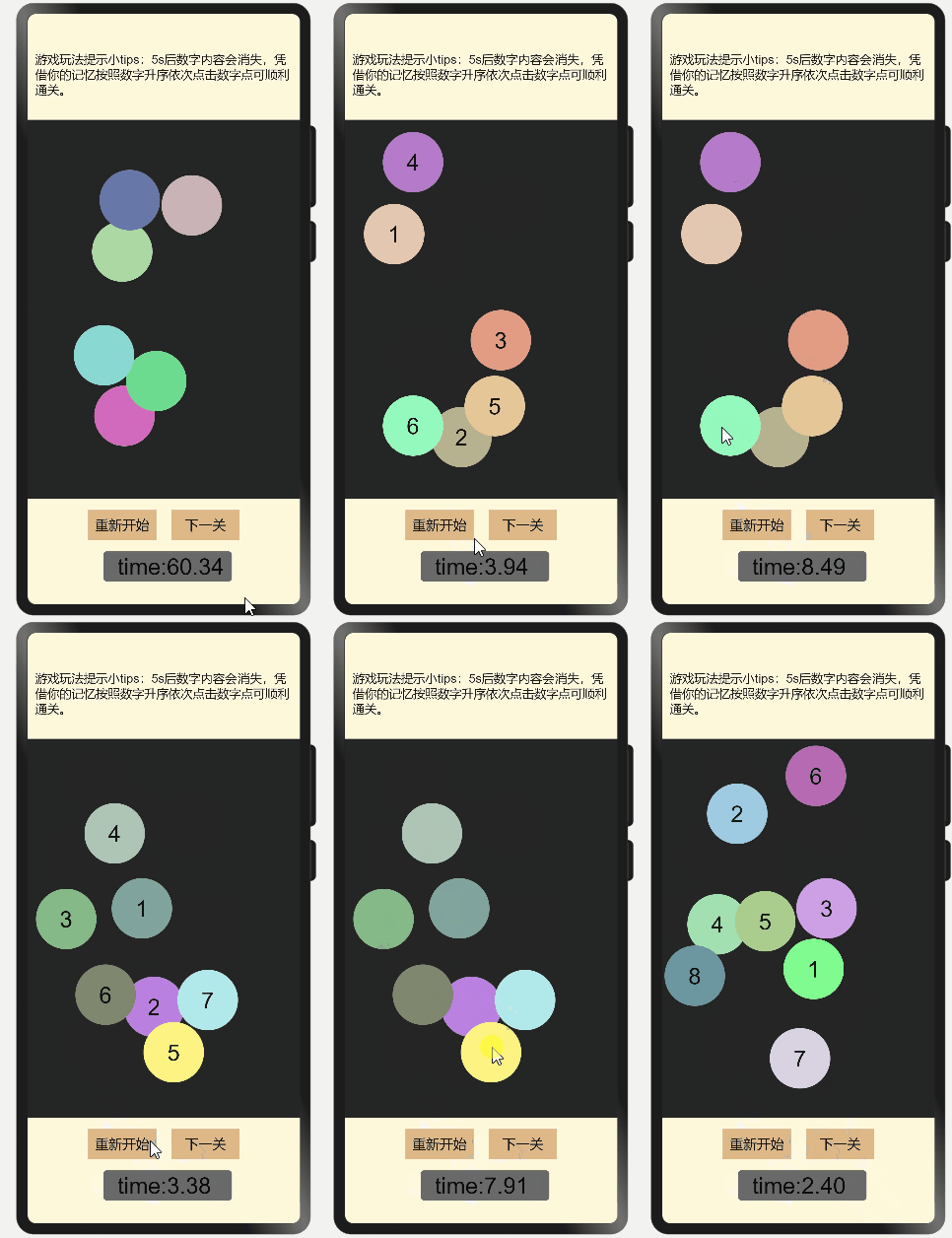
进入游戏页面,启动计时功能,并且随机生成小球,默认数量为六个。时间到达5s后小球内部的数字内容会消失,凭借用户的记忆按照数字升序依次点击数字点可顺利通关,否则通关失败。
包括顶部游戏简介,中间小球展示区,和底部对应的重新开始按钮和下一关按钮。
通过动态渲染的方式生成小球,并且小球数量随着关卡级别升高而增加。
一进入游戏界面就开始计时,五秒后小球上的数字消失需要玩家进行记忆点击,对玩家依次点击触发的小球数字进行去重和排序处理。
排序处理后进行判断,如果排序是从小到大依次点击的顺序,则代表用户闯关成功,否则闯关失败,并弹出对应的弹窗。
用户触发重新开始时,回到默认的初始化关卡,对之前的小球操作等进行清零,点击下一关时对应的小球数量增加,时间不变,最多可增加到十个小球。
<div class="container">
 <div class="header">
 <div class="titleMessage">
 <text style="font-size: 16px;">游戏玩法提示小tips:5s后数字内容会消失,凭借你的记忆按照数字升序依次点击数字点可顺利通关。</text>
 </div>
 </div>
 <div id="cointainer">
 <div for="{{ circleList }}" class="parm {{$item.className}}" @click="recordNmuber($item.text)" style="top:{{$item.top}};left:{{$item.left}};backgroundColor:{{$item.rgrbColor}}">
 <text class="{{cricleClassName}}">{{$item.text}}</text>
 </div>
 </div>
 <div class="todo">
 <text class="again" @click="restart(6)">重新开始</text>
 <text class="again" @click="nextPass" style="margin-left: 20px" >下一关</text>
 </div>
 <div class="againtime">
 <text>time:</text><text>
 <span>{{time}}</span>
 </text>
 </div>
 <div class="goFail" if="{{ isSuccess == false }}" >
 <text class="goFail-text">
 <span>很遗憾通关失败~~</span>
 </text>
 </div>
 <div class="goFail" if="{{ isSuccess == true }}" >
 <text class="goFail-text">
 <span>恭喜你通关成功呀</span>
 </text>
 </div>
</div>
<div class="header">
<div class="titleMessage">
<text style="font-size: 16px;">游戏玩法提示小tips:5s后数字内容会消失,凭借你的记忆按照数字升序依次点击数字点可顺利通关。</text>
</div>
</div>
<div id="cointainer">
<div for="{{ circleList }}" class="parm {{$item.className}}" @click="recordNmuber($item.text)" style="top:{{$item.top}};left:{{$item.left}};backgroundColor:{{$item.rgrbColor}}">
<text class="{{cricleClassName}}">{{$item.text}}</text>
</div>
</div>
<div class="todo">
<text class="again" @click="restart(6)">重新开始</text>
<text class="again" @click="nextPass" style="margin-left: 20px" >下一关</text>
</div>
<div class="againtime">
<text>time:</text><text>
<span>{{time}}</span>
</text>
</div>
<div class="goFail" if="{{ isSuccess == false }}" >
<text class="goFail-text">
<span>很遗憾通关失败~~</span>
</text>
</div>
<div class="goFail" if="{{ isSuccess == true }}" >
<text class="goFail-text">
<span>恭喜你通关成功呀</span>
</text>
</div>
</div>
.container {
 display: flex;
 flex-direction: column;
 align-items: center;
 height: 100%;
 width: 100%;
 position: relative;
}
.header {
 display: flex;
 justify-content: center;
 align-items: center;
 width: 100%;
}
.titleMessage{
 margin-top: 40px;
 width: 100%;
 height: 80px;
 background-color: cornsilk;
 border-radius: 15px;
 padding: 0 10px ;
}
#cointainer {
 display: flex;
 align-items: center;
 margin-top: 20px;
 height: 500px;
 width: 400px;
 background-color: rgb(37, 37, 37);
 position: relative;
}
.todo {
 justify-content: center;
 align-items: center;
 position: absolute;
 top: 84%;
}
.again{
 text-align: center;
 font-size: 18px;
 width: 90px;
 height: 40px;
 background-color: burlywood;
}
.againtime{
 position: absolute;
 top: 91%;
 margin-left: 100px;
 text-align: center;
 font-size: 18px;
 width: 170px;
 height: 40px;
 background-color: dimgray;
 border-radius: 5px;
 padding-left: 19px;
}
.parm{
 width: 80px;
 height: 80px;
 border-radius: 80;
 justify-content: center;
 align-items: center;
 position: absolute;
}
.cricle_text_none{
 display: none;
}
.goFail{
 background-color: beige;
 height: 80px;
 width: 200px;
 border-radius: 20px;
 position: absolute;
 top: 50%;
 left: 50%;
 transform: translate(-50%,-50%);
 justify-content: center;
 align-items: center;
}
.goFail-text{
 font-size: 16px;
}
display: flex;
flex-direction: column;
align-items: center;
height: 100%;
width: 100%;
position: relative;
}
.header {
display: flex;
justify-content: center;
align-items: center;
width: 100%;
}
.titleMessage{
margin-top: 40px;
width: 100%;
height: 80px;
background-color: cornsilk;
border-radius: 15px;
padding: 0 10px ;
}
#cointainer {
display: flex;
align-items: center;
margin-top: 20px;
height: 500px;
width: 400px;
background-color: rgb(37, 37, 37);
position: relative;
}
.todo {
justify-content: center;
align-items: center;
position: absolute;
top: 84%;
}
.again{
text-align: center;
font-size: 18px;
width: 90px;
height: 40px;
background-color: burlywood;
}
.againtime{
position: absolute;
top: 91%;
margin-left: 100px;
text-align: center;
font-size: 18px;
width: 170px;
height: 40px;
background-color: dimgray;
border-radius: 5px;
padding-left: 19px;
}
.parm{
width: 80px;
height: 80px;
border-radius: 80;
justify-content: center;
align-items: center;
position: absolute;
}
.cricle_text_none{
display: none;
}
.goFail{
background-color: beige;
height: 80px;
width: 200px;
border-radius: 20px;
position: absolute;
top: 50%;
left: 50%;
transform: translate(-50%,-50%);
justify-content: center;
align-items: center;
}
.goFail-text{
font-size: 16px;
}
export default {
 data: {
 circleList : [],
 containner:'',
 timmer1:'',
 timmer2:'',
 time:'',
 pass:6,
 asw:[],
 cricleClassName:'',
 recodArr:[],
 isSuccess:null,
 },
 onInit() {
 this.containner = this.$element('cointainer') //获取游戏画板容器元素
 this.timmer2 = setInterval(this.sumTime, 10);
 console.log(this.time)
 this.creatGame(this.pass);
 },
 sumTime() {
 //时间保留两位小数点。
 this.time = (Number(this.time) + 0.01).toFixed(2);
 //当时间超过5秒后,让小球上的数字消失。
 if(Number(this.time)>5) this.cricleClassName = 'cricle_text_none'
 },
 //点击小球时候触发的事件处理函数
 recordNmuber(num){
 //时间小于5秒时点击小球不计入到数组中
 if(this.time<5) return
 //大于五秒时点击小球将对应的数字push到一个新数组里。
 this.recodArr.push(num)
 console.log(JSON.stringify(this.recodArr))
 //去重操作
 let newArr = this.noRepeat(this.recodArr)
 console.log(newArr)
 //对数组进行排序
 if(newArr.length===this.pass) {
 let str = ''
 for (var index = 0; index < this.pass; index++) {
 if(index+1 ===this.pass) {
 str+=String(index+1)
 }
 if((index+1)<this.pass){
 str+=(String(index+1) + ',')
 }
 }
 console.log(str)
 //如果是为数字升序则弹出通关成功弹窗,并清空计时器,否则将弹出通关失败弹窗
 if(String(newArr) === String(str)) {
 console.log('true')
 this.isSuccess=true
 clearInterval(this.timmer2);
 }else{
 console.log('false')
 this.isSuccess=false
 clearInterval(this.timmer2);
 }
 }
 },
 //数组去重方法
 noRepeat(arr) {
 //定义一个新的临时数组
 let newArr=[];
 //遍历当前数组
 for(var i=0;i<arr.length;i++) {
 //如果当前数组的第i已经保存进了临时数组,那么跳过,
 //否则把当前项push到临时数组里面
 if(newArr.indexOf(arr[i]) === -1) { //indexOf() 判断数组中有没有字符串值,如果没有则返回 -1
 newArr.push(arr[i]);
 }
 }
 return newArr
 },
 //circle构造器
 getPosition() {
 let parm = { x: 0, y: 0 };
 //随机生成circle的坐标。
 parm.x = Math.round(Math.random() * 200);
 parm.y = Math.round(Math.random() * 400);
 return parm;
 },
 //创建不重叠circle
 createCircle(total) {
 if (this.circleList.length === 0) {
 this.circleList.push(this.getPosition());
 }
 //限制创建次数200
 for (let i = 0; i < 200; i++) {
 if (this.circleList.length < total) {
 let circle = this.getPosition();
 let distan = [];
 for (let n = 0; n < this.circleList.length; n++) {
 let dis =
 Math.abs(circle.x - this.circleList[n].x) ** 2 +
 Math.abs(circle.y - this.circleList[n].y) ** 2;
 distan.push(dis);
 }
 if (Math.min(...distan) > 3600) {
 this.circleList.push(circle);
 }
 } else {
 break;
 }
 }
 },
 //创建8个circle
 //随机颜色选择器
 selectColor() {
 let r = 100 + Math.round(Math.random() * 155);
 let g = 100 + Math.round(Math.random() * 155);
 let b = 100 + Math.round(Math.random() * 155);
 return `rgb(${r},${g},${b})`;
 },
 //构造关卡,不同关卡对应不同数量的小球,默认为六个小球。
 creatGame(num) {
 this.circleList = [];
 this.createCircle(num);
 for (let i = 0; i < this.circleList.length; i++) {
 this.circleList[i].className = "parm";
 this.circleList[i].text = i + 1;
 this.circleList[i].left = this.circleList[i].x + "px";
 this.circleList[i].top = this.circleList[i].y + "px";
 this.circleList[i].rgrbColor = this.selectColor();
 }
 },
 //触发重新开始
 restart(nowerPass) {
 this.isSuccess=null, //将通关失败和成功的弹窗进行关闭
 this.circleList = []
 this.pass = nowerPass;
 this.recodArr= []
 this.cricleClassName=''
 this.creatGame(nowerPass);
 clearInterval(this.timmer2);
 this.time = 0;
 this.timmer2 = setInterval(this.sumTime, 10);
 },
 //下一关
 nextPass() {
 //圆球数量设限,最多屏幕中出现十个小球。
 if (this.pass < 10) {
 this.pass++;
 this.restart(this.pass);
 }
 }
}
data: {
circleList : [],
containner:'',
timmer1:'',
timmer2:'',
time:'',
pass:6,
asw:[],
cricleClassName:'',
recodArr:[],
isSuccess:null,
},
onInit() {
this.containner = this.$element('cointainer') //获取游戏画板容器元素
this.timmer2 = setInterval(this.sumTime, 10);
console.log(this.time)
this.creatGame(this.pass);
},
sumTime() {
//时间保留两位小数点。
this.time = (Number(this.time) + 0.01).toFixed(2);
//当时间超过5秒后,让小球上的数字消失。
if(Number(this.time)>5) this.cricleClassName = 'cricle_text_none'
},
//点击小球时候触发的事件处理函数
recordNmuber(num){
//时间小于5秒时点击小球不计入到数组中
if(this.time<5) return
//大于五秒时点击小球将对应的数字push到一个新数组里。
this.recodArr.push(num)
console.log(JSON.stringify(this.recodArr))
//去重操作
let newArr = this.noRepeat(this.recodArr)
console.log(newArr)
//对数组进行排序
if(newArr.length===this.pass) {
let str = ''
for (var index = 0; index < this.pass; index++) {
if(index+1 ===this.pass) {
str+=String(index+1)
}
if((index+1)<this.pass){
str+=(String(index+1) + ',')
}
}
console.log(str)
//如果是为数字升序则弹出通关成功弹窗,并清空计时器,否则将弹出通关失败弹窗
if(String(newArr) === String(str)) {
console.log('true')
this.isSuccess=true
clearInterval(this.timmer2);
}else{
console.log('false')
this.isSuccess=false
clearInterval(this.timmer2);
}
}
},
//数组去重方法
noRepeat(arr) {
//定义一个新的临时数组
let newArr=[];
//遍历当前数组
for(var i=0;i<arr.length;i++) {
//如果当前数组的第i已经保存进了临时数组,那么跳过,
//否则把当前项push到临时数组里面
if(newArr.indexOf(arr[i]) === -1) { //indexOf() 判断数组中有没有字符串值,如果没有则返回 -1
newArr.push(arr[i]);
}
}
return newArr
},
//circle构造器
getPosition() {
let parm = { x: 0, y: 0 };
//随机生成circle的坐标。
parm.x = Math.round(Math.random() * 200);
parm.y = Math.round(Math.random() * 400);
return parm;
},
//创建不重叠circle
createCircle(total) {
if (this.circleList.length === 0) {
this.circleList.push(this.getPosition());
}
//限制创建次数200
for (let i = 0; i < 200; i++) {
if (this.circleList.length < total) {
let circle = this.getPosition();
let distan = [];
for (let n = 0; n < this.circleList.length; n++) {
let dis =
Math.abs(circle.x - this.circleList[n].x) ** 2 +
Math.abs(circle.y - this.circleList[n].y) ** 2;
distan.push(dis);
}
if (Math.min(...distan) > 3600) {
this.circleList.push(circle);
}
} else {
break;
}
}
},
//创建8个circle
//随机颜色选择器
selectColor() {
let r = 100 + Math.round(Math.random() * 155);
let g = 100 + Math.round(Math.random() * 155);
let b = 100 + Math.round(Math.random() * 155);
return `rgb(${r},${g},${b})`;
},
//构造关卡,不同关卡对应不同数量的小球,默认为六个小球。
creatGame(num) {
this.circleList = [];
this.createCircle(num);
for (let i = 0; i < this.circleList.length; i++) {
this.circleList[i].className = "parm";
this.circleList[i].text = i + 1;
this.circleList[i].left = this.circleList[i].x + "px";
this.circleList[i].top = this.circleList[i].y + "px";
this.circleList[i].rgrbColor = this.selectColor();
}
},
//触发重新开始
restart(nowerPass) {
this.isSuccess=null, //将通关失败和成功的弹窗进行关闭
this.circleList = []
this.pass = nowerPass;
this.recodArr= []
this.cricleClassName=''
this.creatGame(nowerPass);
clearInterval(this.timmer2);
this.time = 0;
this.timmer2 = setInterval(this.sumTime, 10);
},
//下一关
nextPass() {
//圆球数量设限,最多屏幕中出现十个小球。
if (this.pass < 10) {
this.pass++;
this.restart(this.pass);
}
}
}
这篇文章是我第一次写小游戏,在实现的过程中也遇到了很多问题,得力与同事们的帮助,才顺利实现这个小游戏,后面还需再继续学习,增加自己对FA的熟悉度,多写多练提升自己,每天进步一点点。
© 版权声明
文章版权归作者所有,未经允许请勿转载。








