
文章目录
- 引入import http from '@ohos.net.http'; 网络模块, 通过let httpRequest = http.createHttp();创建一个请求任务,httpRequest.request 添加请求,根据URL地址,发起HTTP网络请求,使用callback方式作为异步方法。
- 前提配置:
获取网络通讯数据必须实用网络权限,需要在config.json配置文件中添加属性。
"reqPermissions": [
 {
 "name": "ohos.permission.INTERNET"
 }
 ],
网络请求默认是支持https的,如果要支持http需要添加如下配置:
"deviceConfig": {
 "default": {
 "network": {
 "cleartextTraffic": true
 }
 }
 }
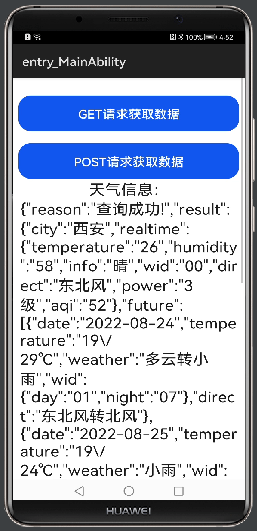
- 添加两个按钮事件,用于get和post请求方式获取数据,添加一个text用于显示获取的天气信息。 <div class="container"> <button class="title" value="GET请求获取数据" onclick="onClickGet"></button> <button class="title" value="POST请求获取数据" onclick="onClickPost"></button> <text class="content">天气信息:</text> <text class="content">{{content}}</text></div>
- .container { flex-direction: column; justify-content: center; align-items: center; margin: 10px;}.title { width: 100%; height: 60px; font-size: 20px; text-align: center; margin-top: 20px;}.content{ font-size: 25px;}
- 描述:引入import http from '@ohos.net.http'; 网络模块, 通过let httpRequest = http.createHttp();创建一个请求任务,httpRequest.request 添加请求,根据URL地址,发起HTTP网络请求,使用callback方式作为异步方法。 设置强求方式:http.RequestMethod.GET,http.RequestMethod.POST。 设置请求头:header: { 'Content-Type': 'application/json'}。 设置请求超时:readTimeout: 60000, connectTimeout: 60000。 import http from '@ohos.net.http';export default { data: { title: 'World', content:"" }, onClickGet(){ // 每一个httpRequest对应一个http请求任务,不可复用 let httpRequest = http.createHttp(); httpRequest.request("http://apis.juhe.cn/simpleWeather/query?key=397c9db4cb0621ad0313123dab416668&city=西安", { method: http.RequestMethod.GET, header: { 'Content-Type': 'application/json' }, readTimeout: 60000, connectTimeout: 60000 }, (err, data) => { if (!err) { console.info('网络Result:' + data.result); this.content = data.result; console.info('网络code:' + data.responseCode); console.info('网络header:' + JSON.stringify(data.header)); console.info('网络cookies:' + data.cookies); // 8+ console.info('网络header.Content-Type:' + data.header['Content-Type']); console.info('网络header.Status-Line:' + data.header['Status-Line']); } else { console.info('网络error:' + JSON.stringify(err)); } }); }, onClickPost(){ // 每一个httpRequest对应一个http请求任务,不可复用 let httpRequest = http.createHttp(); // 用于订阅http响应头,此接口会比request请求先返回。可以根据业务需要订阅此消息 // 从API 8开始,使用on('headersReceive', Callback)替代on('headerReceive', AsyncCallback)。 8+ httpRequest.on('headersReceive', (header) => { console.info('header: ' + JSON.stringify(header)); }); httpRequest.request("http://apis.juhe.cn/simpleWeather/query?key=397c9db4cb0621ad0313123dab416668&city=西安", { method: http.RequestMethod.POST, // 可选,默认为http.RequestMethod.GET // 开发者根据自身业务需要添加header字段 header: { 'Content-Type': 'application/json' }, // 当使用POST请求时此字段用于传递内容 extraData: { "data": "" }, connectTimeout: 60000, // 可选,默认为60s readTimeout: 60000, // 可选,默认为60s }, (err, data) => { if (!err) { // data.result为http响应内容,可根据业务需要进行解析 console.info('Result:' + data.result); this.content = data.result; console.info('code:' + data.responseCode); // data.header为http响应头,可根据业务需要进行解析 console.info('header:' + JSON.stringify(data.header)); console.info('cookies:' + data.cookies); // 8+ } else { console.info('error:' + JSON.stringify(err)); // 当该请求使用完毕时,调用destroy方法主动销毁。 httpRequest.destroy(); } }); }}
- 引入import http from '@ohos.net.http'; 网络模块。 通过let httpRequest = http.createHttp();创建一个请求任务。 httpRequest.request 添加请求,根据URL地址,发起HTTP网络请求,使用callback方式作为异步方法。 设置强求方式:http.RequestMethod.GET,http.RequestMethod.POST。 设置请求头:header: { 'Content-Type': 'application/json'}。 设置请求超时:readTimeout: 60000, connectTimeout: 60000 post请求设置请求体:extraData: { "data": "" }。 想了解更多关于开源的内容,请访问: 51CTO 开源基础软件社区 https://ost.51cto.com。

无论哪种技术开发,核心就是网络通讯,数据操作这些主要业务处理的方面的,没有网络通讯操作的应用不能说不是好应用,但是一定是有缺陷的应用,鸿蒙也是一样网络通讯是核心的开发技能,了解网络通讯就能将应用做到和后台通讯,数据存储到远程服务或者获取远程服务数据,今天就聊聊网络通讯的用法和实现。
每天学习一点点。
场景:
通过鸿蒙网络通讯的api 中 GET,POST请求方式 实现 获取天气信息。
下面我们开始今天的文章,还是老规矩,通过如下几点来说:
1,实现思路
2,代码解析
3,实现效果
3,总结
引入import http from '@ohos.net.http'; 网络模块, 通过let httpRequest = http.createHttp();创建一个请求任务,httpRequest.request 添加请求,根据URL地址,发起HTTP网络请求,使用callback方式作为异步方法。
前提配置:
获取网络通讯数据必须实用网络权限,需要在config.json配置文件中添加属性。
"reqPermissions": [
{
"name": "ohos.permission.INTERNET"
}
],
网络请求默认是支持https的,如果要支持http需要添加如下配置:
"deviceConfig": {
"default": {
"network": {
"cleartextTraffic": true
}
}
}
添加两个按钮事件,用于get和post请求方式获取数据,添加一个text用于显示获取的天气信息。
<div class="container">
 <button class="title" value="GET请求获取数据" onclick="onClickGet"></button>
 <button class="title" value="POST请求获取数据" onclick="onClickPost"></button>
 <text class="content">天气信息:</text>
 <text class="content">{{content}}</text>
</div>
.container {
 flex-direction: column;
 justify-content: center;
 align-items: center;
 margin: 10px;
}
.title {
 width: 100%;
 height: 60px;
 font-size: 20px;
 text-align: center;
 margin-top: 20px;
}
.content{
 font-size: 25px;
}
flex-direction: column;
justify-content: center;
align-items: center;
margin: 10px;
}
.title {
width: 100%;
height: 60px;
font-size: 20px;
text-align: center;
margin-top: 20px;
}
.content{
font-size: 25px;
}
描述:引入import http from '@ohos.net.http'; 网络模块, 通过let httpRequest = http.createHttp();创建一个请求任务,httpRequest.request 添加请求,根据URL地址,发起HTTP网络请求,使用callback方式作为异步方法。
- 设置强求方式:http.RequestMethod.GET,http.RequestMethod.POST。
- 设置请求头:header: { 'Content-Type': 'application/json'}。
- 设置请求超时:readTimeout: 60000, connectTimeout: 60000。
import http from '@ohos.net.http';
export default {
 data: {
 title: 'World',
 content:""
 },
 onClickGet(){
 // 每一个httpRequest对应一个http请求任务,不可复用
 let httpRequest = http.createHttp();
 httpRequest.request("http://apis.juhe.cn/simpleWeather/query?key=397c9db4cb0621ad0313123dab416668&city=西安",
 {
 method: http.RequestMethod.GET,
 header: {
 'Content-Type': 'application/json'
 },
 readTimeout: 60000,
 connectTimeout: 60000
 }, (err, data) => {
 if (!err) {
 console.info('网络Result:' + data.result);
 this.content = data.result;
 console.info('网络code:' + data.responseCode);
 console.info('网络header:' + JSON.stringify(data.header));
 console.info('网络cookies:' + data.cookies); // 8+
 console.info('网络header.Content-Type:' + data.header['Content-Type']);
 console.info('网络header.Status-Line:' + data.header['Status-Line']);
 } else {
 console.info('网络error:' + JSON.stringify(err));
 }
 });
 },
 onClickPost(){
 // 每一个httpRequest对应一个http请求任务,不可复用
 let httpRequest = http.createHttp();
 // 用于订阅http响应头,此接口会比request请求先返回。可以根据业务需要订阅此消息
 // 从API 8开始,使用on('headersReceive', Callback)替代on('headerReceive', AsyncCallback)。 8+
 httpRequest.on('headersReceive', (header) => {
 console.info('header: ' + JSON.stringify(header));
 });
 httpRequest.request("http://apis.juhe.cn/simpleWeather/query?key=397c9db4cb0621ad0313123dab416668&city=西安",
 {
 method: http.RequestMethod.POST, // 可选,默认为http.RequestMethod.GET
 // 开发者根据自身业务需要添加header字段
 header: {
 'Content-Type': 'application/json'
 },
 // 当使用POST请求时此字段用于传递内容
 extraData: {
 "data": ""
 },
 connectTimeout: 60000, // 可选,默认为60s
 readTimeout: 60000, // 可选,默认为60s
 }, (err, data) => {
 if (!err) {
 // data.result为http响应内容,可根据业务需要进行解析
 console.info('Result:' + data.result);
 this.content = data.result;
 console.info('code:' + data.responseCode);
 // data.header为http响应头,可根据业务需要进行解析
 console.info('header:' + JSON.stringify(data.header));
 console.info('cookies:' + data.cookies); // 8+
 } else {
 console.info('error:' + JSON.stringify(err));
 // 当该请求使用完毕时,调用destroy方法主动销毁。
 httpRequest.destroy();
 }
 });
 }
}
- 引入import http from '@ohos.net.http'; 网络模块。
- 通过let httpRequest = http.createHttp();创建一个请求任务。
- httpRequest.request 添加请求,根据URL地址,发起HTTP网络请求,使用callback方式作为异步方法。
- 设置强求方式:http.RequestMethod.GET,http.RequestMethod.POST。
- 设置请求头:header: { 'Content-Type': 'application/json'}。
- 设置请求超时:readTimeout: 60000, connectTimeout: 60000
- post请求设置请求体:extraData: { "data": "" }。
© 版权声明
文章版权归作者所有,未经允许请勿转载。