
自制OpenHarmony标准系统开机动画
文章目录
- 这个开机动画和HarmonyOS的有异曲同工之妙。
- 带有开机声效的视频如下:https://ost.51cto.com/show/17830。 新版Logo设计者是刘石老师,刘石老师在《新发布的 OpenHarmony Logo 竟有这么多的故事!》一文中分享了新版logo背后的故事。
-
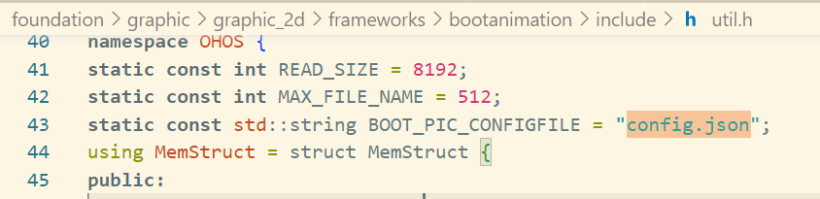
- graphic图形子系统包含了开机动画模块,开机动画模块在ohos3.2beta3源码下。foundation/graphic/graphic_2d/frameworks/bootanimation,开机动画模块bootanimation源码结构。 ├── BUILD.gn├── data│ ├── bootanimation_tool│ │ ├── README.md│ │ ├── raw_maker.py│ │ └── raw_player.py│ ├── bootpic.zip # 包括了开机动画的所有图片帧和json播放配置文件│ ├── bootsound.wav # 开机声效│ └── generate_raw.sh├── include # 开机动画模块的头文件│ ├── boot_animation.h│ ├── log.h│ └── util.h└── src # 开机动画的源文件 ├── boot_animation.cpp ├── main.cpp └── util.cpp bootpic.zip打开后内容如下。 OH_bootAni compressed内容如下,其中包括了150张开机动画的图片帧。 config.json内容如下,在这个文件中设置开机动画的播放帧率,范围为30~60帧,此处视频帧率被设置为30帧。OH_bootAni compressed文件夹内有150张图片,所以开机动画的播放时间为5秒。 { "Remark": "FrameRate Support 30, 60 frame rate configuration", "FrameRate": 30}
- 阅读bootanimation目录下BUILD.gn可以知道bootpic.zip和bootsound.wav等作为配置文件打包至开放板/system/etc/init目录下。 ## Install data/*.jpg to /system/etc/init/ {{{ohos_prebuilt_etc("bootanimation_pics") { source = "data/bootpic.zip" ## bootpic.zip在data目录下 relative_install_dir = "init" part_name = "graphic_standard" ## 部件名 subsystem_name = "graphic" ## 子系统名}ohos_prebuilt_etc("bootanimation_sounds") { source = "data/bootsound.wav" ## bootsound.wav在data目录下 relative_install_dir = "init" part_name = "graphic_standard" subsystem_name = "graphic"}## Install data/*.jpg to /system/etc/init/ }}}
- 阅读bootanimation目录下BUILD.gn可以知道bootpic.zip的解压缩依赖三方库zlib。
- 阅读bootanimation目录下BUILD.gn可以知道config.json的解析依赖三方库cJSON。
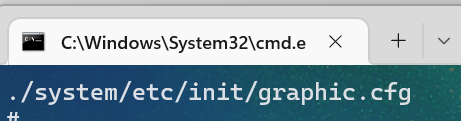
- 开机动画服务启动配置graphic.cfg在ohosbeta3源码./foundation/graphic/graphic_2d/graphic.cfg目录,分别启动了bootanimation和render_service进程。 .cfg只是一个为开发及使用方便而"发明"的一个后缀名。所以,这种文件没有固定的格式,其实也并不能算作是一种文件类型。 { "jobs" : [{ "name" : "init", "cmds" : [ "chmod 666 /dev/mali0", "chown system graphics /dev/mali0" ] }, { "name": "services:restartrender_service", "cmds": [ "reset foundation", "reset bootanimation", "reset gralloc_host", "reset hwc_host" ] } ], "services" : [{ "name" : "render_service", # 渲染服务端 "path" : ["/system/bin/render_service"], "critical" : [1, 5, 60], "importance" : -20, "uid" : "system", "gid" : ["system", "shell", "uhid", "root"], "caps" : ["SYS_NICE"], "secon" : "u:r:render_service:s0", "jobs" : { "on-restart" : "services:restartrender_service" }, "once" : 0 }, { "name" : "bootanimation", # 开机启动进程 "path" : ["/system/bin/bootanimation"], "bootevents": "bootevent.bootanimation.started", "importance" : -20, "once" : 1, "uid" : "graphics", "gid" : ["graphics", "system", "shell", "uhid", "root"], "secon" : "u:r:bootanimation:s0" } ]} 可以用hdc_std工具将pc端与开发板连接进入shell界面运行ps -ef命令,查看进程信息。 # ps -efUID PID PPID C STIME TTY TIME CMD····system 565 1 19 09:12:27 ? 00:00:01 bootanimationsystem 566 1 6 09:12:27 ? 00:00:00 render_service···· 查看beta3源码foundation/graphic/graphic_2d/BUILD.gn,可以知道graphic.cfg会被打包到开发板/system/etc/init/目录下。 用hdc_std工具连接开发板后,服务启动配置graphic.cfg在开发板system\etc\init目录也能找到。 find . -name graphic.cfg
- using namespace OHOS;static const std::string BOOT_PIC_ZIP = "/system/etc/init/bootpic.zip";static const std::string BOOT_SOUND_URI = "file://system/etc/init/bootsound.wav"; C ++中的std :: string类。 C ++在其定义中具有一种将字符序列表示为class对象的方式。此类称为std ::字符串。 它是一个容器类。 static const既是只读的,又是只在当前模块中可见的。 const 就是只读的意思,只在声明中使用。 static 一般有2个作用,规定作用域和存储方式。 对于局部变量, static规定其为静态存储方式, 每次调用的初始值为上一次调用的值,调用结束后存储空间不释放。 对于全局变量, 如果以文件划分作用域的话,此变量只在当前文件可见; 对于static函数也是在当前模块内函数可见。 using namespace OHOS;表示使用using指令使用OHOS空间,其在boot_animation.h中定义boot_animation.CPP中要用到boot_animation.h中OHOS空间中的函数和变量。 namespace OHOS {class BootAnimation {public: void Init(int32_t width, int32_t height, const std::shared_ptr<AppExecFwk::EventHandler>& handler, std::shared_ptr<AppExecFwk::EventRunner>& runner); void Draw(); void CheckExitAnimation(); void PlaySound(); bool CheckFrameRateValid(int32_t ratevalue); ~BootAnimation();private: void OnVsync(); void OnDraw(SkCanvas* canvas, int32_t curNo); void InitBootWindow(); void InitRsSurface(); void InitPicCoordinates(); int32_t windowWidth_; int32_t windowHeight_; sptr<OHOS::Rosen::Window> window_; sptr<OHOS::Rosen::WindowScene> scene_; std::unique_ptr<OHOS::Rosen::RSSurfaceFrame> framePtr_; std::shared_ptr<OHOS::Rosen::RSSurface> rsSurface_; OHOS::Rosen::RenderContext* rc_; int32_t freq_ = 30; int32_t realHeight_ = 0; int32_t realWidth_ = 0; int32_t pointX_ = 0; int32_t pointY_ = 0; int32_t picCurNo_ = -1; int32_t imgVecSize_ = 0; std::shared_ptr<OHOS::Rosen::VSyncReceiver> receiver_ = nullptr; std::shared_ptr<Media::Player> soundPlayer_ = nullptr; ImageStructVec imageVector_; std::shared_ptr<OHOS::AppExecFwk::EventHandler> mainHandler_ = nullptr; std::shared_ptr<AppExecFwk::EventRunner> runner_ = nullptr; bool setBootEvent_ = false;};} // namespace OHOS
- 开机动画模块在社区gitee仓库OpenHarmony / graphic_graphic_2d 找到标签栏,找到3.1Beta分支。下载下来分析。 bootanimation开机模块目录结构如下: ├─data│ ├── bootanimation-480x960.raw│ └── generate_raw.sh├─include│ ├── raw_parser.h│ └── util.h└─src│ ├── raw_parser.cpp│ ├── main.cpp│ └── util.cpp└─BUILD.gn
- 1.开机动画在3.2beta版本的源文件为bootpic.zip和bootpic.wav,需要利用视频剪辑软件制作好一段自己的开机动画。 2.然后利用特殊软件工具将制作好的视频变成150张图片,然后将图片编号再排好序。 3.最后打包为bootpic.zip压缩包。利用hdc_std工具将自制的bootpic.zip导入开发板/system/etc/init目录下。 4.重启开发板就可以了。 笔者使用的剪映软件(对笔者来说剪映够用)制作开机动画。然后在https://www.img2go.com/zh/convert-to-image网址将视频转换成图片。 最后打包成bootpic.zip(需要和原生的bootpic.zip目录机构一样),hdc_std工具使用命令如下: C:\Users\jjh\Desktop\3.2beta1SDK\ohos-sdk\windows\toolchains-windows-3.2.2.5-Beta1\toolchains>hdc_std shell# cd system/etc/init # 进入system/etc/init目录# mount -o remount,rw / # 将系统变成可读写# lsaccess_token.cfg locationsa.cfgaccessibility.cfg media_service.cfgaccountmgr.cfg memmgrservice.cfgappspawn.cfg misc.cfgaudio_policy.cfg mmi_uinput.rcbatterystats.cfg msdp_musl.cfgbgtaskmgr_service.cfg multimodalinput.cfgbluetooth_service.cfg netmanager_base.cfgbootpic.zip netsysnative.cfgbootsound.wav nwebspawn.cfgbytrace.cfg param_watcher.cfgcamera_service.cfg pasteboardservice.cfgconfig.txt pinauth_sa_profile.cfgconsole.cfg pulseaudio.cfgdcamera.cfg resource_schedule_service.cfgdevice_usage_statistics_service.cfg samgr_standard_musl.cfgdeviceauth_service.cfg screenlockservice.cfgdeviceinfoservice.cfg sensors_musl.cfgdhardware.cfg softbus_server_musl.cfgdistributed_data.cfg storage_daemon.cfgdistributedbms.cfg storage_manager.cfgdistributedfile.cfg telephony.cfgdistributedsched_musl.cfg thermal.cfgdownloadservice.cfg thermal_protector.cfgdscreen.cfg timeservice.cfgdslm_service.cfg token_sync.cfgedm.cfg udevd.rcfaceauth_sa_profile.cfg ueventd.cfgfaultloggerd.cfg ui_service.cfgfms_service.cfg updater_sa.cfgfoundation.cfg usb_service.cfggraphic.cfg useriam.cfghidumper_service.cfg wallpaperservice.cfghilogd.cfg watchdog.cfghiview.cfg weston.cfghuks_service.cfg wifi_hal_service.cfginit.reboot.cfg wifi_standard.cfginputmethodservice.cfg work_scheduler_service.cfginstalls.cfg# rm bootpic.zip # 删除原有的开机动画# exit # 退出开发板系统C:\Users\jjh\Desktop\3.2beta1SDK\ohos-sdk\windows\toolchains-windows-3.2.2.5-Beta1\toolchains>hdc_std file send bootpic.zip /system/etc/init/FileTransfer finish, File count = 1, Size:2776406 time:389ms rate:7137.29kB/s # 将自制的开机动画发送至/system/etc/init目录下 最后重启开发板,效果如下:https://ost.51cto.com/show/17796。
- 准备好一段开机动画的mp4格式动画,利用以下raw_maker.py脚本,内容如下: # !/usr/bin/env python3# -*- coding: utf-8 -*-"""* Copyright (c) 2022 Shenzhen Kaihong Digital Industry Development Co., Ltd.* Licensed under the Apache License, Version 2.0 (the "License");* you may not use this file except in compliance with the License.* You may obtain a copy of the License at** http://www.apache.org/licenses/LICENSE-2.0** Unless required by applicable law or agreed to in writing, software* distributed under the License is distributed on an "AS IS" BASIS,* WITHOUT WARRANTIES OR CONDITIONS OF ANY KIND, either express or implied.* See the License for the specific language governing permissions and* limitations under the License."""import structimport zlibimport osimport argparseimport reimport pipdef lost_module(module_name): print("""need %s module, try install first: pip install %s""" % (module_name, module_name)) exit()try: import cv2except ImportError: pip.main(["install", "opencv-python", "-i", "https://pypi.tuna.tsinghua.edu.cn/simple"]) try: import cv2 except ImportError: cv2 = None lost_module("opencv-python")try: from PIL import Imageexcept ImportError: pip.main(["install", "pillow"]) try: from PIL import Image except ImportError: Image = None lost_module("pillow")try: import numpy as npexcept ImportError: pip.main(["install", "numpy"]) try: import numpy as np except ImportError: np = None lost_module("numpy")class RawMaker: """ Make a boot video by a MP4 file or some .img files: """ def __init__(self, args): self._mp4 = args.mp4 self._image = args.image self._out = args.out self._display = [int(i) for i in re.split(r'[xX* ]+', args.display.strip())] self._rotate = args.rotate self._flip = args.flip self._fnp = 0 self._vdo = None self._image_files = [] def _iter_img(self): if self._mp4: success, frame = self._vdo.read() if success: image = Image.fromarray(frame) return success, image else: return False, None else: if self._fnp >= len(self._image_files): return False, None image = Image.open(os.path.join(self._image, self._image_files[self._fnp])) self._fnp += 1 return True, image def make(self): frame_count, width, height = 0, 0, 0 if self._mp4: if not os.path.exists(self._mp4): print("mp4 file %s is not exist" % self._mp4) exit() self._vdo = cv2.VideoCapture(self._mp4) fps = int(self._vdo.get(cv2.CAP_PROP_FPS)) w = int(self._vdo.get(cv2.CAP_PROP_FRAME_WIDTH)) h = int(self._vdo.get(cv2.CAP_PROP_FRAME_HEIGHT)) frame_count = int(self._vdo.get(cv2.CAP_PROP_FRAME_COUNT)) if fps != 30: print("video fps :", fps, ", width :", w, ", height :", h, ", frame count :", frame_count) if frame_count <= 0: exit() elif self._image: for fn in os.listdir(self._image): self._image_files.append(fn) frame_count = len(self._image_files) if frame_count <= 0: exit() self._image_files.sort() else: exit() output_bytes = bytearray(b"RAW.diff") offset = 8 screen_old_bytes = None num = 0 while True: ret, img = self._iter_img() if not ret: break num += 1 img = img.convert("RGBA") if self._flip: img = img.transpose(Image.FLIP_LEFT_RIGHT) if self._rotate == 90: img = img.transpose(Image.ROTATE_90) elif self._rotate == 180: img = img.transpose(Image.ROTATE_180) elif self._rotate == 270: img = img.transpose(Image.ROTATE_270) if self._display[0] != 0: img = img.resize((self._display[0], self._display[1])) img = np.array(img) height, width = img.shape[0], img.shape[1] img[img < 20] = 0 img = img.reshape(-1) screen_now_bytes = img.tobytes() if screen_old_bytes is None: screen_old_bytes = screen_now_bytes start_pos = 0 end_pos = width * height * 4 else: start_pos, end_pos = 3, 6 for i in range(width * height * 4): if screen_now_bytes[i] != screen_old_bytes[i]: start_pos = i break for i in range(width * height * 4 - 1, start_pos, -1): if screen_now_bytes[i] != screen_old_bytes[i]: end_pos = i + 1 break screen_old_bytes = screen_now_bytes print("\r|%s%s|" % ("=" * int(num / frame_count * 30), " " * (30 - int(num / frame_count * 30))), "%.2f%%" % (num / frame_count * 100), end="", flush=True) if start_pos == 3 or end_pos == 6: output_bytes[offset:offset + 16] = struct.pack("IIII", 0, 0, 0, 0) offset += 16 continue compressed_bytes = zlib.compress(screen_old_bytes[start_pos:end_pos]) raw_len = end_pos - start_pos new_len = len(compressed_bytes) output_bytes[offset:offset + 16] = struct.pack("IIII", 2, start_pos, raw_len, new_len) offset += 16 output_bytes[offset:offset + new_len] = compressed_bytes offset += new_len while new_len % 4 != 0: new_len += 1 output_bytes[offset:offset + 1] = b'\0' offset += 1 if not os.path.exists(self._out): os.makedirs(self._out) with open(os.path.join(self._out, "bootanimation-%dx%d.raw" % (width, height)), "wb") as fp: fp.write(output_bytes) print("\nGenerate successfully!")def parse_option(): parser = argparse.ArgumentParser(description="Make a boot video by a MP4 file or some .img files", usage="python raw_maker.py (-m <*.mp4> | -i <directory>) [-o <directory>] " "[-d <size>] [-r <angle>] [-f]\n" " eg.: python raw_maker.py -i ./source/png -o ./out -d 640x480\n" " python raw_maker.py -m ./animation.mp4 -o ./out -d 640x480") exclusive_group = parser.add_mutually_exclusive_group(required=True) exclusive_group.add_argument("-m", "--mp4", metavar="<*.mp4>", help="The input <*.mp4> file") exclusive_group.add_argument("-i", "--image", metavar="<directory>", help="The <directory> where image files are stored") parser.add_argument("-o", "--out", metavar="<directory>", default=".", help="Place generated .raw files into the <directory>") parser.add_argument("-d", "--display", metavar="<size>", default="0x0", help="Set the boot video display <size> and zoom the image, e.g.:640x480") parser.add_argument("-r", "--rotate", metavar="<angle>", type=int, help="Rotate video <angle>, e.g.:90 180 270") parser.add_argument("-f", "--flip", action="store_true", help="Flip the video", ) return parser.parse_args()if __name__ == "__main__": raw_maker = RawMaker(parse_option()) raw_maker.make() 在当前文件夹打开cmd窗口执行以下命令。 python raw_maker.py -m ./cat.mp4 -d 720x1280 此时会生成cat.raw文件,分辨率为720x1280。 播放cat.raw准备好raw_player.py脚本,内容如下: #!/usr/bin/env python# -*- coding: utf-8 -*-"""* Copyright (c) 2022 Shenzhen Kaihong Digital Industry Development Co., Ltd.* Licensed under the Apache License, Version 2.0 (the "License");* you may not use this file except in compliance with the License.* You may obtain a copy of the License at** http://www.apache.org/licenses/LICENSE-2.0** Unless required by applicable law or agreed to in writing, software* distributed under the License is distributed on an "AS IS" BASIS,* WITHOUT WARRANTIES OR CONDITIONS OF ANY KIND, either express or implied.* See the License for the specific language governing permissions and* limitations under the License."""import zlibimport structimport timeimport numpy as npimport cv2import sysimport reimport argparseclass RawPlayer: """ Play a boot video file """ def __init__(self, args): self._raw = args.raw cv2.namedWindow("play", cv2.WINDOW_AUTOSIZE) pass def play(self): screen_size = re.findall("bootanimation-([0-9]+)x([0-9]+).raw", self._raw) if len(screen_size) != 1: exit() width, height = int(screen_size[0][0]), int(screen_size[0][1]) with open(sys.argv[-1], "rb") as fp: data = fp.read() off = 8 img = None while off < len(data): data_type, offset, length, data_length = struct.unpack("IIII", data[off:off + 16]) off += 16 if data_type == 0: time.sleep(0.03) continue out = zlib.decompress(data[off:off + data_length]) if img is None: img = np.copy(np.frombuffer(out, dtype=np.uint8)) else: temp_img = np.frombuffer(out, dtype=np.uint8) img[offset:offset + length] = temp_img reshape_img = img.reshape((height, width, 4)) cv2.imshow("play", reshape_img) if cv2.waitKey(30) & 0xff == 27 or cv2.getWindowProperty("play", cv2.WND_PROP_VISIBLE) < 1: break while data_length % 4 != 0: data_length += 1 off += data_lengthdef parse_option(): parser = argparse.ArgumentParser(description="Play a boot video file", usage="python raw_player.py [-h] <*.raw>\n" " eg.: python raw_player.py ./bootanimation-640x480.raw") parser.add_argument("raw", metavar="<*.raw>", help="file <*.raw> to play") return parser.parse_args()if __name__ == "__main__": raw_player = RawPlayer(parse_option()) raw_player.play() 在当前文件夹打开cmd窗口,执行以下命令; python raw_player.py bootanimation-720x1280.raw 效果如下: 然后重启开发板,效果如下:https://ost.51cto.com/show/17795。 文章相关附件可以点击下面的原文链接前往下载: https://ost.51cto.com/resource/2331。 想了解更多关于开源的内容,请访问: 51CTO 开源基础软件社区 https://ost.51cto.com。

对于笔者这个openharmony高校开发者来说,开源的乐趣在于折腾。在此记录下折腾OpenHarmony标准系统开机动画的过程,ohos的开机动画从3.1beta之后经历过一次变更。下面展示一下变更前和变更后的开机动画。
- 这个开机动画和HarmonyOS的有异曲同工之妙。

带有开机声效的视频如下:https://ost.51cto.com/show/17830。

新版Logo设计者是刘石老师,刘石老师在《新发布的 OpenHarmony Logo 竟有这么多的故事!》一文中分享了新版logo背后的故事。

- graphic图形子系统包含了开机动画模块,开机动画模块在ohos3.2beta3源码下。foundation/graphic/graphic_2d/frameworks/bootanimation,开机动画模块bootanimation源码结构。
├── BUILD.gn
├── data
│ ├── bootanimation_tool
│ │ ├── README.md
│ │ ├── raw_maker.py
│ │ └── raw_player.py
│ ├── bootpic.zip # 包括了开机动画的所有图片帧和json播放配置文件
│ ├── bootsound.wav # 开机声效
│ └── generate_raw.sh
├── include # 开机动画模块的头文件
│ ├── boot_animation.h
│ ├── log.h
│ └── util.h
└── src # 开机动画的源文件
 ├── boot_animation.cpp
 ├── main.cpp
 └── util.cpp
- bootpic.zip打开后内容如下。
├── data
│ ├── bootanimation_tool
│ │ ├── README.md
│ │ ├── raw_maker.py
│ │ └── raw_player.py
│ ├── bootpic.zip # 包括了开机动画的所有图片帧和json播放配置文件
│ ├── bootsound.wav # 开机声效
│ └── generate_raw.sh
├── include # 开机动画模块的头文件
│ ├── boot_animation.h
│ ├── log.h
│ └── util.h
└── src # 开机动画的源文件
├── boot_animation.cpp
├── main.cpp
└── util.cpp
OH_bootAni compressed内容如下,其中包括了150张开机动画的图片帧。

config.json内容如下,在这个文件中设置开机动画的播放帧率,范围为30~60帧,此处视频帧率被设置为30帧。OH_bootAni compressed文件夹内有150张图片,所以开机动画的播放时间为5秒。
{
 "Remark": "FrameRate Support 30, 60 frame rate configuration",
 "FrameRate": 30
}
阅读bootanimation目录下BUILD.gn可以知道bootpic.zip和bootsound.wav等作为配置文件打包至开放板/system/etc/init目录下。
## Install data/*.jpg to /system/etc/init/ {{{
ohos_prebuilt_etc("bootanimation_pics") {
 source = "data/bootpic.zip" ## bootpic.zip在data目录下
 relative_install_dir = "init"
 part_name = "graphic_standard" ## 部件名
 subsystem_name = "graphic" ## 子系统名
}
ohos_prebuilt_etc("bootanimation_sounds") {
 source = "data/bootsound.wav" ## bootsound.wav在data目录下
 relative_install_dir = "init"
 part_name = "graphic_standard"
 subsystem_name = "graphic"
}
## Install data/*.jpg to /system/etc/init/ }}}
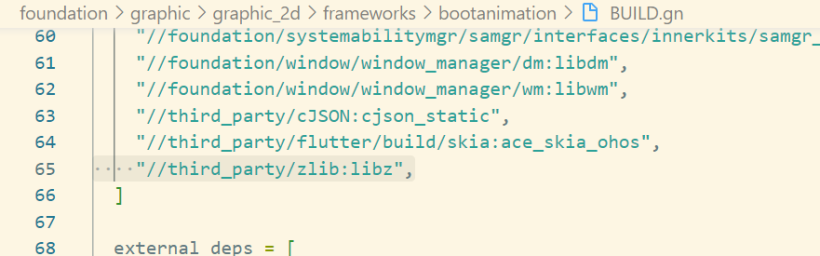
阅读bootanimation目录下BUILD.gn可以知道bootpic.zip的解压缩依赖三方库zlib。
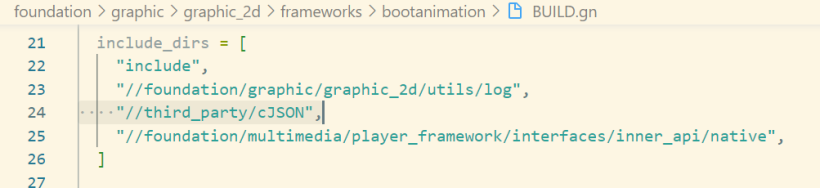
阅读bootanimation目录下BUILD.gn可以知道config.json的解析依赖三方库cJSON。
开机动画服务启动配置graphic.cfg在ohosbeta3源码./foundation/graphic/graphic_2d/graphic.cfg目录,分别启动了bootanimation和render_service进程。
.cfg只是一个为开发及使用方便而"发明"的一个后缀名。所以,这种文件没有固定的格式,其实也并不能算作是一种文件类型。

{
 "jobs" : [{
 "name" : "init",
 "cmds" : [
 "chmod 666 /dev/mali0",
 "chown system graphics /dev/mali0"
 ]
 }, {
 "name": "services:restartrender_service",
 "cmds": [
 "reset foundation",
 "reset bootanimation",
 "reset gralloc_host",
 "reset hwc_host"
 ]
 }
 ],
 "services" : [{
 "name" : "render_service", # 渲染服务端
 "path" : ["/system/bin/render_service"],
 "critical" : [1, 5, 60],
 "importance" : -20,
 "uid" : "system",
 "gid" : ["system", "shell", "uhid", "root"],
 "caps" : ["SYS_NICE"],
 "secon" : "u:r:render_service:s0",
 "jobs" : {
 "on-restart" : "services:restartrender_service"
 },
 "once" : 0
 }, {
 "name" : "bootanimation", # 开机启动进程
 "path" : ["/system/bin/bootanimation"],
 "bootevents": "bootevent.bootanimation.started",
 "importance" : -20,
 "once" : 1,
 "uid" : "graphics",
 "gid" : ["graphics", "system", "shell", "uhid", "root"],
 "secon" : "u:r:bootanimation:s0"
 }
 ]
}
可以用hdc_std工具将pc端与开发板连接进入shell界面运行ps -ef命令,查看进程信息。
# ps -ef
UID PID PPID C STIME TTY TIME CMD
····
system 565 1 19 09:12:27 ? 00:00:01 bootanimation
system 566 1 6 09:12:27 ? 00:00:00 render_service
····
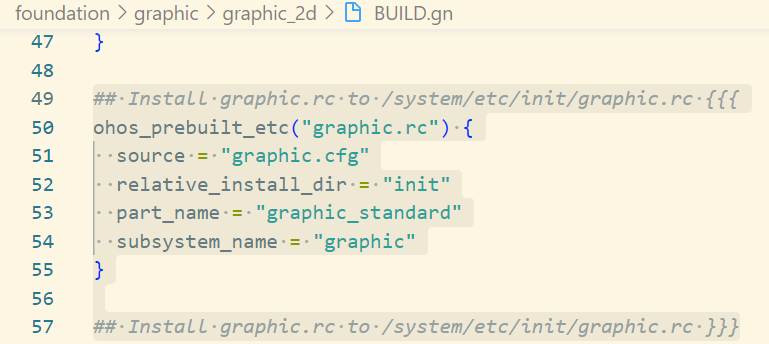
查看beta3源码foundation/graphic/graphic_2d/BUILD.gn,可以知道graphic.cfg会被打包到开发板/system/etc/init/目录下。
用hdc_std工具连接开发板后,服务启动配置graphic.cfg在开发板system\etc\init目录也能找到。
find . -name graphic.cfg
using namespace OHOS;
static const std::string BOOT_PIC_ZIP = "/system/etc/init/bootpic.zip";
static const std::string BOOT_SOUND_URI = "file://system/etc/init/bootsound.wav";
- C ++中的std :: string类。
- C ++在其定义中具有一种将字符序列表示为class对象的方式。此类称为std ::字符串。
- 它是一个容器类。
- static const既是只读的,又是只在当前模块中可见的。
- const 就是只读的意思,只在声明中使用。
- static 一般有2个作用,规定作用域和存储方式。
- 对于局部变量, static规定其为静态存储方式, 每次调用的初始值为上一次调用的值,调用结束后存储空间不释放。
- 对于全局变量, 如果以文件划分作用域的话,此变量只在当前文件可见; 对于static函数也是在当前模块内函数可见。
- using namespace OHOS;表示使用using指令使用OHOS空间,其在boot_animation.h中定义boot_animation.CPP中要用到boot_animation.h中OHOS空间中的函数和变量。
namespace OHOS {
class BootAnimation {
public:
 void Init(int32_t width, int32_t height, const std::shared_ptr<AppExecFwk::EventHandler>& handler,
 std::shared_ptr<AppExecFwk::EventRunner>& runner);
 void Draw();
 void CheckExitAnimation();
 void PlaySound();
 bool CheckFrameRateValid(int32_t ratevalue);
 ~BootAnimation();
private:
 void OnVsync();
 void OnDraw(SkCanvas* canvas, int32_t curNo);
 void InitBootWindow();
 void InitRsSurface();
 void InitPicCoordinates();
 int32_t windowWidth_;
 int32_t windowHeight_;
 sptr<OHOS::Rosen::Window> window_;
 sptr<OHOS::Rosen::WindowScene> scene_;
 std::unique_ptr<OHOS::Rosen::RSSurfaceFrame> framePtr_;
 std::shared_ptr<OHOS::Rosen::RSSurface> rsSurface_;
 OHOS::Rosen::RenderContext* rc_;
 int32_t freq_ = 30;
 int32_t realHeight_ = 0;
 int32_t realWidth_ = 0;
 int32_t pointX_ = 0;
 int32_t pointY_ = 0;
 int32_t picCurNo_ = -1;
 int32_t imgVecSize_ = 0;
 std::shared_ptr<OHOS::Rosen::VSyncReceiver> receiver_ = nullptr;
 std::shared_ptr<Media::Player> soundPlayer_ = nullptr;
 ImageStructVec imageVector_;
 std::shared_ptr<OHOS::AppExecFwk::EventHandler> mainHandler_ = nullptr;
 std::shared_ptr<AppExecFwk::EventRunner> runner_ = nullptr;
 bool setBootEvent_ = false;
};
} // namespace OHOS
static const std::string BOOT_PIC_ZIP = "/system/etc/init/bootpic.zip";
static const std::string BOOT_SOUND_URI = "file://system/etc/init/bootsound.wav";
- const 就是只读的意思,只在声明中使用。
- static 一般有2个作用,规定作用域和存储方式。
- 对于局部变量, static规定其为静态存储方式, 每次调用的初始值为上一次调用的值,调用结束后存储空间不释放。
- 对于全局变量, 如果以文件划分作用域的话,此变量只在当前文件可见; 对于static函数也是在当前模块内函数可见。
class BootAnimation {
public:
void Init(int32_t width, int32_t height, const std::shared_ptr<AppExecFwk::EventHandler>& handler,
std::shared_ptr<AppExecFwk::EventRunner>& runner);
void Draw();
void CheckExitAnimation();
void PlaySound();
bool CheckFrameRateValid(int32_t ratevalue);
~BootAnimation();
private:
void OnVsync();
void OnDraw(SkCanvas* canvas, int32_t curNo);
void InitBootWindow();
void InitRsSurface();
void InitPicCoordinates();
int32_t windowWidth_;
int32_t windowHeight_;
sptr<OHOS::Rosen::Window> window_;
sptr<OHOS::Rosen::WindowScene> scene_;
std::unique_ptr<OHOS::Rosen::RSSurfaceFrame> framePtr_;
std::shared_ptr<OHOS::Rosen::RSSurface> rsSurface_;
OHOS::Rosen::RenderContext* rc_;
int32_t freq_ = 30;
int32_t realHeight_ = 0;
int32_t realWidth_ = 0;
int32_t pointX_ = 0;
int32_t pointY_ = 0;
int32_t picCurNo_ = -1;
int32_t imgVecSize_ = 0;
std::shared_ptr<OHOS::Rosen::VSyncReceiver> receiver_ = nullptr;
std::shared_ptr<Media::Player> soundPlayer_ = nullptr;
ImageStructVec imageVector_;
std::shared_ptr<OHOS::AppExecFwk::EventHandler> mainHandler_ = nullptr;
std::shared_ptr<AppExecFwk::EventRunner> runner_ = nullptr;
bool setBootEvent_ = false;
};
} // namespace OHOS
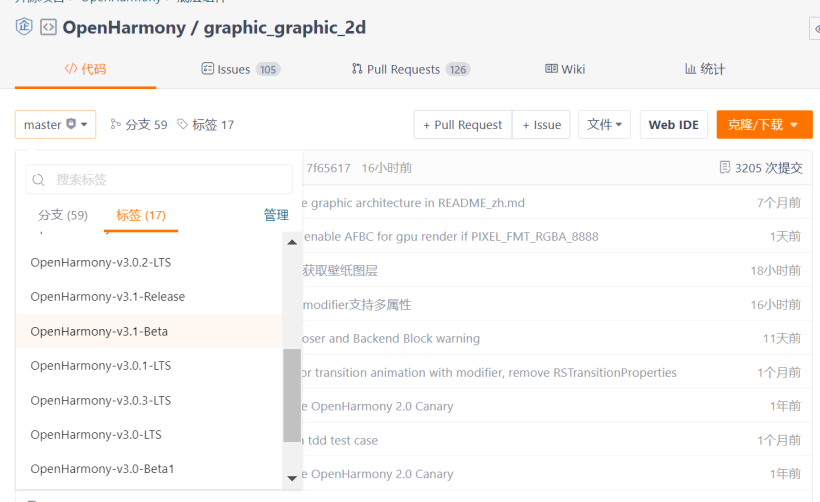
- 开机动画模块在社区gitee仓库OpenHarmony / graphic_graphic_2d
- 找到标签栏,找到3.1Beta分支。下载下来分析。
- bootanimation开机模块目录结构如下:
├─data
│ ├── bootanimation-480x960.raw
│ └── generate_raw.sh
├─include
│ ├── raw_parser.h
│ └── util.h
└─src
│ ├── raw_parser.cpp
│ ├── main.cpp
│ └── util.cpp
└─BUILD.gn
## Install data/bootanimation-480x960.raw to /system/etc/bootanimation-480x960.raw {{{
ohos_prebuilt_etc("bootanimation-480x960.raw") {
 source = "data/bootanimation-480x960.raw"
 part_name = "graphic_standard"
 subsystem_name = "graphic"
}
## Install data/bootanimation-480x960.raw to /system/etc/bootanimation-480x960.raw }}}
ohos_prebuilt_etc("bootanimation-480x960.raw") {
source = "data/bootanimation-480x960.raw"
part_name = "graphic_standard"
subsystem_name = "graphic"
}
## Install data/bootanimation-480x960.raw to /system/etc/bootanimation-480x960.raw }}}
RAW是未经处理、也未经压缩的格式,可以把RAW概念化为“原始图像编码数据”或更形象的称为“数字底片”。
- 1.开机动画在3.2beta版本的源文件为bootpic.zip和bootpic.wav,需要利用视频剪辑软件制作好一段自己的开机动画。
- 2.然后利用特殊软件工具将制作好的视频变成150张图片,然后将图片编号再排好序。
- 3.最后打包为bootpic.zip压缩包。利用hdc_std工具将自制的bootpic.zip导入开发板/system/etc/init目录下。
- 4.重启开发板就可以了。
笔者使用的剪映软件(对笔者来说剪映够用)制作开机动画。然后在
https://www.img2go.com/zh/convert-to-image网址将视频转换成图片。
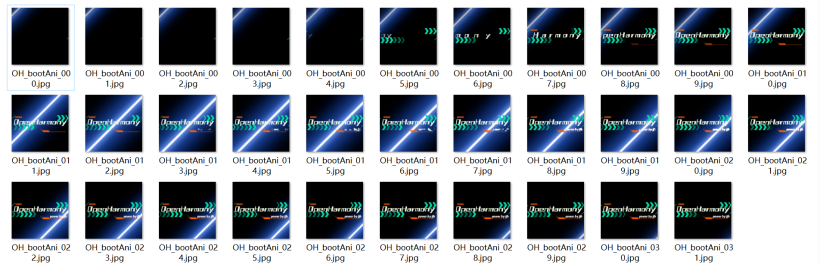
最后打包成bootpic.zip(需要和原生的bootpic.zip目录机构一样),hdc_std工具使用命令如下:
C:\Users\jjh\Desktop\3.2beta1SDK\ohos-sdk\windows\toolchains-windows-3.2.2.5-Beta1\toolchains>hdc_std shell
# cd system/etc/init # 进入system/etc/init目录
# mount -o remount,rw / # 将系统变成可读写
# ls
access_token.cfg locationsa.cfg
accessibility.cfg media_service.cfg
accountmgr.cfg memmgrservice.cfg
appspawn.cfg misc.cfg
audio_policy.cfg mmi_uinput.rc
batterystats.cfg msdp_musl.cfg
bgtaskmgr_service.cfg multimodalinput.cfg
bluetooth_service.cfg netmanager_base.cfg
bootpic.zip netsysnative.cfg
bootsound.wav nwebspawn.cfg
bytrace.cfg param_watcher.cfg
camera_service.cfg pasteboardservice.cfg
config.txt pinauth_sa_profile.cfg
console.cfg pulseaudio.cfg
dcamera.cfg resource_schedule_service.cfg
device_usage_statistics_service.cfg samgr_standard_musl.cfg
deviceauth_service.cfg screenlockservice.cfg
deviceinfoservice.cfg sensors_musl.cfg
dhardware.cfg softbus_server_musl.cfg
distributed_data.cfg storage_daemon.cfg
distributedbms.cfg storage_manager.cfg
distributedfile.cfg telephony.cfg
distributedsched_musl.cfg thermal.cfg
downloadservice.cfg thermal_protector.cfg
dscreen.cfg timeservice.cfg
dslm_service.cfg token_sync.cfg
edm.cfg udevd.rc
faceauth_sa_profile.cfg ueventd.cfg
faultloggerd.cfg ui_service.cfg
fms_service.cfg updater_sa.cfg
foundation.cfg usb_service.cfg
graphic.cfg useriam.cfg
hidumper_service.cfg wallpaperservice.cfg
hilogd.cfg watchdog.cfg
hiview.cfg weston.cfg
huks_service.cfg wifi_hal_service.cfg
init.reboot.cfg wifi_standard.cfg
inputmethodservice.cfg work_scheduler_service.cfg
installs.cfg
# rm bootpic.zip # 删除原有的开机动画
# exit # 退出开发板系统
C:\Users\jjh\Desktop\3.2beta1SDK\ohos-sdk\windows\toolchains-windows-3.2.2.5-Beta1\toolchains>hdc_std file send bootpic.zip /system/etc/init/
FileTransfer finish, File count = 1, Size:2776406 time:389ms rate:7137.29kB/s # 将自制的开机动画发送至/system/etc/init目录下
最后重启开发板,效果如下:https://ost.51cto.com/show/17796。
准备好一段开机动画的mp4格式动画,利用以下raw_maker.py脚本,内容如下:
# !/usr/bin/env python3
# -*- coding: utf-8 -*-
"""
* Copyright (c) 2022 Shenzhen Kaihong Digital Industry Development Co., Ltd.
* Licensed under the Apache License, Version 2.0 (the "License");
* you may not use this file except in compliance with the License.
* You may obtain a copy of the License at
*
* http://www.apache.org/licenses/LICENSE-2.0
*
* Unless required by applicable law or agreed to in writing, software
* distributed under the License is distributed on an "AS IS" BASIS,
* WITHOUT WARRANTIES OR CONDITIONS OF ANY KIND, either express or implied.
* See the License for the specific language governing permissions and
* limitations under the License.
"""
import struct
import zlib
import os
import argparse
import re
import pip
def lost_module(module_name):
 print("""
need %s module, try install first:
 pip install %s""" % (module_name, module_name))
 exit()
try:
 import cv2
except ImportError:
 pip.main(["install", "opencv-python", "-i", "https://pypi.tuna.tsinghua.edu.cn/simple"])
 try:
 import cv2
 except ImportError:
 cv2 = None
 lost_module("opencv-python")
try:
 from PIL import Image
except ImportError:
 pip.main(["install", "pillow"])
 try:
 from PIL import Image
 except ImportError:
 Image = None
 lost_module("pillow")
try:
 import numpy as np
except ImportError:
 pip.main(["install", "numpy"])
 try:
 import numpy as np
 except ImportError:
 np = None
 lost_module("numpy")
class RawMaker:
 """
 Make a boot video by a MP4 file or some .img files:
 """
 def __init__(self, args):
 self._mp4 = args.mp4
 self._image = args.image
 self._out = args.out
 self._display = [int(i) for i in re.split(r'[xX* ]+', args.display.strip())]
 self._rotate = args.rotate
 self._flip = args.flip
 self._fnp = 0
 self._vdo = None
 self._image_files = []
 def _iter_img(self):
 if self._mp4:
 success, frame = self._vdo.read()
 if success:
 image = Image.fromarray(frame)
 return success, image
 else:
 return False, None
 else:
 if self._fnp >= len(self._image_files):
 return False, None
 image = Image.open(os.path.join(self._image, self._image_files[self._fnp]))
 self._fnp += 1
 return True, image
 def make(self):
 frame_count, width, height = 0, 0, 0
 if self._mp4:
 if not os.path.exists(self._mp4):
 print("mp4 file %s is not exist" % self._mp4)
 exit()
 self._vdo = cv2.VideoCapture(self._mp4)
 fps = int(self._vdo.get(cv2.CAP_PROP_FPS))
 w = int(self._vdo.get(cv2.CAP_PROP_FRAME_WIDTH))
 h = int(self._vdo.get(cv2.CAP_PROP_FRAME_HEIGHT))
 frame_count = int(self._vdo.get(cv2.CAP_PROP_FRAME_COUNT))
 if fps != 30:
 print("video fps :", fps, ", width :", w, ", height :", h, ", frame count :", frame_count)
 if frame_count <= 0:
 exit()
 elif self._image:
 for fn in os.listdir(self._image):
 self._image_files.append(fn)
 frame_count = len(self._image_files)
 if frame_count <= 0:
 exit()
 self._image_files.sort()
 else:
 exit()
 output_bytes = bytearray(b"RAW.diff")
 offset = 8
 screen_old_bytes = None
 num = 0
 while True:
 ret, img = self._iter_img()
 if not ret:
 break
 num += 1
 img = img.convert("RGBA")
 if self._flip:
 img = img.transpose(Image.FLIP_LEFT_RIGHT)
 if self._rotate == 90:
 img = img.transpose(Image.ROTATE_90)
 elif self._rotate == 180:
 img = img.transpose(Image.ROTATE_180)
 elif self._rotate == 270:
 img = img.transpose(Image.ROTATE_270)
 if self._display[0] != 0:
 img = img.resize((self._display[0], self._display[1]))
 img = np.array(img)
 height, width = img.shape[0], img.shape[1]
 img[img < 20] = 0
 img = img.reshape(-1)
 screen_now_bytes = img.tobytes()
 if screen_old_bytes is None:
 screen_old_bytes = screen_now_bytes
 start_pos = 0
 end_pos = width * height * 4
 else:
 start_pos, end_pos = 3, 6
 for i in range(width * height * 4):
 if screen_now_bytes[i] != screen_old_bytes[i]:
 start_pos = i
 break
 for i in range(width * height * 4 - 1, start_pos, -1):
 if screen_now_bytes[i] != screen_old_bytes[i]:
 end_pos = i + 1
 break
 screen_old_bytes = screen_now_bytes
 print("\r|%s%s|" % ("=" * int(num / frame_count * 30), " " * (30 - int(num / frame_count * 30))),
 "%.2f%%" % (num / frame_count * 100), end="", flush=True)
 if start_pos == 3 or end_pos == 6:
 output_bytes[offset:offset + 16] = struct.pack("IIII", 0, 0, 0, 0)
 offset += 16
 continue
 compressed_bytes = zlib.compress(screen_old_bytes[start_pos:end_pos])
 raw_len = end_pos - start_pos
 new_len = len(compressed_bytes)
 output_bytes[offset:offset + 16] = struct.pack("IIII", 2, start_pos, raw_len, new_len)
 offset += 16
 output_bytes[offset:offset + new_len] = compressed_bytes
 offset += new_len
 while new_len % 4 != 0:
 new_len += 1
 output_bytes[offset:offset + 1] = b'\0'
 offset += 1
 if not os.path.exists(self._out):
 os.makedirs(self._out)
 with open(os.path.join(self._out, "bootanimation-%dx%d.raw" % (width, height)), "wb") as fp:
 fp.write(output_bytes)
 print("\nGenerate successfully!")
def parse_option():
 parser = argparse.ArgumentParser(description="Make a boot video by a MP4 file or some .img files",
 usage="python raw_maker.py (-m <*.mp4> | -i <directory>) [-o <directory>] "
 "[-d <size>] [-r <angle>] [-f]\n"
 " eg.: python raw_maker.py -i ./source/png -o ./out -d 640x480\n"
 " python raw_maker.py -m ./animation.mp4 -o ./out -d 640x480")
 exclusive_group = parser.add_mutually_exclusive_group(required=True)
 exclusive_group.add_argument("-m", "--mp4", metavar="<*.mp4>", help="The input <*.mp4> file")
 exclusive_group.add_argument("-i", "--image", metavar="<directory>",
 help="The <directory> where image files are stored")
 parser.add_argument("-o", "--out", metavar="<directory>", default=".",
 help="Place generated .raw files into the <directory>")
 parser.add_argument("-d", "--display", metavar="<size>", default="0x0",
 help="Set the boot video display <size> and zoom the image, e.g.:640x480")
 parser.add_argument("-r", "--rotate", metavar="<angle>", type=int, help="Rotate video <angle>, e.g.:90 180 270")
 parser.add_argument("-f", "--flip", action="store_true", help="Flip the video", )
 return parser.parse_args()
if __name__ == "__main__":
 raw_maker = RawMaker(parse_option())
 raw_maker.make()
在当前文件夹打开cmd窗口执行以下命令。
python raw_maker.py -m ./cat.mp4 -d 720x1280

此时会生成cat.raw文件,分辨率为720x1280。
播放cat.raw准备好raw_player.py脚本,内容如下:
#!/usr/bin/env python
# -*- coding: utf-8 -*-
"""
* Copyright (c) 2022 Shenzhen Kaihong Digital Industry Development Co., Ltd.
* Licensed under the Apache License, Version 2.0 (the "License");
* you may not use this file except in compliance with the License.
* You may obtain a copy of the License at
*
* http://www.apache.org/licenses/LICENSE-2.0
*
* Unless required by applicable law or agreed to in writing, software
* distributed under the License is distributed on an "AS IS" BASIS,
* WITHOUT WARRANTIES OR CONDITIONS OF ANY KIND, either express or implied.
* See the License for the specific language governing permissions and
* limitations under the License.
"""
import zlib
import struct
import time
import numpy as np
import cv2
import sys
import re
import argparse
class RawPlayer:
 """
 Play a boot video file
 """
 def __init__(self, args):
 self._raw = args.raw
 cv2.namedWindow("play", cv2.WINDOW_AUTOSIZE)
 pass
 def play(self):
 screen_size = re.findall("bootanimation-([0-9]+)x([0-9]+).raw", self._raw)
 if len(screen_size) != 1:
 exit()
 width, height = int(screen_size[0][0]), int(screen_size[0][1])
 with open(sys.argv[-1], "rb") as fp:
 data = fp.read()
 off = 8
 img = None
 while off < len(data):
 data_type, offset, length, data_length = struct.unpack("IIII", data[off:off + 16])
 off += 16
 if data_type == 0:
 time.sleep(0.03)
 continue
 out = zlib.decompress(data[off:off + data_length])
 if img is None:
 img = np.copy(np.frombuffer(out, dtype=np.uint8))
 else:
 temp_img = np.frombuffer(out, dtype=np.uint8)
 img[offset:offset + length] = temp_img
 reshape_img = img.reshape((height, width, 4))
 cv2.imshow("play", reshape_img)
 if cv2.waitKey(30) & 0xff == 27 or cv2.getWindowProperty("play", cv2.WND_PROP_VISIBLE) < 1:
 break
 while data_length % 4 != 0:
 data_length += 1
 off += data_length
def parse_option():
 parser = argparse.ArgumentParser(description="Play a boot video file",
 usage="python raw_player.py [-h] <*.raw>\n"
 " eg.: python raw_player.py ./bootanimation-640x480.raw")
 parser.add_argument("raw", metavar="<*.raw>", help="file <*.raw> to play")
 return parser.parse_args()
if __name__ == "__main__":
 raw_player = RawPlayer(parse_option())
 raw_player.play()
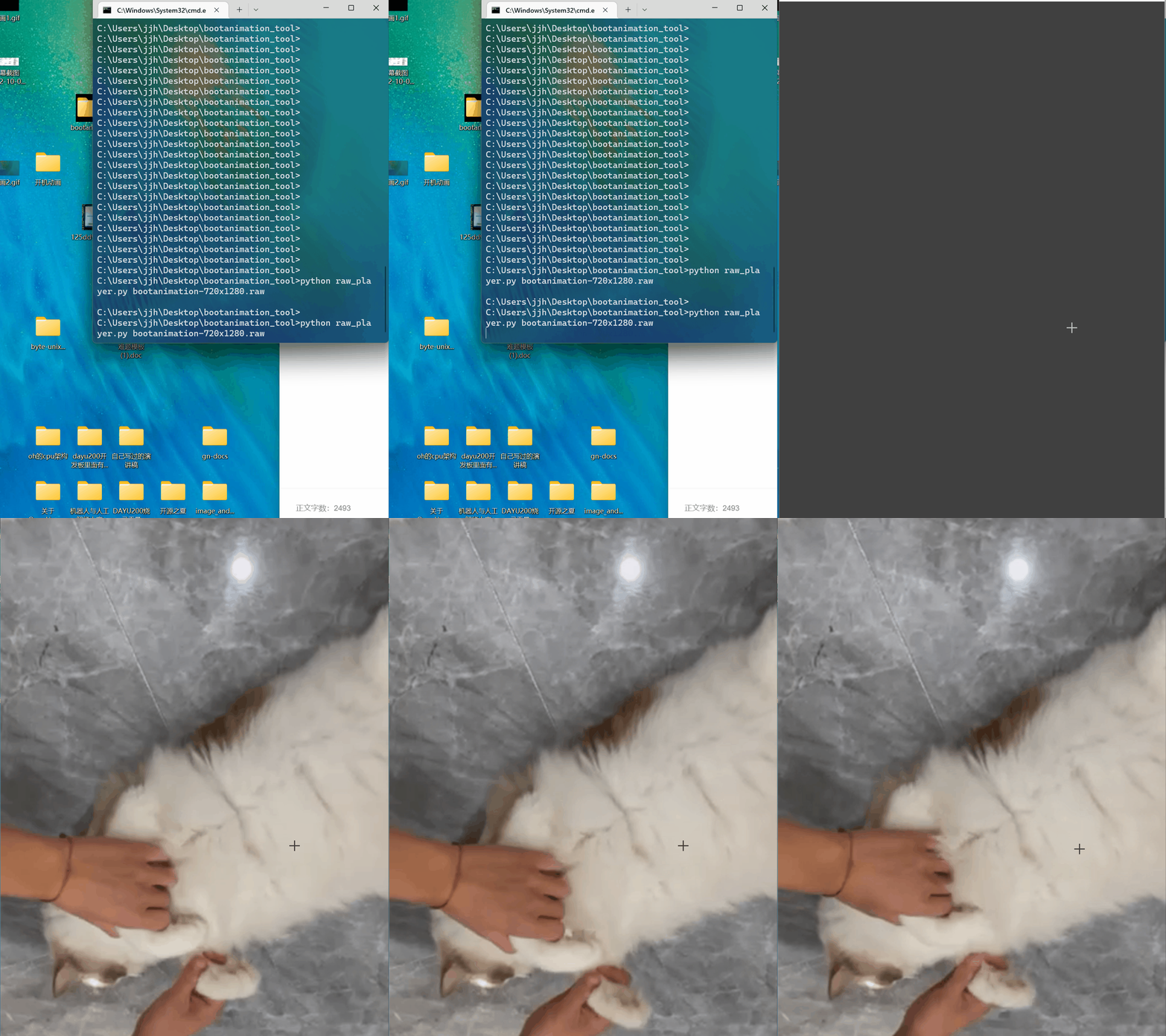
在当前文件夹打开cmd窗口,执行以下命令;
python raw_player.py bootanimation-720x1280.raw
效果如下:
然后重启开发板,效果如下:https://ost.51cto.com/show/17795。
文章相关附件可以点击下面的原文链接前往下载:
https://ost.51cto.com/resource/2331。
© 版权声明
文章版权归作者所有,未经允许请勿转载。








