iOS7扁平化设计已经成为了一个趋势基于对老版本的临时修改UITableView在sytle是group的时候是个×××烦没办法改就改吧。
直接用图片的方式是最简单的设置一个背景图拖一个UIImageView到你的Custom Cell中去设置普通和高亮情况下的p_w_picpath针对iOS7修改内部元素的frame设置默认的北京view为空代码如下
-(UITableViewCell *)tableView:(UITableView *)tableView cellForRowAtIndexPath:(NSIndexPath *)indexPath
{
 ...........
 UIView *testView2 = [[UIView alloc] init];
 testView2.backgroundColor = UIColor.clearColor;
 cell.selectedBackgroundView = testView2;
 ......
}
这样基本就OK了。
我在另一个文章里看到的方法确实通过自己写代码来实现大部分功能我觉得相对比较好但是很多阴影效果还是需要在研究研究的。主要是修改custom cell的setFrame,和修改tableview的
willDisplayCell来看看这两段代码
//custom 重写setFrame方法当然该方法最好针对iOS7才有效。
#define IOS7_OR_LATER ( [[[UIDevice currentDevice] systemVersion] compare:@"7.0"] != NSOrderedAscending )
- (void)setFrame:(CGRect)frame {
 if (IOS7_OR_LATER) {
 NSInteger inset = 10;
 frame.origin.x += inset;
 frame.size.width -= 2 * inset;
 }
 [super setFrame:frame];
}
然后写UITableViewDelegate的回调函数
- (void)tableView:(UITableView *)tableView willDisplayCell:(UITableViewCell *)cell forRowAtIndexPath:(NSIndexPath *)indexPath
{
 if ([cell respondsToSelector:@selector(tintColor)]) {
 if (tableView == self.vTableView) {
 CGFloat cornerRadius = 10.f;
 cell.backgroundColor = UIColor.clearColor;
 CAShapeLayer *layer = [[CAShapeLayer alloc] init];
 CAShapeLayer *borderLayer = [[CAShapeLayer alloc] init];
 CAShapeLayer *selectedLayer = [[CAShapeLayer alloc] init];

 CGMutablePathRef borderPathRef = CGPathCreateMutable();
 CGRect bounds0 = CGRectInset(cell.bounds, 0, 0);
 NSLog(@"bound0:%@",NSStringFromCGRect(cell.frame));
 if (indexPath.row == 0 && indexPath.row == [tableView numberOfRowsInSection:indexPath.section]-1) {
 CGPathAddRoundedRect(borderPathRef, nil, bounds0, cornerRadius, cornerRadius);
 } else if (indexPath.row == 0) {
 CGPathMoveToPoint(borderPathRef, nil, CGRectGetMinX(bounds0), CGRectGetMaxY(bounds0));//left bottom
 CGPathAddArcToPoint(borderPathRef, nil, CGRectGetMinX(bounds0), CGRectGetMinY(bounds0), CGRectGetMidX(bounds0), CGRectGetMinY(bounds0), cornerRadius);
 CGPathAddArcToPoint(borderPathRef, nil, CGRectGetMaxX(bounds0), CGRectGetMinY(bounds0), CGRectGetMaxX(bounds0), CGRectGetMidY(bounds0), cornerRadius);
 CGPathAddLineToPoint(borderPathRef, nil, CGRectGetMaxX(bounds0), CGRectGetMaxY(bounds0));
 } else if (indexPath.row == [tableView numberOfRowsInSection:indexPath.section]-1) {
 CGPathMoveToPoint(borderPathRef, nil, CGRectGetMinX(bounds0), CGRectGetMinY(bounds0));//left top
 CGPathAddArcToPoint(borderPathRef, nil, CGRectGetMinX(bounds0), CGRectGetMaxY(bounds0), CGRectGetMidX(bounds0), CGRectGetMaxY(bounds0), cornerRadius);
 CGPathAddArcToPoint(borderPathRef, nil, CGRectGetMaxX(bounds0), CGRectGetMaxY(bounds0), CGRectGetMaxX(bounds0), CGRectGetMidY(bounds0), cornerRadius);
 CGPathAddLineToPoint(borderPathRef, nil, CGRectGetMaxX(bounds0), CGRectGetMinY(bounds0));
 } else {
 CGPathAddRect(borderPathRef, nil, CGRectInset(cell.bounds, 0, 1));
 }
 borderLayer.path = borderPathRef;
 CFRelease(borderPathRef);
 cornerRadius = 7.f;
 CGMutablePathRef pathRef = CGPathCreateMutable();
 CGRect bounds = CGRectInset(cell.bounds, 1, 1);
 BOOL addLine = NO;
 if (indexPath.row == 0 && indexPath.row == [tableView numberOfRowsInSection:indexPath.section]-1) {
 CGPathAddRoundedRect(pathRef, nil, bounds, cornerRadius, cornerRadius);
 } else if (indexPath.row == 0) {
 CGPathMoveToPoint(pathRef, nil, CGRectGetMinX(bounds), CGRectGetMaxY(bounds0));
 CGPathAddArcToPoint(pathRef, nil, CGRectGetMinX(bounds), CGRectGetMinY(bounds), CGRectGetMidX(bounds), CGRectGetMinY(bounds), cornerRadius);
 CGPathAddArcToPoint(pathRef, nil, CGRectGetMaxX(bounds), CGRectGetMinY(bounds), CGRectGetMaxX(bounds), CGRectGetMidY(bounds), cornerRadius);
 CGPathAddLineToPoint(pathRef, nil, CGRectGetMaxX(bounds), CGRectGetMaxY(bounds0));
 addLine = YES;
 } else if (indexPath.row == [tableView numberOfRowsInSection:indexPath.section]-1) {
 CGPathMoveToPoint(pathRef, nil, CGRectGetMinX(bounds), CGRectGetMinY(bounds0));
 CGPathAddArcToPoint(pathRef, nil, CGRectGetMinX(bounds), CGRectGetMaxY(bounds), CGRectGetMidX(bounds), CGRectGetMaxY(bounds), cornerRadius);
 CGPathAddArcToPoint(pathRef, nil, CGRectGetMaxX(bounds), CGRectGetMaxY(bounds), CGRectGetMaxX(bounds), CGRectGetMidY(bounds), cornerRadius);
 CGPathAddLineToPoint(pathRef, nil, CGRectGetMaxX(bounds), CGRectGetMinY(bounds0));
 } else {
 CGPathAddRect(pathRef, nil, CGRectInset(cell.bounds, 1, 0));
 addLine = YES;
 }
 layer.path = pathRef;
 selectedLayer.path = pathRef;
 CFRelease(pathRef);
 layer.fillColor = [UIColor whiteColor].CGColor;
 selectedLayer.fillColor = [UIColor redColor].CGColor;

 borderLayer.zPosition = 0.0f;
 borderLayer.strokeColor = [UIColor blueColor].CGColor;
 borderLayer.lineWidth = 1;
 borderLayer.lineCap = kCALineCapRound;
 borderLayer.lineJoin = kCALineJoinRound;

 [borderLayer addSublayer:layer];

 if (addLine == YES) {
 CALayer *lineLayer = [[CALayer alloc] init];
 CGFloat lineHeight = (1.f / [UIScreen mainScreen].scale);
 lineLayer.frame = CGRectMake(CGRectGetMinX(bounds)+1, bounds0.size.height-lineHeight, bounds0.size.width-2, lineHeight);
 lineLayer.backgroundColor = tableView.separatorColor.CGColor;
 [layer addSublayer:lineLayer];
 }
 //add general view
 UIView *testView = [[UIView alloc] initWithFrame:bounds];
 [testView.layer insertSublayer:borderLayer atIndex:0];
 testView.backgroundColor = UIColor.clearColor;
 cell.backgroundView = testView;

 //add selected layer view;
 UIView *testView2 = [[UIView alloc] initWithFrame:bounds];
 [testView2.layer insertSublayer:selectedLayer atIndex:0];
 testView2.backgroundColor = UIColor.clearColor;
 cell.selectedBackgroundView = testView2;
 }
 }
}
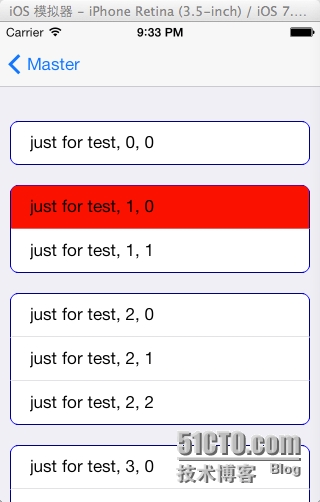
代码至此结束看看最终的效果图吧
© 版权声明
文章版权归作者所有,未经允许请勿转载。
相关文章
没有相关内容!






