#!/usr/bash
#create by lhb
#date 2014-05-07
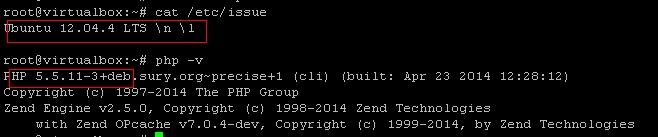
#desc install gearman and php extension for Ubuntu 12.04.4 LTS PHP 5.5
apt-get update
#安装依赖库
apt-get install libboost-all-dev gperf libevent1-dev libcloog-ppl0
mkdir -pv /home/lhb/software && cd /home/lhb/software
#下载gearman包
wget https://launchpad.net/gearmand/1.2/1.1.8/+download/gearmand-1.1.8.tar.gz
tar zxvf gearmand-1.1.8.tar.gz
cd gearmand-1.1.8/
./configure
make
make install
cd ..
apt-get install gearman-job-server
service gearman-job-server start
ps -ef |grep gearman
#安装php5-fpm
apt-get install php5-fpm php-cli php5-cli php5-dev
#下载gearman的php扩展库
wget http://pecl.php.net/get/gearman-1.1.2.tgz
tar zxvf gearman-1.1.2.tgz
cd gearman-1.1.2/
phpize
whereis php-config
./configure --with-php-config=/usr/bin/php-config
make
make install
#加入到php.ini配置
echo "extension=gearman.so" > /etc/php5/mods-available/gearman.ini
#cd /etc/php5/cli/conf.d/ && ln -s ../../mods-available/gearman.ini gearman.ini
#cd /etc/php5/fpm/conf.d/ && ln -s ../../mods-available/gearman.ini gearman.ini
for target_path in /etc/php5/cli/conf.d/ /etc/php5/fpm/conf.d/ ; do
 cd $target_path && ln -s ../../mods-available/gearman.ini gearman.ini
done
service php5-fpm restart
#查看扩展是否安装成功
php --info | grep "gearman"
查看是否启动
ps auxw | grep [g]earmand
lsof -i tcp:4730

worker.php
<?php
 $worker= new GearmanWorker();
 $worker->addServer();
 $worker->addFunction("lhb", "lhb_test");
 while ($worker->work());
 function lhb_test($job)
 {
 return strtoupper($job->workload());
 }
?>
client.php
<?php
 $client= new GearmanClient();
 $client->addServer();
 print $client->do("lhb", "this is a test by lhb");
 print "\n";
?>
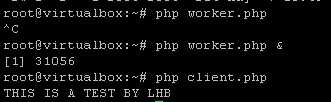
测试结果:
© 版权声明
文章版权归作者所有,未经允许请勿转载。
相关文章
没有相关内容!






