文章目录
- 使用OpenHarmony 小型系统支持的基础控件实现类似textarea的多行文本输入框,输入的文本可以控制动画的播放时间。
- 在OpenHarmony标准的系统提供了基础组件:textarea多行文本输入的文本框。但在小型系统中并没有类似的组件,目前有个需求在小型系统中实现输入框功能,支持类似软键盘输入后显示相关的信息,并可以把输入的信息缓存,用于操作其他业务使用的数据。
- 设备:君正x2000开发板。 系统:OpenHarmony 3.0.0.0(LTS)。
- 从效果图中我们可以看出,textarea多行文本输入的文本框可以有以下几个特点:
1、输入框中可以通过自定义的软键盘输入单行或多行数据。
2、输入框有两种状态,常态、点击态
常态:未获取焦点,不显示软键盘,无法通过软键盘输入,输入框背景透明且边框为白色。
点击态:获取焦点,显示软键盘,支持软键盘输入,输入框背景灰色且边框为红色。
3、点击软键盘非完成按钮,在输入框中显示相关的文本;
4、点击软键盘完成按钮,清空输入框中内容,在结果框中显示用户输入的数据,输入框恢复为常态。
- 1、在输入框中输入数字,点击完成,帧动画根据用户输入的数据设置动画播放的时长; 分析:小型系统所支持的基础容器中。 1、使用text组件实现文本输入框,使用onclick监听点击事件,修改输入框的状态,通过动态的设置其属性:background-color、border-color来实现点击状态下的背景和边框颜色; 2、使用input type=‘button’实现软键盘中的按键,使用onclick监听点击事件,根据监听不同的按键执行不同的操作。
- 1、使用image-animator组件实现帧动画的加载,通其属性duration来设置单次动画播放的时长。 备注:如果你对上面提到的容器API还不熟悉,可以参看以下内容: input API text API image-animator API
- 1、无光标,无法在指定位置后插入数据,目前只能从最后一位插入数据,当然删除数据也只能从最后一位开始向前删除; 2、软键盘需要按需实现; 3、输入框内容超出限制高度则无法显示超出部分内容。
- 说明:组件的代码包括三个部分:hml、css、js,因为代码比较简单,所以没有写注释,如果有不明白的地方可以留言。 动画需要的资源在文章底部附件中下载。 <!--textView.hml--><div class="container"> <image src="/common/images/back.png" class="back-img" onclick="onBack"></image> <div class="animator_box"> <image-animator class="animator" images="{{ images }}" duration="{{ animatorDuration }}" ref="animator"> </image-animator> </div> <text class="animator-title" onclick="onText"> 动画单次播放时长{{ animatorDuration }} </text> <div class="title-content" style="background-color : {{ bg_color }}; border-color : {{ border_color }};"> <text class="title" onclick="onText"> {{ curText }} </text> </div> <text class="result"> 您输入的内容:{{ resultText }} </text> <div class="key-code" show="{{ isShowKeyCode }}"> <div class="btn-content"> <input class="num-btn" type="button" value="1" ref="num-one" onclick="onNumOne"></input> <input class="num-btn" type="button" value="2" ref="num-two" onclick="onNumTwo"></input> <input class="num-btn" type="button" value="3" ref="num-three" onclick="onNumThree"></input> <input class="num-btn" type="button" value="O" ref="en-char" onclick="onEnChar"></input> <input class="num-btn" type="button" onclick="onDelete">←</input> </div> <div class="btn-content"> <input class="num-btn" type="button" value="#" ref="num-one" onclick="onSpecialSymbol1"></input> <input class="num-btn" type="button" value="@" ref="en-char" onclick="onSpecialSymbol2"></input> <input class="num-btn" type="button" value="鸿" ref="special-symbol" onclick="onZhChar1"></input> <input class="num-btn" type="button" value="蒙" ref="zh-char" onclick="onZhChar2"></input> <input class="num-btn" type="button" value="完成" onclick="onFinish"></input> </div> </div></div> /*textView.css*/.container { display: flex; flex-direction: column; width: 100%; height: 100%; background-color: black;}.title-content { width: 100%; height: 220px; border-width: 1px; padding: 10px; margin-bottom: 10px; justify-content: flex-start; align-items: flex-start; text-align: left;}.title { font-size: 30px; width: 95%; height: 220px;}.result { font-size: 22px; width: 100%; height: 220px; text-align: left; align-items: flex-start; border-width: 1px; border-color: white; padding: 10px;}.btn-content { flex-direction: row; width: 100%; height: 80px; margin-top: 5px; justify-content: space-between;}.num-btn{ width: 19%; text-align: center; color: black; font-size: 25px; border-radius: 5px; background-color: white; margin: 0 2px;}.key-code{ display: flex; flex-direction: column; justify-content: space-between; width: 100%; height: 180px; align-items: center; margin-top: 10px;}.back-img { width: 40px; height: 40px; border-radius: 20px; margin: 20px;}.animator_box{ width: 100%; height: 240px; justify-content: center;}.animator { width: 100%; height: 240px;}.animator-title { font-size: 30px; width: 95%; height: 40px; color: white;} // textView.jsimport router from '@system.router';const TEXT_COLOR = { NORMAL: '#000', CLICK: '#88666666'};const BORDER_COLOR = { NORMAL: '#fff', CLICK: '#c00000'};export default { data: { title: 'World', bg_color: TEXT_COLOR.NORMAL, isFocus: false, curText: '', resultText: '', isShowKeyCode: false, border_color: BORDER_COLOR.NORMAL, animatorDuration:'1s', images: [ { src: "/common/images/1.png", }, { src: "/common/images/2.png", }, { src: "/common/images/3.png", }, { src: "/common/images/4.png", }, { src: "/common/images/5.png", }, { src: "/common/images/6.png", }, { src: "/common/images/7.png", }, { src: "/common/images/8.png", }, { src: "/common/images/9.png", }, { src: "/common/images/10.png", }, { src: "/common/images/11.png", }, { src: "/common/images/12.png", }, { src: "/common/images/13.png", }, { src: "/common/images/14.png", }, { src: "/common/images/15.png", }, { src: "/common/images/16.png", }, { src: "/common/images/17.png", }, { src: "/common/images/18.png", }, { src: "/common/images/19.png", }, { src: "/common/images/20.png", }, { src: "/common/images/21.png", }, { src: "/common/images/22.png", }, { src: "/common/images/23.png", }, { src: "/common/images/24.png", }, { src: "/common/images/25.png", }, { src: "/common/images/26.png", }, { src: "/common/images/27.png", } ], }, onText() { this.bg_color = TEXT_COLOR.CLICK; this.border_color = BORDER_COLOR.CLICK; this.isFocus = true; this.isShowKeyCode = true; this.resultText = ''; }, onNumOne() { if (!this.isFocus) { return; } this.curText += '1'; }, onNumTwo() { if (!this.isFocus) { return; } this.curText += '2'; }, onNumThree() { if (!this.isFocus) { return; } this.curText += '3'; }, onEnChar() { if (!this.isFocus) { return; } this.curText += 'O'; }, onSpecialSymbol1() { if (!this.isFocus) { return; } this.curText += '#'; }, onSpecialSymbol2() { if (!this.isFocus) { return; } this.curText += '@'; }, onZhChar1() { if (!this.isFocus) { return; } this.curText += '鸿'; }, onZhChar2() { if (!this.isFocus) { return; } this.curText += '蒙'; }, onFinish() { this.resultText = this.curText; this.animatorDuration = this.curText+'s'; this.reset(); }, /** * 每次点击删除最后一个字节 */ onDelete() { if (!this.isFocus) { return; } const len = this.curText.length; if (len >= 1) { this.curText = this.curText.substring(0, len - 1); } }, reset() { this.isFocus = false; this.curText = ''; this.bg_color = TEXT_COLOR.NORMAL; this.border_color = BORDER_COLOR.NORMAL; this.isShowKeyCode = false; }, onBack() { router.replace({ uri: 'pages/index/index' }); }, onDestroy() { this.reset(); }} 想了解更多内容,请访问: 51CTO和华为官方合作共建的鸿蒙技术社区 https://ost.51cto.com

使用OpenHarmony 小型系统支持的基础控件实现类似textarea的多行文本输入框,输入的文本可以控制动画的播放时间。
在OpenHarmony标准的系统提供了基础组件:textarea多行文本输入的文本框。但在小型系统中并没有类似的组件,目前有个需求在小型系统中实现输入框功能,支持类似软键盘输入后显示相关的信息,并可以把输入的信息缓存,用于操作其他业务使用的数据。
- 设备:君正x2000开发板。
- 系统:OpenHarmony 3.0.0.0(LTS)。
请你移步至:小型系统textarea多行文本输入框视频效果。
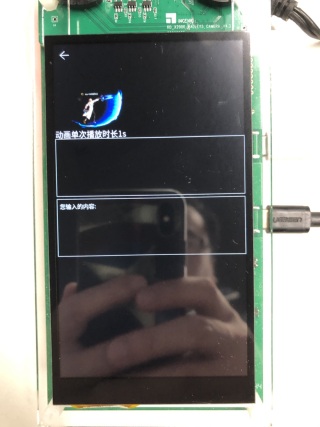
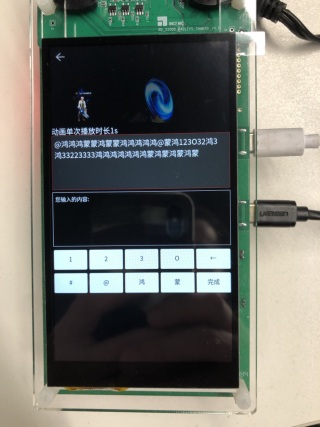
从效果图中我们可以看出,textarea多行文本输入的文本框可以有以下几个特点:
1、输入框中可以通过自定义的软键盘输入单行或多行数据。
2、输入框有两种状态,常态、点击态
- 常态:未获取焦点,不显示软键盘,无法通过软键盘输入,输入框背景透明且边框为白色。
- 点击态:获取焦点,显示软键盘,支持软键盘输入,输入框背景灰色且边框为红色。
3、点击软键盘非完成按钮,在输入框中显示相关的文本;
4、点击软键盘完成按钮,清空输入框中内容,在结果框中显示用户输入的数据,输入框恢复为常态。
1、在输入框中输入数字,点击完成,帧动画根据用户输入的数据设置动画播放的时长;
分析:小型系统所支持的基础容器中。
1、使用text组件实现文本输入框,使用onclick监听点击事件,修改输入框的状态,通过动态的设置其属性:background-color、border-color来实现点击状态下的背景和边框颜色;
2、使用input type=‘button’实现软键盘中的按键,使用onclick监听点击事件,根据监听不同的按键执行不同的操作。
1、使用image-animator组件实现帧动画的加载,通其属性duration来设置单次动画播放的时长。
备注:如果你对上面提到的容器API还不熟悉,可以参看以下内容:
1、无光标,无法在指定位置后插入数据,目前只能从最后一位插入数据,当然删除数据也只能从最后一位开始向前删除;
2、软键盘需要按需实现;
3、输入框内容超出限制高度则无法显示超出部分内容。
说明:组件的代码包括三个部分:hml、css、js,因为代码比较简单,所以没有写注释,如果有不明白的地方可以留言。
动画需要的资源在文章底部附件中下载。
<!--textView.hml-->
<div class="container">
 <image src="/common/images/back.png" class="back-img" onclick="onBack"></image>
 <div class="animator_box">
 <image-animator class="animator" images="{{ images }}" duration="{{ animatorDuration }}" ref="animator">
 </image-animator>
 </div>
 <text class="animator-title" onclick="onText">
 动画单次播放时长{{ animatorDuration }}
 </text>
 <div class="title-content" style="background-color : {{ bg_color }}; border-color : {{ border_color }};">
 <text class="title" onclick="onText">
 {{ curText }}
 </text>
 </div>
 <text class="result">
 您输入的内容:{{ resultText }}
 </text>
 <div class="key-code" show="{{ isShowKeyCode }}">
 <div class="btn-content">
 <input class="num-btn" type="button" value="1" ref="num-one" onclick="onNumOne"></input>
 <input class="num-btn" type="button" value="2" ref="num-two" onclick="onNumTwo"></input>
 <input class="num-btn" type="button" value="3" ref="num-three" onclick="onNumThree"></input>
 <input class="num-btn" type="button" value="O" ref="en-char" onclick="onEnChar"></input>
 <input class="num-btn" type="button" onclick="onDelete">←</input>
 </div>
 <div class="btn-content">
 <input class="num-btn" type="button" value="#" ref="num-one" onclick="onSpecialSymbol1"></input>
 <input class="num-btn" type="button" value="@" ref="en-char" onclick="onSpecialSymbol2"></input>
 <input class="num-btn" type="button" value="鸿" ref="special-symbol" onclick="onZhChar1"></input>
 <input class="num-btn" type="button" value="蒙" ref="zh-char" onclick="onZhChar2"></input>
 <input class="num-btn" type="button" value="完成" onclick="onFinish"></input>
 </div>
 </div>
</div>
/*textView.css*/

.container {
 display: flex;
 flex-direction: column;
 width: 100%;
 height: 100%;
 background-color: black;
}
.title-content {
 width: 100%;
 height: 220px;
 border-width: 1px;
 padding: 10px;
 margin-bottom: 10px;
 justify-content: flex-start;
 align-items: flex-start;
 text-align: left;
}
.title {
 font-size: 30px;
 width: 95%;
 height: 220px;
}
.result {
 font-size: 22px;
 width: 100%;
 height: 220px;
 text-align: left;
 align-items: flex-start;
 border-width: 1px;
 border-color: white;
 padding: 10px;
}
.btn-content {
 flex-direction: row;
 width: 100%;
 height: 80px;
 margin-top: 5px;
 justify-content: space-between;
}
.num-btn{
 width: 19%;
 text-align: center;
 color: black;
 font-size: 25px;
 border-radius: 5px;
 background-color: white;
 margin: 0 2px;
}
.key-code{
 display: flex;
 flex-direction: column;
 justify-content: space-between;
 width: 100%;
 height: 180px;
 align-items: center;
 margin-top: 10px;
}
.back-img {
 width: 40px;
 height: 40px;
 border-radius: 20px;
 margin: 20px;
}
.animator_box{
 width: 100%;
 height: 240px;
 justify-content: center;
}
.animator {
 width: 100%;
 height: 240px;
}
.animator-title {
 font-size: 30px;
 width: 95%;
 height: 40px;
 color: white;
}
// textView.js
import router from '@system.router';
const TEXT_COLOR = {
 NORMAL: '#000',
 CLICK: '#88666666'
};
const BORDER_COLOR = {
 NORMAL: '#fff',
 CLICK: '#c00000'
};
export default {
 data: {
 title: 'World',
 bg_color: TEXT_COLOR.NORMAL,
 isFocus: false,
 curText: '',
 resultText: '',
 isShowKeyCode: false,
 border_color: BORDER_COLOR.NORMAL,
 animatorDuration:'1s',
 images: [
 {
 src: "/common/images/1.png",
 },
 {
 src: "/common/images/2.png",
 },
 {
 src: "/common/images/3.png",
 },
 {
 src: "/common/images/4.png",
 },
 {
 src: "/common/images/5.png",
 },
 {
 src: "/common/images/6.png",
 },
 {
 src: "/common/images/7.png",
 },
 {
 src: "/common/images/8.png",
 },
 {
 src: "/common/images/9.png",
 },
 {
 src: "/common/images/10.png",
 },
 {
 src: "/common/images/11.png",
 },
 {
 src: "/common/images/12.png",
 },
 {
 src: "/common/images/13.png",
 },
 {
 src: "/common/images/14.png",
 },
 {
 src: "/common/images/15.png",
 },
 {
 src: "/common/images/16.png",
 },
 {
 src: "/common/images/17.png",
 },
 {
 src: "/common/images/18.png",
 },
 {
 src: "/common/images/19.png",
 },
 {
 src: "/common/images/20.png",
 },
 {
 src: "/common/images/21.png",
 },
 {
 src: "/common/images/22.png",
 },
 {
 src: "/common/images/23.png",
 },
 {
 src: "/common/images/24.png",
 },
 {
 src: "/common/images/25.png",
 },
 {
 src: "/common/images/26.png",
 },
 {
 src: "/common/images/27.png",
 }
 ],
 },
 onText() {
 this.bg_color = TEXT_COLOR.CLICK;
 this.border_color = BORDER_COLOR.CLICK;
 this.isFocus = true;
 this.isShowKeyCode = true;
 this.resultText = '';
 },
 onNumOne() {
 if (!this.isFocus) {
 return;
 }
 this.curText += '1';
 },
 onNumTwo() {
 if (!this.isFocus) {
 return;
 }
 this.curText += '2';
 },
 onNumThree() {
 if (!this.isFocus) {
 return;
 }
 this.curText += '3';
 },
 onEnChar() {
 if (!this.isFocus) {
 return;
 }
 this.curText += 'O';
 },
 onSpecialSymbol1() {
 if (!this.isFocus) {
 return;
 }
 this.curText += '#';
 },
 onSpecialSymbol2() {
 if (!this.isFocus) {
 return;
 }
 this.curText += '@';
 },
 onZhChar1() {
 if (!this.isFocus) {
 return;
 }
 this.curText += '鸿';
 },
 onZhChar2() {
 if (!this.isFocus) {
 return;
 }
 this.curText += '蒙';
 },
 onFinish() {
 this.resultText = this.curText;
 this.animatorDuration = this.curText+'s';
 this.reset();
 },
 /**
 * 每次点击删除最后一个字节
 */
 onDelete() {
 if (!this.isFocus) {
 return;
 }
 const len = this.curText.length;
 if (len >= 1) {
 this.curText = this.curText.substring(0, len - 1);
 }
 },
 reset() {
 this.isFocus = false;
 this.curText = '';
 this.bg_color = TEXT_COLOR.NORMAL;
 this.border_color = BORDER_COLOR.NORMAL;
 this.isShowKeyCode = false;
 },
 onBack() {
 router.replace({
 uri: 'pages/index/index'
 });
 },
 onDestroy() {
 this.reset();
 }
}
© 版权声明
文章版权归作者所有,未经允许请勿转载。








