
文章目录
- 在一些应用中,需要通过时间设置提醒用户操作,如闹钟,象棋步数倒计时等。 设计思路:将对时间的获取与响应的结果拆分开,时间的获取可以有倒计时与直接设计时间。响应结果可以是:震动,闪烁,通知栏,铃声。 项目涵盖了IntetAgent,通知,以及JS FA调用PA等知识点,项目应用到了前面同事编写的计时器组件#夏日挑战赛# HarmonyOS - 自定义组件之计时器。
- 如果需要展示震动和弹出效果,需要通过物理机进入通知管理,勾选横幅通知和锁屏通知并且修改震动为其他震动方式。 倒计时提醒如下图: 闹钟类提醒如下图:
-
- "reqPermissions": [ {"name": "ohos.permission.PUBLISH_AGENT_REMINDER" }]
- 前端页面主要是获取设置的倒计时以及设置的闹钟类的时间,封装进一个对象ActionData通过调用接口传递给PA处理。 主要分为两部分:一部分是倒计时提醒界面,一部分是闹钟类提醒界面。 在编写页面的时候遇到了一个问题:由于初步编写hml页面,不知道如何实现input输入框的双向绑定,后面请教后解决:通过change事件来触发。 hml代码如下: <element name="countDown" src="../countDown/countDown.hml"></element><div class="container"><!--倒计时功能区域--> <div class="box"> <text>倒计时: {{ leftTime }} s</text> <input type="text" id="countDown" onchange="changeCountDown"></input> <countDown time="{{ leftTime }}"> </countDown> <div> <button class="button" value="设置" onclick="alarmCountdown"></button> </div> </div><!--定时功能区域--> <div class="box"> <form> <text>时:</text> <input type="text" id="hour" onchange="changeHour"></input> <text>分:</text> <input type="text" id="minute" onchange="changeMinute"></input> <div> <button class="button" value="设置" onclick="alarmClock"></button> <button class="button" value="取消" onclick="cancel"></button> </div> </form> </div></div> 主要js代码如下: 通过不同的命令实现不同的调用。 //双向绑定实现 changeHour(event){ this.hour=event.value; }, changeMinute(event){ this.minute=event.value }, changeCountDown(event){ this.countDown=event.value }, //闹钟类提醒 alarmClock:function(){ this.notification(0x1003); }, //倒计时提醒 alarmCountdown:function(){ this.leftTime=0;//重置倒计时的读秒 this.leftTime=this.countDown;//同步倒计时读秒 this.notification(0x1002); }, //取消提醒 cancel:function(){ this.notification(0x1001); }, //初始化action数据 initAction: function (code) { var actionData = {hour:this.hour,minute:this.minute,countDown:this.countDown}; actionData.notify = "this actionData form JS "; var action = {}; action.bundleName = "com.chinasoft.reminder"; action.abilityName = "ReminderAbility"; action.messageCode = code; action.data = actionData; action.abilityType = 1; action.syncOption = 0; return action; }, //调用PA接口 notification: async function(code) { try { var action = this.initAction(code); var result = await FeatureAbility.callAbility(action); this.showToast(result); } catch (pluginError) { console.error("startNotification : Plugin Error = " + pluginError); } },
-
- 这里有个坑,需要手动设置手机的通知管理的通知铃声,打开震动才有震动效果,打开横幅通知才有通知弹出效果。设置如下图: 设置通知slot需要真实的手机才有震动效果,设置呼吸灯需要手机支持呼吸灯才有效果。 /* * 设置通知slot * */ private NotificationSlot setSlot() { // 1. 设置渠道信息 NotificationSlot slot = new NotificationSlot("slot_id", "slot_name", NotificationSlot.LEVEL_HIGH); slot.setDescription("slot_description");//设置NotificationSlot的描述信息。 slot.enableBypassDnd(true);//设置是否绕过系统的免打扰模式 slot.setEnableLight(false);//设置收到通知时是否开启呼吸灯,前提是当前硬件支持呼吸灯。 slot.setEnableVibration(true);//设置收到通知时是否使能振动。 slot.setLedLightColor(123456); return slot; } // 2. 向代理服务添加渠道对象 ReminderHelper.addNotificationSlot(setSlot());
- ReminderRequest分为3个子类:1.ReminderRequestTimer ,2.ReminderRequestCalendar ,3.ReminderRequestAlarm。 ReminderRequestTimer 对象创建。 用于倒计时提醒,需要传递进一个倒计时的秒的参数。这个数据是从前端页面传过来的。 ReminderRequest reminderRequestTimer = new ReminderRequestTimer(countDown); ReminderRequestAlarm对象创建。 用于闹钟类提醒,需要传递时间数据。需要三个参数:int hour,int minute,int[] repeatDay。 ReminderRequest reminder = new ReminderRequestAlarm(hour, minute, repeatDay);
- 提醒是以通知形式来表现的。设置通知展示的标题和内容。 reminderRequestTimer.setTitle("倒计时").setContent("炸弹"); //设置标题和内容
- 提醒默认提醒一次,如果需要提醒能长时间提醒,进行如下设置: reminder.setRingDuration(10);//设置提醒时长
- 需要设置BundleName和AbilityName。且AbilityName需要全类名(加上包名),才能实现页面的跳转。点击提醒弹出的通知就会跳转到对应的页面。 reminder.setIntentAgent(BUNDLE_NAME, ABILITY_NAME);
- 延时提醒和设置延时的时间,设置延时后提醒的次数。 当提醒时会发出通知,设置延迟提醒和关闭按钮。 reminder.setSnoozeTimes(2) //设置延迟提醒次数 .setTimeInterval(1 * 60);//设置一分钟,实际为5分钟reminder.setActionButton("延迟", ReminderRequest.ACTION_BUTTON_TYPE_SNOOZE) .setActionButton("关闭", ReminderRequest.ACTION_BUTTON_TYPE_CLOSE); 在这里有一个坑:通过测试得,延迟提醒的最短时间为300s(5分钟)如果设置时间小于300s则为默认的。 注意:对于倒计时提醒设置延迟提醒不起作用,只有设置提醒时长有效。
- 发布和取消提醒都是通过ReminderHelper这个类来完成的,取消提醒需要获取发布提醒后返回的一个整型id来识别需要取消哪一个提醒。 int reminderId = ReminderHelper.publishReminder(reminder);//发布提醒 ReminderHelper.cancelReminder(this.reminderId);//取消提醒
- 对于提醒类ReminderRequest的3个子类来说,ReminderRequestTimer用于倒计时提醒,ReminderRequestAlarm用于闹钟类提醒,ReminderRequestCalendar类用于日历类提醒。本项目还有日历类提醒(ReminderRequestCalendar)的功能没有实现,通过API可以发现其与闹钟类提醒的功能实现大致一样。在运用时需要注意其中的一些细节,才能正确使用。 想了解更多关于开源的内容,请访问: 51CTO 开源基础软件社区 https://ost.51cto.com。

在一些应用中,需要通过时间设置提醒用户操作,如闹钟,象棋步数倒计时等。
设计思路:将对时间的获取与响应的结果拆分开,时间的获取可以有倒计时与直接设计时间。响应结果可以是:震动,闪烁,通知栏,铃声。
项目涵盖了IntetAgent,通知,以及JS FA调用PA等知识点,项目应用到了前面同事编写的计时器组件#夏日挑战赛# HarmonyOS - 自定义组件之计时器。
如果需要展示震动和弹出效果,需要通过物理机进入通知管理,勾选横幅通知和锁屏通知并且修改震动为其他震动方式。
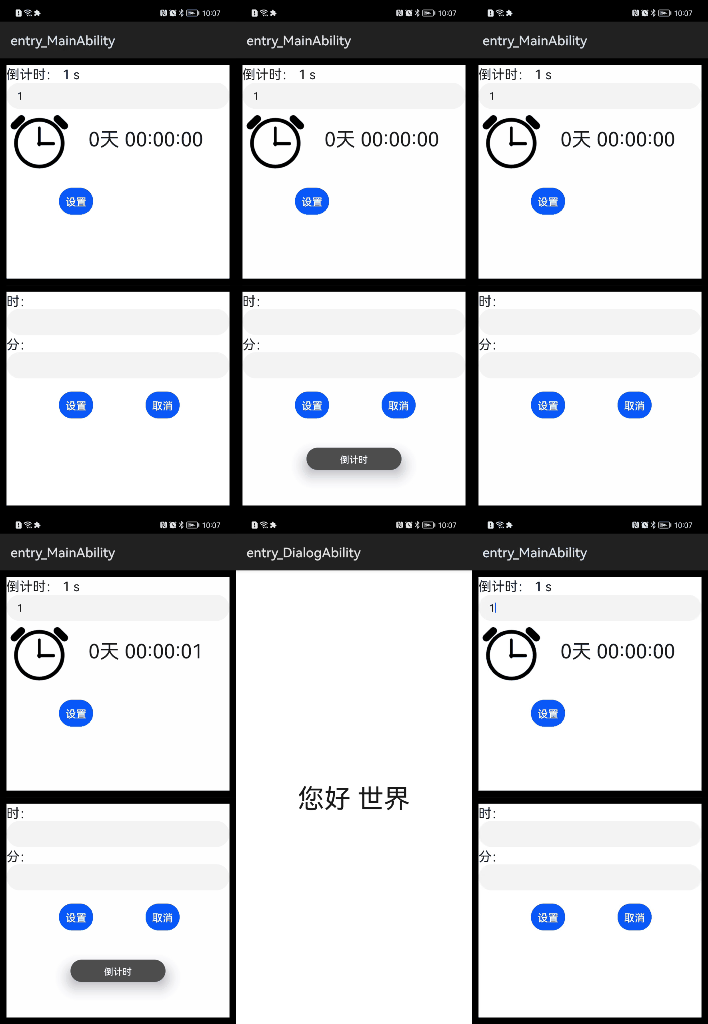
倒计时提醒如下图:
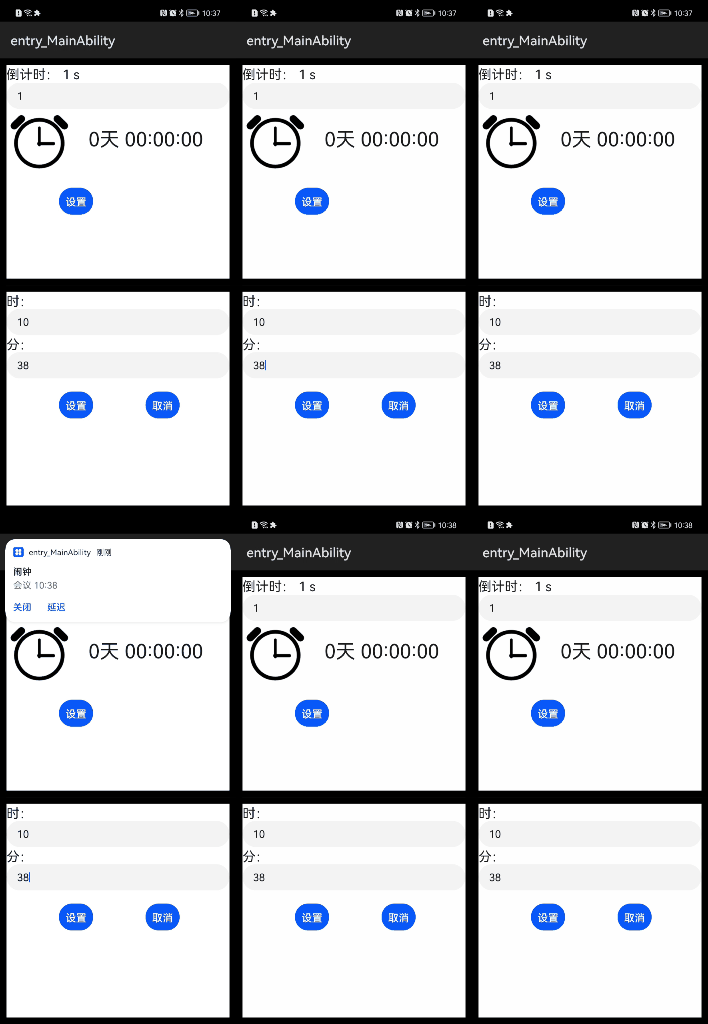
闹钟类提醒如下图:
"reqPermissions": [ {"name": "ohos.permission.PUBLISH_AGENT_REMINDER" }]
前端页面主要是获取设置的倒计时以及设置的闹钟类的时间,封装进一个对象ActionData通过调用接口传递给PA处理。
主要分为两部分:一部分是倒计时提醒界面,一部分是闹钟类提醒界面。
在编写页面的时候遇到了一个问题:由于初步编写hml页面,不知道如何实现input输入框的双向绑定,后面请教后解决:通过change事件来触发。
hml代码如下:
<element name="countDown" src="../countDown/countDown.hml">
</element>
<div class="container">
<!--倒计时功能区域-->
 <div class="box">
 <text>倒计时: {{ leftTime }} s</text>
 <input type="text" id="countDown" onchange="changeCountDown"></input>
 <countDown time="{{ leftTime }}">
 </countDown>
 <div>
 <button class="button" value="设置" onclick="alarmCountdown"></button>
 </div>
 </div>
<!--定时功能区域-->
 <div class="box">
 <form>
 <text>时:</text>
 <input type="text" id="hour" onchange="changeHour"></input>
 <text>分:</text>
 <input type="text" id="minute" onchange="changeMinute"></input>
 <div>
 <button class="button" value="设置" onclick="alarmClock"></button>
 <button class="button" value="取消" onclick="cancel"></button>
 </div>
 </form>
 </div>
</div>
主要js代码如下:
通过不同的命令实现不同的调用。
//双向绑定实现
 changeHour(event){
 this.hour=event.value;
 },
 changeMinute(event){
 this.minute=event.value
 },
 changeCountDown(event){
 this.countDown=event.value
 },
//闹钟类提醒
 alarmClock:function(){
 this.notification(0x1003);
 },
 //倒计时提醒
 alarmCountdown:function(){
 this.leftTime=0;//重置倒计时的读秒
 this.leftTime=this.countDown;//同步倒计时读秒
 this.notification(0x1002);
 },
 //取消提醒
 cancel:function(){
 this.notification(0x1001);
 },
 //初始化action数据
 initAction: function (code) {
 var actionData = {hour:this.hour,minute:this.minute,countDown:this.countDown};
 actionData.notify = "this actionData form JS ";
 var action = {};
 action.bundleName = "com.chinasoft.reminder";
 action.abilityName = "ReminderAbility";
 action.messageCode = code;
 action.data = actionData;
 action.abilityType = 1;
 action.syncOption = 0;
 return action;
 },
 //调用PA接口
 notification: async function(code) {
 try {
 var action = this.initAction(code);
 var result = await FeatureAbility.callAbility(action);
 this.showToast(result);
 } catch (pluginError) {
 console.error("startNotification : Plugin Error = " + pluginError);
 }
 },
这里有个坑,需要手动设置手机的通知管理的通知铃声,打开震动才有震动效果,打开横幅通知才有通知弹出效果。设置如下图:
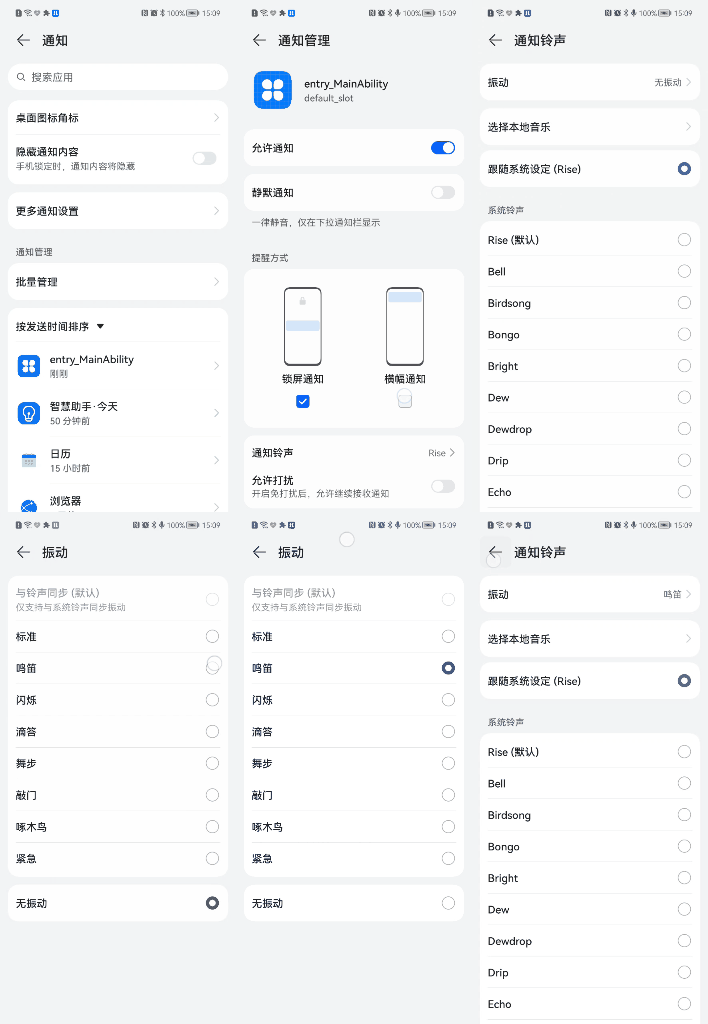
设置通知slot需要真实的手机才有震动效果,设置呼吸灯需要手机支持呼吸灯才有效果。
/*
 * 设置通知slot
 * */
 private NotificationSlot setSlot() {
 // 1. 设置渠道信息
 NotificationSlot slot = new NotificationSlot("slot_id", "slot_name", NotificationSlot.LEVEL_HIGH);
 slot.setDescription("slot_description");//设置NotificationSlot的描述信息。
 slot.enableBypassDnd(true);//设置是否绕过系统的免打扰模式
 slot.setEnableLight(false);//设置收到通知时是否开启呼吸灯,前提是当前硬件支持呼吸灯。
 slot.setEnableVibration(true);//设置收到通知时是否使能振动。
 slot.setLedLightColor(123456);
 return slot;
 }
 // 2. 向代理服务添加渠道对象
 ReminderHelper.addNotificationSlot(setSlot());
ReminderRequest分为3个子类:1.ReminderRequestTimer ,2.ReminderRequestCalendar ,3.ReminderRequestAlarm。
ReminderRequestTimer 对象创建。
用于倒计时提醒,需要传递进一个倒计时的秒的参数。这个数据是从前端页面传过来的。
ReminderRequest reminderRequestTimer = new ReminderRequestTimer(countDown);
ReminderRequestAlarm对象创建。
用于闹钟类提醒,需要传递时间数据。需要三个参数:int hour,int minute,int[] repeatDay。
ReminderRequest reminder = new ReminderRequestAlarm(hour, minute, repeatDay);
提醒是以通知形式来表现的。设置通知展示的标题和内容。
reminderRequestTimer.setTitle("倒计时").setContent("炸弹"); //设置标题和内容
提醒默认提醒一次,如果需要提醒能长时间提醒,进行如下设置:
reminder.setRingDuration(10);//设置提醒时长
需要设置BundleName和AbilityName。且AbilityName需要全类名(加上包名),才能实现页面的跳转。点击提醒弹出的通知就会跳转到对应的页面。
reminder.setIntentAgent(BUNDLE_NAME, ABILITY_NAME);
延时提醒和设置延时的时间,设置延时后提醒的次数。
当提醒时会发出通知,设置延迟提醒和关闭按钮。
reminder.setSnoozeTimes(2) //设置延迟提醒次数
 .setTimeInterval(1 * 60);//设置一分钟,实际为5分钟
reminder.setActionButton("延迟", ReminderRequest.ACTION_BUTTON_TYPE_SNOOZE)
 .setActionButton("关闭", ReminderRequest.ACTION_BUTTON_TYPE_CLOSE);
在这里有一个坑:通过测试得,延迟提醒的最短时间为300s(5分钟)如果设置时间小于300s则为默认的。
注意:对于倒计时提醒设置延迟提醒不起作用,只有设置提醒时长有效。
发布和取消提醒都是通过ReminderHelper这个类来完成的,取消提醒需要获取发布提醒后返回的一个整型id来识别需要取消哪一个提醒。
int reminderId = ReminderHelper.publishReminder(reminder);//发布提醒
ReminderHelper.cancelReminder(this.reminderId);//取消提醒
对于提醒类ReminderRequest的3个子类来说,ReminderRequestTimer用于倒计时提醒,ReminderRequestAlarm用于闹钟类提醒,ReminderRequestCalendar类用于日历类提醒。本项目还有日历类提醒(ReminderRequestCalendar)的功能没有实现,通过API可以发现其与闹钟类提醒的功能实现大致一样。在运用时需要注意其中的一些细节,才能正确使用。
© 版权声明
文章版权归作者所有,未经允许请勿转载。








