
文章目录
- 随着气温越来越高,相信很多小伙伴已经没有心思工作了,作为前端的开发人员,决定自己搞个风扇降将温。刚好最近在学习HarmonyOS开发相关知识,发现动画属性使用比较多并且学起来比较有意思,因此利用HarmonyOS的动画效果实现了一个变速小风扇。
- 工具版本:DevEco Studio 3.0 Beta3 SDK版本;3.1.5.5 主要用到知识:animate 官方API链接:动画效果
- 拆过电风扇的小伙伴应该知道,核心就是一个扇叶、控制开关、风扇罩,其余的都是些装饰品。 首先,我们来实现我们的风扇罩和扇叶,这个功能比较简单好实现,无非就是CSS3中的一些特性,例如圆角呀、旋转呀等等特性。 加上基于动画animation相关知识,通过按钮控制对扇叶进行相应的动画效果处理,最终呈现出不同速度下不同风速的转动效果。
- 对风扇样式进行绘制(扇叶,扇柄,控制按钮) 在触发风速按钮后,通过获取风页id属性标识后,给该id对象调用动画方法。 给1、2、3级风速传入不同的所需转动时长,实现低中高风速旋转 判断触发关闭按钮时,调用animation对象方法finish(),实现暂停风速的功能。
- animate( keyframes: Keyframes, options: Options):void。 参数名 参数类型 必填 描述 keyframes keyframes 是 设置动画样式 options Options 是 用于设置动画属性的对象列表 keyframes: 属性 类型 说明 frames Array<Style> 用于设置动画样式的对象列表。 Style类型说明 参数 类型 默认值 说明 transform Transform - 设置到变换对象上的类型。 Options说明: 参数 类型 默认值 说明 duration number 0 指定当前动画的运行时长(单位毫秒)。 easing string linear 描述动画的时间曲线,支持类型见表4 easing有效值说明。 delay number 0 设置动画执行的延迟时间(默认值表示无延迟)。 iterations number | string 1 设置动画执行的次数。number表示固定次数,Infinity枚举表示无限次数播放。 animation对象方法: 方法 参数 说明 play - 组件播放动画。 finish - 组件完成动画。 pause - 组件暂停动画。 cancel - 组件取消动画。 reverse - 组件倒播动画。
-
- <div class="container"> <div class="title"> <!--风扇叶上的装饰线--> <div class="line-box"> <div class="line"></div> <div class="line line1"></div> <div class="line line2"></div> <div class="line line3"></div> <div class="line line4"></div> <div class="line line5"></div> </div> <!--扇叶--> <div class="left-box" id="controlLevel" > <text class="leaf"></text> <text class="leaf leaf1"></text> <text class="leaf leaf2"></text> </div> </div><!--扇柄--> <div class="bom-part"> <text class="item" @click="oneLevel(900)" >1</text> <text class="item" @click="oneLevel(750)">2</text> <text class="item" @click="oneLevel(600)">3</text> <text class="item" @click="oneLevel(4)">关</text> </div><!-- 风扇--><text class="base">变速小风扇</text></div>
- .container { flex-direction: column; align-items: center; width: 100%; height: 100%;}.title { width: 200px; height: 200px; margin-top: 150px; position: relative; font-size: 40px; opacity: 0.9; z-index: 200;}.line-box{ z-index:100;}.line{ position: absolute; top: 48.8%; left: 0px; width: 200px; height: 5px; height: 5px; background-color: black; opacity: 0.75; z-index: 100;}.line1{ transform: rotate(30deg);}.line2{ transform: rotate(60deg);}.line3{ transform: rotate(90deg);}.line4{ transform: rotate(120deg);}.line5{ transform: rotate(150deg);}.left-box{ width: 220px; height: 220px; border-radius: 110px; border: 8px solid #333;}.leaf{ position: absolute; left: 44%; width: 30px; height: 95px; border-radius: 80px; background-color: cornflowerblue;}.leaf1 { height: 92px; transform: rotate(125deg); transform-origin: 50% 100%;}.leaf2 { transform: rotate(240deg); transform-origin: 50% 100%;}.bom-part{ width: 30px; height: 200px; background-color:black; opacity: 0.75; flex-direction:column; position: absolute; top: 348px; left: 47%;}.item{ font-size: 16px; text-align: center; color: black; width: 25px; height: 25px; border-radius:12.5px; background-color: cornflowerblue; margin-top: 10px; margin-left: 3px;}.base{ width: 100%; margin: 0 16px ; height: 75px; background-color: cornflowerblue; position: absolute; top: 575px; color: black; border-radius: 20px; text-align: center;}
- export default { data: { animation:'', },// 触发风速按钮后,通过获取风页id属性标识后,给该id对象调用动画方法 oneLevel(value){ var options = { easing:'linear',//描述动画的时间曲线 duration: value,//指定当前动画的运行时长(单位毫秒) fill: 'forwards',//指定动画开始和结束的状态 iterations:'Infinity',//设置动画执行的次数 }; //用于设置动画样式的对象列表 var frames = [ { transform: { rotate: '0deg' } }, { transform: { rotate: '360deg' } } ];// 给风页添加动画方法 this.animation = this.$element('controlLevel').animate(frames, options);// 点击关机时调用animation对象方法finish完成动画实现停止风扇转动功能 if(value==4){ this.animation.finish() }else{ this.animation.play(); } }}
- 这篇文章是我对学习鸿蒙动画API的一个练习,也算是一个比较常见的动画,后面还需继续努力,希望和大家一起共同成长。 想了解更多关于开源的内容,请访问: 51CTO 开源基础软件社区 https://ost.51cto.com。

随着气温越来越高,相信很多小伙伴已经没有心思工作了,作为前端的开发人员,决定自己搞个风扇降将温。刚好最近在学习HarmonyOS开发相关知识,发现动画属性使用比较多并且学起来比较有意思,因此利用HarmonyOS的动画效果实现了一个变速小风扇。
- 工具版本:DevEco Studio 3.0 Beta3
- SDK版本;3.1.5.5
- 主要用到知识:animate
- 官方API链接:动画效果
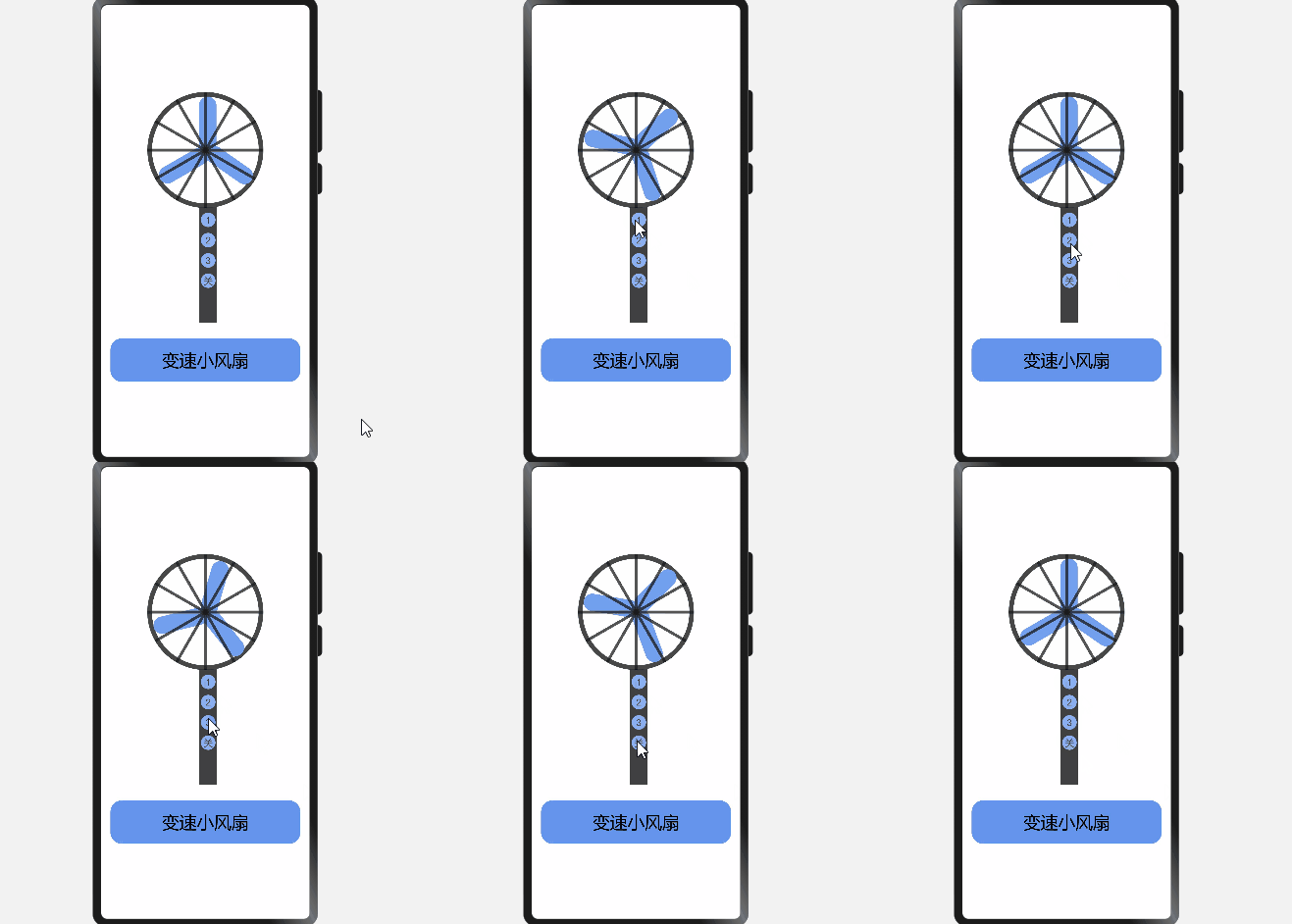
拆过电风扇的小伙伴应该知道,核心就是一个扇叶、控制开关、风扇罩,其余的都是些装饰品。 首先,我们来实现我们的风扇罩和扇叶,这个功能比较简单好实现,无非就是CSS3中的一些特性,例如圆角呀、旋转呀等等特性。 加上基于动画animation相关知识,通过按钮控制对扇叶进行相应的动画效果处理,最终呈现出不同速度下不同风速的转动效果。
- 对风扇样式进行绘制(扇叶,扇柄,控制按钮)
- 在触发风速按钮后,通过获取风页id属性标识后,给该id对象调用动画方法。
- 给1、2、3级风速传入不同的所需转动时长,实现低中高风速旋转
- 判断触发关闭按钮时,调用animation对象方法finish(),实现暂停风速的功能。
animate( keyframes: Keyframes, options: Options):void。
|
参数名 |
参数类型 |
必填 |
描述 |
|
keyframes |
keyframes |
是 |
设置动画样式 |
|
options |
Options |
是 |
用于设置动画属性的对象列表 |
keyframes:
|
属性 |
类型 |
说明 |
|
frames |
Array<Style> |
用于设置动画样式的对象列表。 |
Style类型说明
|
参数 |
类型 |
默认值 |
说明 |
|
transform |
- |
设置到变换对象上的类型。 |
Options说明:
|
参数 |
类型 |
默认值 |
说明 |
|
duration |
number |
0 |
指定当前动画的运行时长(单位毫秒)。 |
|
easing |
string |
linear |
描述动画的时间曲线,支持类型见表4 easing有效值说明。 |
|
delay |
number |
0 |
设置动画执行的延迟时间(默认值表示无延迟)。 |
|
iterations |
number | string |
1 |
设置动画执行的次数。number表示固定次数,Infinity枚举表示无限次数播放。 |
animation对象方法:
|
方法 |
参数 |
说明 |
|
play |
- |
组件播放动画。 |
|
finish |
- |
组件完成动画。 |
|
pause |
- |
组件暂停动画。 |
|
cancel |
- |
组件取消动画。 |
|
reverse |
- |
组件倒播动画。 |
<div class="container">
 <div class="title">
 <!--风扇叶上的装饰线-->
 <div class="line-box">
 <div class="line"></div>
 <div class="line line1"></div>
 <div class="line line2"></div>
 <div class="line line3"></div>
 <div class="line line4"></div>
 <div class="line line5"></div>
 </div>
 <!--扇叶-->
 <div class="left-box" id="controlLevel" >
 <text class="leaf"></text>
 <text class="leaf leaf1"></text>
 <text class="leaf leaf2"></text>
 </div>
 </div>
<!--扇柄-->
 <div class="bom-part">
 <text class="item" @click="oneLevel(900)" >1</text>
 <text class="item" @click="oneLevel(750)">2</text>
 <text class="item" @click="oneLevel(600)">3</text>
 <text class="item" @click="oneLevel(4)">关</text>
 </div>
<!-- 风扇-->
<text class="base">变速小风扇</text>
</div>
<div class="title">
<!--风扇叶上的装饰线-->
<div class="line-box">
<div class="line"></div>
<div class="line line1"></div>
<div class="line line2"></div>
<div class="line line3"></div>
<div class="line line4"></div>
<div class="line line5"></div>
</div>
<!--扇叶-->
<div class="left-box" id="controlLevel" >
<text class="leaf"></text>
<text class="leaf leaf1"></text>
<text class="leaf leaf2"></text>
</div>
</div>
<!--扇柄-->
<div class="bom-part">
<text class="item" @click="oneLevel(900)" >1</text>
<text class="item" @click="oneLevel(750)">2</text>
<text class="item" @click="oneLevel(600)">3</text>
<text class="item" @click="oneLevel(4)">关</text>
</div>
<!-- 风扇-->
<text class="base">变速小风扇</text>
</div>
.container {
 flex-direction: column;
 align-items: center;
 width: 100%;
 height: 100%;
}
.title {
 width: 200px;
 height: 200px;
 margin-top: 150px;
 position: relative;
 font-size: 40px;
 opacity: 0.9;
 z-index: 200;
}
.line-box{
 z-index:100;
}
.line{
 position: absolute;
 top: 48.8%;
 left: 0px;
 width: 200px;
 height: 5px;
 height: 5px;
 background-color: black;
 opacity: 0.75;
 z-index: 100;
}
.line1{
 transform: rotate(30deg);
}
.line2{
 transform: rotate(60deg);
}
.line3{
 transform: rotate(90deg);
}
.line4{
 transform: rotate(120deg);
}
.line5{
 transform: rotate(150deg);
}
.left-box{
 width: 220px;
 height: 220px;
 border-radius: 110px;
 border: 8px solid #333;
}
.leaf{
 position: absolute;
 left: 44%;
 width: 30px;
 height: 95px;
 border-radius: 80px;
 background-color: cornflowerblue;
}
.leaf1 {
 height: 92px;
 transform: rotate(125deg);
 transform-origin: 50% 100%;
}
.leaf2 {
 transform: rotate(240deg);
 transform-origin: 50% 100%;
}
.bom-part{
 width: 30px;
 height: 200px;
 background-color:black;
 opacity: 0.75;
 flex-direction:column;
 position: absolute;
 top: 348px;
 left: 47%;
}
.item{
 font-size: 16px;
 text-align: center;
 color: black;
 width: 25px;
 height: 25px;
 border-radius:12.5px;
 background-color: cornflowerblue;
 margin-top: 10px;
 margin-left: 3px;
}
.base{
 width: 100%;
 margin: 0 16px ;
 height: 75px;
 background-color: cornflowerblue;
 position: absolute;
 top: 575px;
 color: black;
 border-radius: 20px;
 text-align: center;
}
flex-direction: column;
align-items: center;
width: 100%;
height: 100%;
}
.title {
width: 200px;
height: 200px;
margin-top: 150px;
position: relative;
font-size: 40px;
opacity: 0.9;
z-index: 200;
}
.line-box{
z-index:100;
}
.line{
position: absolute;
top: 48.8%;
left: 0px;
width: 200px;
height: 5px;
height: 5px;
background-color: black;
opacity: 0.75;
z-index: 100;
}
.line1{
transform: rotate(30deg);
}
.line2{
transform: rotate(60deg);
}
.line3{
transform: rotate(90deg);
}
.line4{
transform: rotate(120deg);
}
.line5{
transform: rotate(150deg);
}
.left-box{
width: 220px;
height: 220px;
border-radius: 110px;
border: 8px solid #333;
}
.leaf{
position: absolute;
left: 44%;
width: 30px;
height: 95px;
border-radius: 80px;
background-color: cornflowerblue;
}
.leaf1 {
height: 92px;
transform: rotate(125deg);
transform-origin: 50% 100%;
}
.leaf2 {
transform: rotate(240deg);
transform-origin: 50% 100%;
}
.bom-part{
width: 30px;
height: 200px;
background-color:black;
opacity: 0.75;
flex-direction:column;
position: absolute;
top: 348px;
left: 47%;
}
.item{
font-size: 16px;
text-align: center;
color: black;
width: 25px;
height: 25px;
border-radius:12.5px;
background-color: cornflowerblue;
margin-top: 10px;
margin-left: 3px;
}
.base{
width: 100%;
margin: 0 16px ;
height: 75px;
background-color: cornflowerblue;
position: absolute;
top: 575px;
color: black;
border-radius: 20px;
text-align: center;
}
export default {
 data: {
 animation:'',
 },
// 触发风速按钮后,通过获取风页id属性标识后,给该id对象调用动画方法
 oneLevel(value){
 var options = {
 easing:'linear',//描述动画的时间曲线
 duration: value,//指定当前动画的运行时长(单位毫秒)
 fill: 'forwards',//指定动画开始和结束的状态
 iterations:'Infinity',//设置动画执行的次数
 };
 //用于设置动画样式的对象列表
 var frames = [
 {
 transform: {
 rotate: '0deg'
 }
 },
 {
 transform: {
 rotate: '360deg'
 }
 }
 ];
// 给风页添加动画方法
 this.animation = this.$element('controlLevel').animate(frames, options);
// 点击关机时调用animation对象方法finish完成动画实现停止风扇转动功能
 if(value==4){
 this.animation.finish()
 }else{
 this.animation.play();
 }

 }
}
data: {
animation:'',
},
// 触发风速按钮后,通过获取风页id属性标识后,给该id对象调用动画方法
oneLevel(value){
var options = {
easing:'linear',//描述动画的时间曲线
duration: value,//指定当前动画的运行时长(单位毫秒)
fill: 'forwards',//指定动画开始和结束的状态
iterations:'Infinity',//设置动画执行的次数
};
//用于设置动画样式的对象列表
var frames = [
{
transform: {
rotate: '0deg'
}
},
{
transform: {
rotate: '360deg'
}
}
];
// 给风页添加动画方法
this.animation = this.$element('controlLevel').animate(frames, options);
// 点击关机时调用animation对象方法finish完成动画实现停止风扇转动功能
if(value==4){
this.animation.finish()
}else{
this.animation.play();
}
}
}
这篇文章是我对学习鸿蒙动画API的一个练习,也算是一个比较常见的动画,后面还需继续努力,希望和大家一起共同成长。
© 版权声明
文章版权归作者所有,未经允许请勿转载。








