
文章目录
- 小项目全部部署在基于openharmony的小熊派上,效果如图: 图片仅供演示,系统在设备中实际运行良好
- 确定实现功能如下: 获取传感器数据(水流量传感器)并实时渲染在屏幕上。 可以对水阀进行控制(发送控制指令)。 自动(手动)上报数据,发送给服务器/上位机以供后续处理。 其他(如统计数据,计算费用等…)。 所有功能实现的代码都将贴在文章末尾,以供编译参考。
- 注意:南向部分需要自己实现,本项目内容可以参考 基于 OpenHarmony 的水流量监测系统。 其本质依然是gpio操作和一些基础知识组合,会点led后就可以放心大胆的上啦~ 依照物联网项目的基本架构:端管云用,我们北向也可以类比依照这四点实现功能设计(不涉及后端)。 端:即感知识别层,用于信息生成。 管:信息的传输,用于信息传输,具体为调用通信接口与上位机通信。 云:信息处理。 用:信息应用:如微信小程序设计。 我们参考Led点灯的接口,在 @system.app.d.ts 末尾添加如下接口声明: static ledcontrol(options: { code: number; success?: (res: string) => void; fail?: (res: string, code: number) => void; complete?: () => void; }): void; 没错,就是led灯的接口连名字都不带改的,我们利用回调函数返回的对象,在res对象里添加传感器数据:值 作为data内容,发送的命令码,即为对水阀的控制开关指令。 在处理页面逻辑的文件上,我们也要添加主动调用接口的方法: /*index.js*/app.ledcontrol({ code:led.open, success(res){ //解析数据并保存 }, fail(res,code){ }, complete(){ }})
- 如有需要可以添加网络请求接粗体口,在api7(及以前)可以用@system.fetch,aip6后推荐使用@ohos.net.http (fetch不在维护,建议弃用) //首先要导入鸿蒙的网络请求模块import fetch from '@system.fetch';try{ fetch.fetch({ url: 'http://127.0.0.1'+'?data='+this.rate, //填写服务器地址 responseType: 'json', success: res => { this.code3="已连接" let data = JSON.parse(res.data); //必须要加上 console.log(res.data) } }); console.log("手动上报数据") } catch(e){ console.log(e); this.code3="连接失败" } 如果报错,尝试在配置文件config.json里修改网络权限。 默认在module模块下: "reqPermissions": [ { "name": "ohos.permission.GET_NETWORK_INFO" }, { "name": "ohos.permission.SET_NETWORK_INFO" }, { "name": "ohos.permission.INTERNET" } ], 轻量级穿戴设备似乎不支持网络通信接口,最后弃用改为南向上传(此处代码仅供参考)。 提醒:由于需要传输的是南向部分传输过来的传感器数据,所以建议也在南向部分处理数据上传,以减小时延和精度误差等。
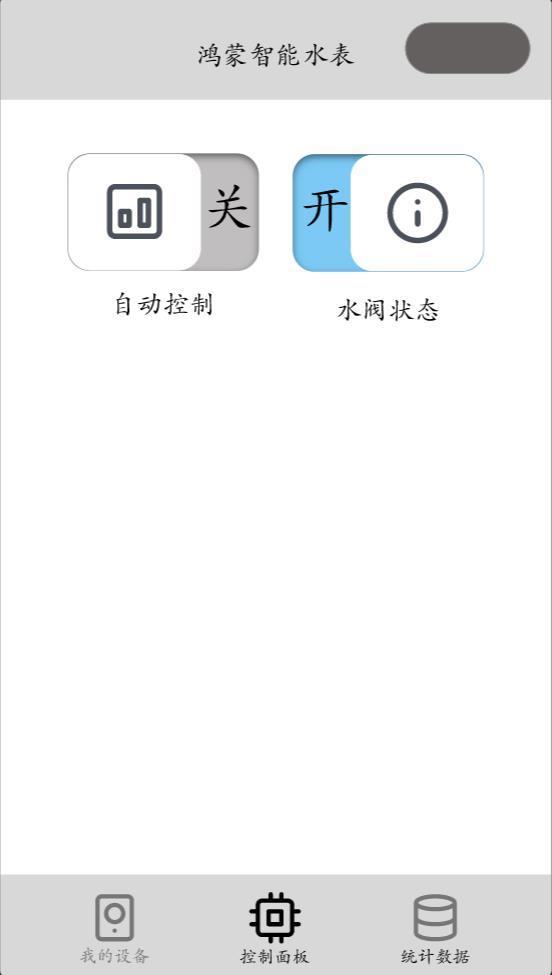
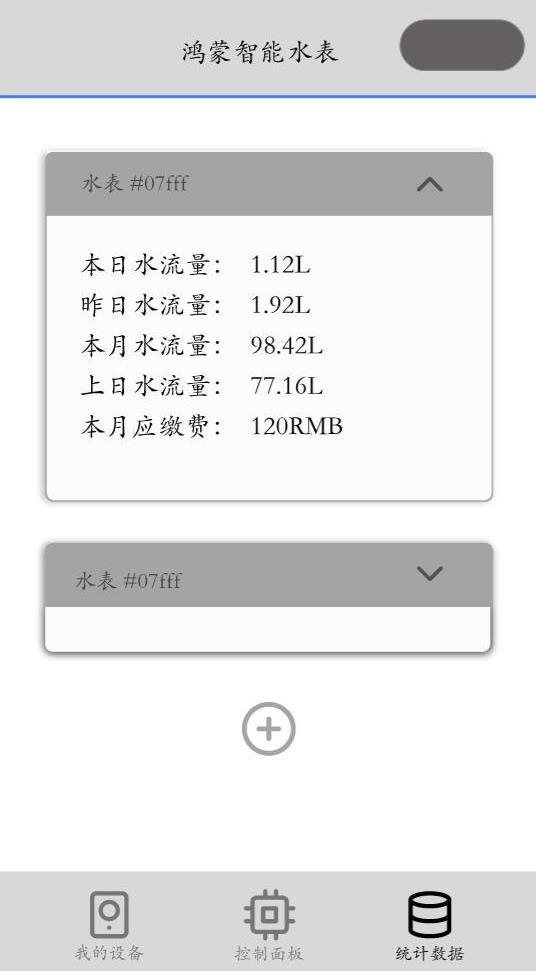
- 上位机(这里以微信小程序示例)主要负责远程监控与管理,设计如下: 控制面板页面设计 统计页面设计 页面仅代表功能演示,不代表实际数据。
-
- <div class="container"> <div class="title-view"> <div class="top-view" onclick="exit"> <text class="back-btn"> 退出 </text> <text class="date"> 运行时长 0d 0h {{min}}m {{sec}} s </text> <text class="deviceid"> 设备{{info}} </text> </div> </div> <div class='main'> <div class='title_l'> <text class="text"> {{ title }} </text> <text class="text"> {{rate_L}} L </text> <text class="text_small"> {{rate}} ml </text> </div> <div class='title_r'> <text class="text"> 运行状态 </text> <text class="text_s"> 工作状态 : {{code1}} </text> <text class="text_s"> 水阀状态 : {{code2}} </text> <text class="text_s"> 上位机 : {{code3}} </text> </div> </div> <div class="ledAction" > <div class="ledAction-view" onclick="senddata"> <text class="ledAction-btn"> 手动上报 </text> </div> <div class="ledAction-view" onclick="close"> <text class="ledAction-btn"> 关闭水阀 </text> </div> <div class="ledAction-view" onclick="openDoor"> <text class="ledAction-btn"> 开阀计水 </text> </div> </div></div>
- .container { width: 100%; height: 100%; flex-direction: column; align-items: center;}swiper{ height: 60%; width: 100%; background-color: greenyellow;}.main{ margin: 10px; width: 100%; height: 60%; flex-direction:row; align-items: center; /*background-color: cadetblue;*/}.title_l { width: 50%; height: 280px; font-size: 40px; text-align: center; flex-direction: column;}.title_r { margin-top: 10px; width: 40%; height: 240px; font-size: 40px; text-align: center; background-color: black; border-radius: 50px; flex-direction: column; opacity: 0.9; border-color: white; border-width: 2px; padding: 10px; margin: 10px;}.text{ font-size: 40px; text-align: center; width: 100%; height: 35%;}.text_small{ font-size: 33px; text-align: center; width: 100%; height: 20%;}.text_s{ font-size: 30px; left: 12px; width: 100%; margin-left:10px ;}.ledImg{ width: 200px; height: 150px; margin-top: 10px; font-size: 40px;}.ledAction{ height: 50px; width: 100%; flex-direction: row; justify-content: space-around; align-items: center;}.ledAction-view{ width: 120px; height: 50px; flex-direction: column; justify-content: center; align-items: center;}.ledAction-img{ width: 60px; height: 60px;}.ledAction-btn{ width: 120px; margin-top: 10px; font-size: 30px; text-align: center;}.title-view{ width: 100%; height: 60px; margin: 1px; flex-direction: column; display: flex; background-color: midnightblue;}.title{ width: 100%; height: 300px; margin: 1px; flex-direction: row; display: flex; background-color: darkblue;}.top-view{ height: 60px; width: 100%; flex-direction: row; justify-content: center; align-items: center; display: flex; text-align: center;}.back-img{ height: 30px; width: 30px; margin-left: 10px;}.back-btn{ font-size: 30px; width: 25%; padding: 20px;}.date{ font-size: 30px; width: 50%;}.deviceid{ font-size: 30px; width: 20%;}
- var led = {open:1,close:0,change:2}import app from '@system.app';import router from "@system.router";export default { data: { title: '当日累计:', statu:'0', rate: 0, rate_L:0, sec:0, min:0, info:"正常", tmp_rate:-1, curr_rate:0, code1:0, code2:"关闭", code3:"未连接", timer:0, time:0, }, onInit(){ //初始化 //this.openDoor() this.startTimer() this.info="初始化.." }, exit(e){ console.log("terminate!") app.terminate() }, startTimer() { this.time= setInterval(()=>{ //this.getRate() this.runtime() },1000); }, runtime(){ this.sec++ if(this.sec===60){ this.sec=0 this.min++ } }, getRate(){ let that=this try{ //that.rate++ app.ledcontrol({ code:led.open, success(res){ //console.log("data show1") that.tmp_rate=that.rate that.rate = (Number(JSON.stringify(res.led_status))) that.curr_rate=that.rate-that.tmp_rate that.code1=that.curr_rate }, fail(res,code){ console.log("get fail") }, complete(){ } }) }catch(e){ console.log(err) this.device_id="err" } }, openDoor(e){ console.log("open") this.info="运行中" this.code2="开启" //function function closeapp() { console.log("close") //clearInterval(timer); //数据归0 } const ShowRate = ()=> { this.time++ this.device_id++; //console.log(this.time) //if(this.time===300)closeapp() let that=this app.ledcontrol({ code:led.open, success(res){ //console.log("data show1") that.rate = (Number(JSON.stringify(res.led_status))) }, fail(res,code){ }, complete(){ } }) } this.rate=-1; try{ this.timer= setInterval(function(){ShowRate()},100); }catch(e){ console.error("err"+e) this.info="计时器故障" } /*这里有一个关于类里This的指向问题,这里使用匿名函数处理 ()=>{} 不可以使用function(),因为由于类特性,在function里的this指向change_per_second的rate变量,而无法访问到default类的rate变量 但是匿名函数里this会逐层上找 */ }, close(e){ console.log("close timer") this.info="关闭" this.code2="关闭" try{ clearInterval(this.timer) }catch{ this.info="故障" } //this.rate =0; let that = this app.ledcontrol({ //关闭水阀命令 code:led.close, success(res){ that.statu = res.led_status }, fail(res,code){ }, complete(){ } }) }, datalist(){ }, senddata(){ try{ fetch.fetch({ url: 'http://127.0.0.1'+'?data='+this.rate, //填写服务器地址 responseType: 'json', success: res => { this.code3="已连接" let data = JSON.parse(res.data); //必须要加上 console.log(res.data) } }); console.log("手动上报数据") } catch(e){ console.log(e); this.code3="连接失败" } },} 想了解更多关于开源的内容,请访问: 51CTO 开源基础软件社区 https://ost.51cto.com。

本篇分享一个编写简单的完整鸿蒙小项目的流程。
以本文制作一个智能水表的demo为例:
你需要先学会:
- 点亮一个Led灯(没错只需要会点灯的北向代码即可,非常简单,本文也以此为模板制作)
声明:本文编译sdk版本为api7,IDE环境 3.0.0.800(3.0Beta2),语言基于为 JSUI
小项目全部部署在基于openharmony的小熊派上,效果如图:
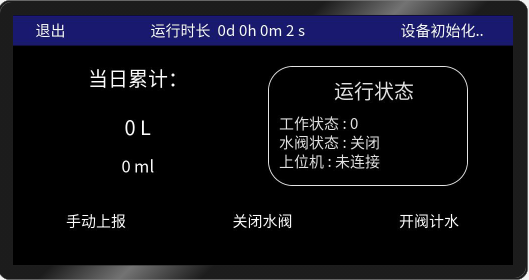
图片仅供演示,系统在设备中实际运行良好
确定实现功能如下:
- 获取传感器数据(水流量传感器)并实时渲染在屏幕上。
- 可以对水阀进行控制(发送控制指令)。
- 自动(手动)上报数据,发送给服务器/上位机以供后续处理。
- 其他(如统计数据,计算费用等…)。
所有功能实现的代码都将贴在文章末尾,以供编译参考。
注意:南向部分需要自己实现,本项目内容可以参考 基于 OpenHarmony 的水流量监测系统。
其本质依然是gpio操作和一些基础知识组合,会点led后就可以放心大胆的上啦~
依照物联网项目的基本架构:端管云用,我们北向也可以类比依照这四点实现功能设计(不涉及后端)。
- 端:即感知识别层,用于信息生成。
- 管:信息的传输,用于信息传输,具体为调用通信接口与上位机通信。
- 云:信息处理。
- 用:信息应用:如微信小程序设计。
我们参考Led点灯的接口,在 @system.app.d.ts 末尾添加如下接口声明:
static ledcontrol(options: {
 code: number;
 success?: (res: string) => void;
 fail?: (res: string, code: number) => void;
 complete?: () => void;
 }): void;
没错,就是led灯的接口连名字都不带改的,我们利用回调函数返回的对象,在res对象里添加传感器数据:值 作为data内容,发送的命令码,即为对水阀的控制开关指令。
在处理页面逻辑的文件上,我们也要添加主动调用接口的方法:
/*index.js*/
app.ledcontrol({
 code:led.open,
 success(res){
 //解析数据并保存
 },
 fail(res,code){

 },
 complete(){

 }
})
如有需要可以添加网络请求接粗体口,在api7(及以前)可以用@system.fetch,aip6后推荐使用@ohos.net.http (fetch不在维护,建议弃用)
//首先要导入鸿蒙的网络请求模块
import fetch from '@system.fetch';
try{
 fetch.fetch({
 url: 'http://127.0.0.1'+'?data='+this.rate, //填写服务器地址
 responseType: 'json',
 success: res => {
 this.code3="已连接"
 let data = JSON.parse(res.data); //必须要加上
 console.log(res.data)
 }
 });
 console.log("手动上报数据")
 }
 catch(e){
 console.log(e);
 this.code3="连接失败"
 }
如有需要可以添加网络请求接粗体口,在api7(及以前)可以用@system.fetch,aip6后推荐使用@ohos.net.http (fetch不在维护,建议弃用)
import fetch from '@system.fetch';
try{
fetch.fetch({
url: 'http://127.0.0.1'+'?data='+this.rate, //填写服务器地址
responseType: 'json',
success: res => {
this.code3="已连接"
let data = JSON.parse(res.data); //必须要加上
console.log(res.data)
}
});
console.log("手动上报数据")
}
catch(e){
console.log(e);
this.code3="连接失败"
}
如果报错,尝试在配置文件config.json里修改网络权限。
默认在module模块下:
"reqPermissions": [
 {
 "name": "ohos.permission.GET_NETWORK_INFO"
 },
 {
 "name": "ohos.permission.SET_NETWORK_INFO"
 },
 {
 "name": "ohos.permission.INTERNET"
 }
 ],
轻量级穿戴设备似乎不支持网络通信接口,最后弃用改为南向上传(此处代码仅供参考)。
提醒:由于需要传输的是南向部分传输过来的传感器数据,所以建议也在南向部分处理数据上传,以减小时延和精度误差等。
上位机(这里以微信小程序示例)主要负责远程监控与管理,设计如下:
|
控制面板页面设计 |
统计页面设计 |
|
|
|
页面仅代表功能演示,不代表实际数据。
<div class="container">
 <div class="title-view">
 <div class="top-view" onclick="exit">
 <text class="back-btn"> 退出 </text>
 <text class="date"> 运行时长 0d 0h {{min}}m {{sec}} s </text>
 <text class="deviceid"> 设备{{info}} </text>
 </div>
 </div>
 <div class='main'>

 <div class='title_l'>
 <text class="text">
 {{ title }}
 </text>
 <text class="text">
 {{rate_L}} L
 </text>
 <text class="text_small">
 {{rate}} ml
 </text>
 </div>
 <div class='title_r'>
 <text class="text">
 运行状态
 </text>
 <text class="text_s">
 工作状态 : {{code1}}
 </text>
 <text class="text_s">
 水阀状态 : {{code2}}
 </text>
 <text class="text_s">
 上位机 : {{code3}}
 </text>
 </div>
 </div>
 <div class="ledAction" >
 <div class="ledAction-view" onclick="senddata">
 <text class="ledAction-btn">
 手动上报
 </text>
 </div>
 <div class="ledAction-view" onclick="close">
 <text class="ledAction-btn">
 关闭水阀
 </text>
 </div>
 <div class="ledAction-view" onclick="openDoor">
 <text class="ledAction-btn">
 开阀计水
 </text>
 </div>
 </div>
</div>
<div class="title-view">
<div class="top-view" onclick="exit">
<text class="back-btn"> 退出 </text>
<text class="date"> 运行时长 0d 0h {{min}}m {{sec}} s </text>
<text class="deviceid"> 设备{{info}} </text>
</div>
</div>
<div class='main'>
<div class='title_l'>
<text class="text">
{{ title }}
</text>
<text class="text">
{{rate_L}} L
</text>
<text class="text_small">
{{rate}} ml
</text>
</div>
<div class='title_r'>
<text class="text">
运行状态
</text>
<text class="text_s">
工作状态 : {{code1}}
</text>
<text class="text_s">
水阀状态 : {{code2}}
</text>
<text class="text_s">
上位机 : {{code3}}
</text>
</div>
</div>
<div class="ledAction" >
<div class="ledAction-view" onclick="senddata">
<text class="ledAction-btn">
手动上报
</text>
</div>
<div class="ledAction-view" onclick="close">
<text class="ledAction-btn">
关闭水阀
</text>
</div>
<div class="ledAction-view" onclick="openDoor">
<text class="ledAction-btn">
开阀计水
</text>
</div>
</div>
</div>
.container {
 width: 100%;
 height: 100%;
 flex-direction: column;
 align-items: center;
}
swiper{
 height: 60%;
 width: 100%;
 background-color: greenyellow;
}
.main{
 margin: 10px;
 width: 100%;
 height: 60%;
 flex-direction:row;
 align-items: center;
 /*background-color: cadetblue;*/
}
.title_l {
 width: 50%;
 height: 280px;
 font-size: 40px;
 text-align: center;
 flex-direction: column;
}
.title_r {
 margin-top: 10px;
 width: 40%;
 height: 240px;
 font-size: 40px;
 text-align: center;
 background-color: black;
 border-radius: 50px;
 flex-direction: column;
 opacity: 0.9;
 border-color: white;
 border-width: 2px;
 padding: 10px;
 margin: 10px;
}
.text{
 font-size: 40px;
 text-align: center;
 width: 100%;
 height: 35%;
}
.text_small{
 font-size: 33px;
 text-align: center;
 width: 100%;
 height: 20%;
}
.text_s{
 font-size: 30px;
 left: 12px;
 width: 100%;
 margin-left:10px ;
}
.ledImg{
 width: 200px;
 height: 150px;
 margin-top: 10px;
 font-size: 40px;
}

.ledAction{
 height: 50px;
 width: 100%;
 flex-direction: row;
 justify-content: space-around;
 align-items: center;

}
.ledAction-view{
 width: 120px;
 height: 50px;
 flex-direction: column;
 justify-content: center;
 align-items: center;
}

.ledAction-img{
 width: 60px;
 height: 60px;
}
.ledAction-btn{
 width: 120px;
 margin-top: 10px;
 font-size: 30px;
 text-align: center;
}
.title-view{
 width: 100%;
 height: 60px;
 margin: 1px;
 flex-direction: column;
 display: flex;
 background-color: midnightblue;
}
.title{
 width: 100%;
 height: 300px;
 margin: 1px;
 flex-direction: row;
 display: flex;
 background-color: darkblue;
}
.top-view{
 height: 60px;
 width: 100%;
 flex-direction: row;
 justify-content: center;
 align-items: center;
 display: flex;
 text-align: center;
}
.back-img{
 height: 30px;
 width: 30px;
 margin-left: 10px;
}
.back-btn{
 font-size: 30px;
 width: 25%;
 padding: 20px;
}
.date{
 font-size: 30px;
 width: 50%;
}
.deviceid{
 font-size: 30px;
 width: 20%;
}
width: 100%;
height: 100%;
flex-direction: column;
align-items: center;
}
swiper{
height: 60%;
width: 100%;
background-color: greenyellow;
}
.main{
margin: 10px;
width: 100%;
height: 60%;
flex-direction:row;
align-items: center;
/*background-color: cadetblue;*/
}
.title_l {
width: 50%;
height: 280px;
font-size: 40px;
text-align: center;
flex-direction: column;
}
.title_r {
margin-top: 10px;
width: 40%;
height: 240px;
font-size: 40px;
text-align: center;
background-color: black;
border-radius: 50px;
flex-direction: column;
opacity: 0.9;
border-color: white;
border-width: 2px;
padding: 10px;
margin: 10px;
}
.text{
font-size: 40px;
text-align: center;
width: 100%;
height: 35%;
}
.text_small{
font-size: 33px;
text-align: center;
width: 100%;
height: 20%;
}
.text_s{
font-size: 30px;
left: 12px;
width: 100%;
margin-left:10px ;
}
.ledImg{
width: 200px;
height: 150px;
margin-top: 10px;
font-size: 40px;
}
.ledAction{
height: 50px;
width: 100%;
flex-direction: row;
justify-content: space-around;
align-items: center;
}
.ledAction-view{
width: 120px;
height: 50px;
flex-direction: column;
justify-content: center;
align-items: center;
}
.ledAction-img{
width: 60px;
height: 60px;
}
.ledAction-btn{
width: 120px;
margin-top: 10px;
font-size: 30px;
text-align: center;
}
.title-view{
width: 100%;
height: 60px;
margin: 1px;
flex-direction: column;
display: flex;
background-color: midnightblue;
}
.title{
width: 100%;
height: 300px;
margin: 1px;
flex-direction: row;
display: flex;
background-color: darkblue;
}
.top-view{
height: 60px;
width: 100%;
flex-direction: row;
justify-content: center;
align-items: center;
display: flex;
text-align: center;
}
.back-img{
height: 30px;
width: 30px;
margin-left: 10px;
}
.back-btn{
font-size: 30px;
width: 25%;
padding: 20px;
}
.date{
font-size: 30px;
width: 50%;
}
.deviceid{
font-size: 30px;
width: 20%;
}
var led = {open:1,close:0,change:2}
import app from '@system.app';
import router from "@system.router";
export default {
 data: {
 title: '当日累计:',
 statu:'0',
 rate: 0,
 rate_L:0,
 sec:0,
 min:0,
 info:"正常",
 tmp_rate:-1,
 curr_rate:0,
 code1:0,
 code2:"关闭",
 code3:"未连接",
 timer:0,
 time:0,
 },
 onInit(){ //初始化
 //this.openDoor()
 this.startTimer()
 this.info="初始化.."
 },
 exit(e){
 console.log("terminate!")
 app.terminate()
 },
 startTimer() {
 this.time= setInterval(()=>{
 //this.getRate()
 this.runtime()
 },1000);
 },
 runtime(){
 this.sec++
 if(this.sec===60){
 this.sec=0
 this.min++
 }
 },
 getRate(){
 let that=this
 try{
 //that.rate++
 app.ledcontrol({
 code:led.open,
 success(res){
 //console.log("data show1")
 that.tmp_rate=that.rate
 that.rate = (Number(JSON.stringify(res.led_status)))
 that.curr_rate=that.rate-that.tmp_rate
 that.code1=that.curr_rate
 },
 fail(res,code){
 console.log("get fail")
 },
 complete(){
 }
 })
 }catch(e){
 console.log(err)
 this.device_id="err"
 }
 },
 openDoor(e){
 console.log("open")
 this.info="运行中"
 this.code2="开启"
 //function
 function closeapp()
 {
 console.log("close")
 //clearInterval(timer);
 //数据归0
 }
 const ShowRate = ()=>
 {
 this.time++
 this.device_id++;
 //console.log(this.time)
 //if(this.time===300)closeapp()
 let that=this
 app.ledcontrol({
 code:led.open,
 success(res){
 //console.log("data show1")
 that.rate = (Number(JSON.stringify(res.led_status)))
 },
 fail(res,code){
 },
 complete(){
 }
 })
 }
 this.rate=-1;
 try{
 this.timer= setInterval(function(){ShowRate()},100);
 }catch(e){
 console.error("err"+e)
 this.info="计时器故障"
 }

 /*这里有一个关于类里This的指向问题,这里使用匿名函数处理 ()=>{}
 不可以使用function(),因为由于类特性,在function里的this指向change_per_second的rate变量,而无法访问到default类的rate变量
 但是匿名函数里this会逐层上找
 */
 },
 close(e){
 console.log("close timer")
 this.info="关闭"
 this.code2="关闭"
 try{
 clearInterval(this.timer)
 }catch{
 this.info="故障"
 }
 //this.rate =0;
 let that = this

 app.ledcontrol({ //关闭水阀命令
 code:led.close,
 success(res){
 that.statu = res.led_status
 },
 fail(res,code){
 },
 complete(){
 }
 })
 },
 datalist(){
 },
 senddata(){
 try{
 fetch.fetch({
 url: 'http://127.0.0.1'+'?data='+this.rate, //填写服务器地址
 responseType: 'json',
 success: res => {
 this.code3="已连接"
 let data = JSON.parse(res.data); //必须要加上
 console.log(res.data)
 }
 });
 console.log("手动上报数据")
 }
 catch(e){
 console.log(e);
 this.code3="连接失败"
 }
 },

}
import app from '@system.app';
import router from "@system.router";
export default {
data: {
title: '当日累计:',
statu:'0',
rate: 0,
rate_L:0,
sec:0,
min:0,
info:"正常",
tmp_rate:-1,
curr_rate:0,
code1:0,
code2:"关闭",
code3:"未连接",
timer:0,
time:0,
},
onInit(){ //初始化
//this.openDoor()
this.startTimer()
this.info="初始化.."
},
exit(e){
console.log("terminate!")
app.terminate()
},
startTimer() {
this.time= setInterval(()=>{
//this.getRate()
this.runtime()
},1000);
},
runtime(){
this.sec++
if(this.sec===60){
this.sec=0
this.min++
}
},
getRate(){
let that=this
try{
//that.rate++
app.ledcontrol({
code:led.open,
success(res){
//console.log("data show1")
that.tmp_rate=that.rate
that.rate = (Number(JSON.stringify(res.led_status)))
that.curr_rate=that.rate-that.tmp_rate
that.code1=that.curr_rate
},
fail(res,code){
console.log("get fail")
},
complete(){
}
})
}catch(e){
console.log(err)
this.device_id="err"
}
},
openDoor(e){
console.log("open")
this.info="运行中"
this.code2="开启"
//function
function closeapp()
{
console.log("close")
//clearInterval(timer);
//数据归0
}
const ShowRate = ()=>
{
this.time++
this.device_id++;
//console.log(this.time)
//if(this.time===300)closeapp()
let that=this
app.ledcontrol({
code:led.open,
success(res){
//console.log("data show1")
that.rate = (Number(JSON.stringify(res.led_status)))
},
fail(res,code){
},
complete(){
}
})
}
this.rate=-1;
try{
this.timer= setInterval(function(){ShowRate()},100);
}catch(e){
console.error("err"+e)
this.info="计时器故障"
}
/*这里有一个关于类里This的指向问题,这里使用匿名函数处理 ()=>{}
不可以使用function(),因为由于类特性,在function里的this指向change_per_second的rate变量,而无法访问到default类的rate变量
但是匿名函数里this会逐层上找
*/
},
close(e){
console.log("close timer")
this.info="关闭"
this.code2="关闭"
try{
clearInterval(this.timer)
}catch{
this.info="故障"
}
//this.rate =0;
let that = this
app.ledcontrol({ //关闭水阀命令
code:led.close,
success(res){
that.statu = res.led_status
},
fail(res,code){
},
complete(){
}
})
},
datalist(){
},
senddata(){
try{
fetch.fetch({
url: 'http://127.0.0.1'+'?data='+this.rate, //填写服务器地址
responseType: 'json',
success: res => {
this.code3="已连接"
let data = JSON.parse(res.data); //必须要加上
console.log(res.data)
}
});
console.log("手动上报数据")
}
catch(e){
console.log(e);
this.code3="连接失败"
}
},
}
© 版权声明
文章版权归作者所有,未经允许请勿转载。








