基于Netty的代理网关设计与实现
文章目录
- 平台端购置一批裸代理,来做广告异地展现审核。从外部购置的代理,使用方式为: 通过给定的HTTP 的 API 提取代理 IP:PORT,返回的结果会给出代理的有效时长 3~5 分钟,以及代理所属地域; 从提取的代理中,选取指定地域,添加认证信息,请求获取结果; 本文设计实现一个通过的代理网关: 管理维护代理资源,并做代理的认证鉴权; 对外暴露统一的代理入口,而非动态变化的代理IP:PORT; 流量过滤及限流,比如:静态资源不走代理; 本文重点在代理网关本身的设计与实现,而非代理资源的管理与维护。 注:本文包含大量可执行的JAVA代码以解释代理相关的原理
- 本文的技术路线。在现代理网关之前,首先介绍下代理相关的原理及如何实现
透明代理;
非透明代理;
透明的上游代理;
非透明的上游代理;
最后,本文要构建代理网关,本质上就是一个非透明的上游代理,并给出详细的设计与实现。
- 透明代理是代理网关的基础,本文采用JAVA原生的NIO进行详细介绍。在实现代理网关时,实际使用的为NETTY框架。原生NIO的实现对理解NETTY的实现有帮助。 透明代理设计三个交互方,客户端、代理服务、服务端,其原理是: 代理服务在收到连接请求时,判定:如果是CONNECT请求,需要回应代理连接成功消息到客户端; CONNECT请求回应结束后,代理服务需要连接到CONNECT指定的远程服务器,然后直接转发客户端和远程服务通信; 代理服务在收到非CONNECT请求时,需要解析出请求的远程服务器,然后直接转发客户端和远程服务通信; 需要注意的点是: 通常HTTPS请求,在通过代理前,会发送CONNECT请求;连接成功后,会在信道上进行加密通信的握手协议;因此连接远程的时机是在CONNECT请求收到时,因为此后是加密数据; 透明代理在收到CONNECT请求时,不需要传递到远程服务(远程服务不识别此请求); 透明代理在收到非CONNECT请求时,要无条件转发; 完整的透明代理的实现不到约300行代码,完整摘录如下: @Slf4j public class SimpleTransProxy { public static void main(String[] args) throws IOException { int port = 8006; ServerSocketChannel localServer = ServerSocketChannel.open(); localServer.bind(new InetSocketAddress(port)); Reactor reactor = new Reactor(); // REACTOR线程 GlobalThreadPool.REACTOR_EXECUTOR.submit(reactor::run); // WORKER单线程调试 while (localServer.isOpen()) { // 此处阻塞等待连接 SocketChannel remoteClient = localServer.accept(); // 工作线程 GlobalThreadPool.WORK_EXECUTOR.submit(new Runnable() { @SneakyThrows @Override public void run() { // 代理到远程 SocketChannel remoteServer = new ProxyHandler().proxy(remoteClient); // 透明传输 reactor.pipe(remoteClient, remoteServer) .pipe(remoteServer, remoteClient); } }); } } } @Data class ProxyHandler { private String method; private String host; private int port; private SocketChannel remoteServer; private SocketChannel remoteClient; /** * 原始信息 */ private List<ByteBuffer> buffers = new ArrayList<>(); private StringBuilder stringBuilder = new StringBuilder(); /** * 连接到远程 * @param remoteClient * @return * @throws IOException */ public SocketChannel proxy(SocketChannel remoteClient) throws IOException { this.remoteClient = remoteClient; connect(); return this.remoteServer; } public void connect() throws IOException { // 解析METHOD, HOST和PORT beforeConnected(); // 链接REMOTE SERVER createRemoteServer(); // CONNECT请求回应,其他请求WRITE THROUGH afterConnected(); } protected void beforeConnected() throws IOException { // 读取HEADER readAllHeader(); // 解析HOST和PORT parseRemoteHostAndPort(); } /** * 创建远程连接 * @throws IOException */ protected void createRemoteServer() throws IOException { remoteServer = SocketChannel.open(new InetSocketAddress(host, port)); } /** * 连接建立后预处理 * @throws IOException */ protected void afterConnected() throws IOException { // 当CONNECT请求时,默认写入200到CLIENT if ("CONNECT".equalsIgnoreCase(method)) { // CONNECT默认为443端口,根据HOST再解析 remoteClient.write(ByteBuffer.wrap("HTTP/1.0 200 Connection Established\r\nProxy-agent: nginx\r\n\r\n".getBytes())); } else { writeThrouth(); } } protected void writeThrouth() { buffers.forEach(byteBuffer -> { try { remoteServer.write(byteBuffer); } catch (IOException e) { e.printStackTrace(); } }); } /** * 读取请求内容 * @throws IOException */ protected void readAllHeader() throws IOException { while (true) { ByteBuffer clientBuffer = newByteBuffer(); int read = remoteClient.read(clientBuffer); clientBuffer.flip(); appendClientBuffer(clientBuffer); if (read < clientBuffer.capacity()) { break; } } } /** * 解析出HOST和PROT * @throws IOException */ protected void parseRemoteHostAndPort() throws IOException { // 读取第一批,获取到METHOD method = parseRequestMethod(stringBuilder.toString()); // 默认为80端口,根据HOST再解析 port = 80; if ("CONNECT".equalsIgnoreCase(method)) { port = 443; } this.host = parseHost(stringBuilder.toString()); URI remoteServerURI = URI.create(host); host = remoteServerURI.getHost(); if (remoteServerURI.getPort() > 0) { port = remoteServerURI.getPort(); } } protected void appendClientBuffer(ByteBuffer clientBuffer) { buffers.add(clientBuffer); stringBuilder.append(new String(clientBuffer.array(), clientBuffer.position(), clientBuffer.limit())); } protected static ByteBuffer newByteBuffer() { // buffer必须大于7,保证能读到method return ByteBuffer.allocate(128); } private static String parseRequestMethod(String rawContent) { // create uri return rawContent.split("\r\n")[0].split(" ")[0]; } private static String parseHost(String rawContent) { String[] headers = rawContent.split("\r\n"); String host = "host:"; for (String header : headers) { if (header.length() > host.length()) { String key = header.substring(0, host.length()); String value = header.substring(host.length()).trim(); if (host.equalsIgnoreCase(key)) { if (!value.startsWith("http://") && !value.startsWith("https://")) { value = "http://" + value; } return value; } } } return ""; } } @Slf4j @Data class Reactor { private Selector selector; private volatile boolean finish = false; @SneakyThrows public Reactor() { selector = Selector.open(); } @SneakyThrows public Reactor pipe(SocketChannel from, SocketChannel to) { from.configureBlocking(false); from.register(selector, SelectionKey.OP_READ, new SocketPipe(this, from, to)); return this; } @SneakyThrows public void run() { try { while (!finish) { if (selector.selectNow() > 0) { Iterator<SelectionKey> it = selector.selectedKeys().iterator(); while (it.hasNext()) { SelectionKey selectionKey = it.next(); if (selectionKey.isValid() && selectionKey.isReadable()) { ((SocketPipe) selectionKey.attachment()).pipe(); } it.remove(); } } } } finally { close(); } } @SneakyThrows public synchronized void close() { if (finish) { return; } finish = true; if (!selector.isOpen()) { return; } for (SelectionKey key : selector.keys()) { closeChannel(key.channel()); key.cancel(); } if (selector != null) { selector.close(); } } public void cancel(SelectableChannel channel) { SelectionKey key = channel.keyFor(selector); if (Objects.isNull(key)) { return; } key.cancel(); } @SneakyThrows public void closeChannel(Channel channel) { SocketChannel socketChannel = (SocketChannel)channel; if (socketChannel.isConnected() && socketChannel.isOpen()) { socketChannel.shutdownOutput(); socketChannel.shutdownInput(); } socketChannel.close(); } } @Data @AllArgsConstructor class SocketPipe { private Reactor reactor; private SocketChannel from; private SocketChannel to; @SneakyThrows public void pipe() { // 取消监听 clearInterestOps(); GlobalThreadPool.PIPE_EXECUTOR.submit(new Runnable() { @SneakyThrows @Override public void run() { int totalBytesRead = 0; ByteBuffer byteBuffer = ByteBuffer.allocate(1024); while (valid(from) && valid(to)) { byteBuffer.clear(); int bytesRead = from.read(byteBuffer); totalBytesRead = totalBytesRead + bytesRead; byteBuffer.flip(); to.write(byteBuffer); if (bytesRead < byteBuffer.capacity()) { break; } } if (totalBytesRead < 0) { reactor.closeChannel(from); reactor.cancel(from); } else { // 重置监听 resetInterestOps(); } } }); } protected void clearInterestOps() { from.keyFor(reactor.getSelector()).interestOps(0); to.keyFor(reactor.getSelector()).interestOps(0); } protected void resetInterestOps() { from.keyFor(reactor.getSelector()).interestOps(SelectionKey.OP_READ); to.keyFor(reactor.getSelector()).interestOps(SelectionKey.OP_READ); } private boolean valid(SocketChannel channel) { return channel.isConnected() && channel.isRegistered() && channel.isOpen(); } } 以上,借鉴NETTY: 首先初始化REACTOR线程,然后开启代理监听,当收到代理请求时处理。 代理服务在收到代理请求时,首先做代理的预处理,然后又SocketPipe做客户端和远程服务端双向转发。 代理预处理,首先读取第一个HTTP请求,解析出METHOD, HOST, PORT。 如果是CONNECT请求,发送回应Connection Established,然后连接远程服务端,并返回SocketChannel 如果是非CONNECT请求,连接远程服务端,写入原始请求,并返回SocketChannel SocketPipe在客户端和远程服务端,做双向的转发;其本身是将客户端和服务端的SocketChannel注册到REACTOR REACTOR在监测到READABLE的CHANNEL,派发给SocketPipe做双向转发。 测试 代理的测试比较简单,指向代码后,代理服务监听8006端口,此时: curl -x 'localhost:8006' http://httpbin.org/get测试HTTP请求 curl -x 'localhost:8006' https://httpbin.org/get测试HTTPS请求 注意,此时代理服务代理了HTTPS请求,但是并不需要-k选项,指示非安全的代理。因为代理服务本身并没有作为一个中间人,并没有解析出客户端和远程服务端通信的内容。在非透明代理时,需要解决这个问题。
- 非透明代理,需要解析出客户端和远程服务端传输的内容,并做相应的处理。 当传输为HTTP协议时,SocketPipe传输的数据即为明文的数据,可以拦截后直接做处理。 当传输为HTTPS协议时,SocketPipe传输的有效数据为加密数据,并不能透明处理。 另外,无论是传输的HTTP协议还是HTTPS协议,SocketPipe读到的都为非完整的数据,需要做聚批的处理。 SocketPipe聚批问题,可以采用类似BufferedInputStream对InputStream做Decorate的模式来实现,相对比较简单;详细可以参考NETTY的HttpObjectAggregator; HTTPS原始请求和结果数据的加密和解密的处理,需要实现的NIO的SOCKET CHANNEL;
- 考虑到目前JDK自带的NIO的SocketChannel并不支持SSL;已有的SSLSocket是阻塞的OIO。如图: 可以看出 每次入站数据和出站数据都需要 SSL SESSION 做握手; 入站数据做解密,出站数据做加密; 握手,数据加密和数据解密是统一的一套状态机; 以下,代码实现 SslSocketChannel public class SslSocketChannel { /** * 握手加解密需要的四个存储 */ protected ByteBuffer myAppData; // 明文 protected ByteBuffer myNetData; // 密文 protected ByteBuffer peerAppData; // 明文 protected ByteBuffer peerNetData; // 密文 /** * 握手加解密过程中用到的异步执行器 */ protected ExecutorService executor = Executors.newSingleThreadExecutor(); /** * 原NIO 的 CHANNEL */ protected SocketChannel socketChannel; /** * SSL 引擎 */ protected SSLEngine engine; public SslSocketChannel(SSLContext context, SocketChannel socketChannel, boolean clientMode) throws Exception { // 原始的NIO SOCKET this.socketChannel = socketChannel; // 初始化BUFFER SSLSession dummySession = context.createSSLEngine().getSession(); myAppData = ByteBuffer.allocate(dummySession.getApplicationBufferSize()); myNetData = ByteBuffer.allocate(dummySession.getPacketBufferSize()); peerAppData = ByteBuffer.allocate(dummySession.getApplicationBufferSize()); peerNetData = ByteBuffer.allocate(dummySession.getPacketBufferSize()); dummySession.invalidate(); engine = context.createSSLEngine(); engine.setUseClientMode(clientMode); engine.beginHandshake(); } /** * 参考 https://docs.oracle.com/javase/8/docs/technotes/guides/security/jsse/JSSERefGuide.html * 实现的 SSL 的握手协议 * @return * @throws IOException */ protected boolean doHandshake() throws IOException { SSLEngineResult result; HandshakeStatus handshakeStatus; int appBufferSize = engine.getSession().getApplicationBufferSize(); ByteBuffer myAppData = ByteBuffer.allocate(appBufferSize); ByteBuffer peerAppData = ByteBuffer.allocate(appBufferSize); myNetData.clear(); peerNetData.clear(); handshakeStatus = engine.getHandshakeStatus(); while (handshakeStatus != HandshakeStatus.FINISHED && handshakeStatus != HandshakeStatus.NOT_HANDSHAKING) { switch (handshakeStatus) { case NEED_UNWRAP: if (socketChannel.read(peerNetData) < 0) { if (engine.isInboundDone() && engine.isOutboundDone()) { return false; } try { engine.closeInbound(); } catch (SSLException e) { log.debug("收到END OF STREAM,关闭连接.", e); } engine.closeOutbound(); handshakeStatus = engine.getHandshakeStatus(); break; } peerNetData.flip(); try { result = engine.unwrap(peerNetData, peerAppData); peerNetData.compact(); handshakeStatus = result.getHandshakeStatus(); } catch (SSLException sslException) { engine.closeOutbound(); handshakeStatus = engine.getHandshakeStatus(); break; } switch (result.getStatus()) { case OK: break; case BUFFER_OVERFLOW: peerAppData = enlargeApplicationBuffer(engine, peerAppData); break; case BUFFER_UNDERFLOW: peerNetData = handleBufferUnderflow(engine, peerNetData); break; case CLOSED: if (engine.isOutboundDone()) { return false; } else { engine.closeOutbound(); handshakeStatus = engine.getHandshakeStatus(); break; } default: throw new IllegalStateException("无效的握手状态: " + result.getStatus()); } break; case NEED_WRAP: myNetData.clear(); try { result = engine.wrap(myAppData, myNetData); handshakeStatus = result.getHandshakeStatus(); } catch (SSLException sslException) { engine.closeOutbound(); handshakeStatus = engine.getHandshakeStatus(); break; } switch (result.getStatus()) { case OK : myNetData.flip(); while (myNetData.hasRemaining()) { socketChannel.write(myNetData); } break; case BUFFER_OVERFLOW: myNetData = enlargePacketBuffer(engine, myNetData); break; case BUFFER_UNDERFLOW: throw new SSLException("加密后消息内容为空,报错"); case CLOSED: try { myNetData.flip(); while (myNetData.hasRemaining()) { socketChannel.write(myNetData); } peerNetData.clear(); } catch (Exception e) { handshakeStatus = engine.getHandshakeStatus(); } break; default: throw new IllegalStateException("无效的握手状态: " + result.getStatus()); } break; case NEED_TASK: Runnable task; while ((task = engine.getDelegatedTask()) != null) { executor.execute(task); } handshakeStatus = engine.getHandshakeStatus(); break; case FINISHED: break; case NOT_HANDSHAKING: break; default: throw new IllegalStateException("无效的握手状态: " + handshakeStatus); } } return true; } /** * 参考 https://docs.oracle.com/javase/8/docs/technotes/guides/security/jsse/JSSERefGuide.html * 实现的 SSL 的传输读取协议 * @param consumer * @throws IOException */ public void read(Consumer<ByteBuffer> consumer) throws IOException { // BUFFER初始化 peerNetData.clear(); int bytesRead = socketChannel.read(peerNetData); if (bytesRead > 0) { peerNetData.flip(); while (peerNetData.hasRemaining()) { peerAppData.clear(); SSLEngineResult result = engine.unwrap(peerNetData, peerAppData); switch (result.getStatus()) { case OK: log.debug("收到远程的返回结果消息为:" + new String(peerAppData.array(), 0, peerAppData.position())); consumer.accept(peerAppData); peerAppData.flip(); break; case BUFFER_OVERFLOW: peerAppData = enlargeApplicationBuffer(engine, peerAppData); break; case BUFFER_UNDERFLOW: peerNetData = handleBufferUnderflow(engine, peerNetData); break; case CLOSED: log.debug("收到远程连接关闭消息."); closeConnection(); return; default: throw new IllegalStateException("无效的握手状态: " + result.getStatus()); } } } else if (bytesRead < 0) { log.debug("收到END OF STREAM,关闭连接."); handleEndOfStream(); } } public void write(String message) throws IOException { write(ByteBuffer.wrap(message.getBytes())); } /** * 参考 https://docs.oracle.com/javase/8/docs/technotes/guides/security/jsse/JSSERefGuide.html * 实现的 SSL 的传输写入协议 * @param message * @throws IOException */ public void write(ByteBuffer message) throws IOException { myAppData.clear(); myAppData.put(message); myAppData.flip(); while (myAppData.hasRemaining()) { myNetData.clear(); SSLEngineResult result = engine.wrap(myAppData, myNetData); switch (result.getStatus()) { case OK: myNetData.flip(); while (myNetData.hasRemaining()) { socketChannel.write(myNetData); } log.debug("写入远程的消息为: {}", message); break; case BUFFER_OVERFLOW: myNetData = enlargePacketBuffer(engine, myNetData); break; case BUFFER_UNDERFLOW: throw new SSLException("加密后消息内容为空."); case CLOSED: closeConnection(); return; default: throw new IllegalStateException("无效的握手状态: " + result.getStatus()); } } } /** * 关闭连接 * @throws IOException */ public void closeConnection() throws IOException { engine.closeOutbound(); doHandshake(); socketChannel.close(); executor.shutdown(); } /** * END OF STREAM(-1)默认是关闭连接 * @throws IOException */ protected void handleEndOfStream() throws IOException { try { engine.closeInbound(); } catch (Exception e) { log.error("END OF STREAM 关闭失败.", e); } closeConnection(); } } 以上: 基于 SSL 协议,实现统一的握手动作; 分别实现读取的解密,和写入的加密方法; 将 SslSocketChannel 实现为 SocketChannel的Decorator; SslSocketChannel测试服务端 基于以上封装,简单测试服务端如下: @Slf4j public class NioSslServer { public static void main(String[] args) throws Exception { NioSslServer sslServer = new NioSslServer("127.0.0.1", 8006); sslServer.start() // 使用 curl -vv -k 'https://localhost:8006' 连接 } private SSLContext context; private Selector selector; public NioSslServer(String hostAddress, int port) throws Exception { // 初始化SSL Context context = serverSSLContext(); // 注册监听器 selector = SelectorProvider.provider().openSelector(); ServerSocketChannel serverSocketChannel = ServerSocketChannel.open(); serverSocketChannel.configureBlocking(false); serverSocketChannel.socket().bind(new InetSocketAddress(hostAddress, port)); serverSocketChannel.register(selector, SelectionKey.OP_ACCEPT); } public void start() throws Exception { log.debug("等待连接中."); while (true) { selector.select(); Iterator<SelectionKey> selectedKeys = selector.selectedKeys().iterator(); while (selectedKeys.hasNext()) { SelectionKey key = selectedKeys.next(); selectedKeys.remove(); if (!key.isValid()) { continue; } if (key.isAcceptable()) { accept(key); } else if (key.isReadable()) { ((SslSocketChannel)key.attachment()).read(buf->{}); // 直接回应一个OK ((SslSocketChannel)key.attachment()).write("HTTP/1.1 200 OK\r\nContent-Type: text/plain\r\n\r\nOK\r\n\r\n"); ((SslSocketChannel)key.attachment()).closeConnection(); } } } } private void accept(SelectionKey key) throws Exception { log.debug("接收新的请求."); SocketChannel socketChannel = ((ServerSocketChannel)key.channel()).accept(); socketChannel.configureBlocking(false); SslSocketChannel sslSocketChannel = new SslSocketChannel(context, socketChannel, false); if (sslSocketChannel.doHandshake()) { socketChannel.register(selector, SelectionKey.OP_READ, sslSocketChannel); } else { socketChannel.close(); log.debug("握手失败,关闭连接."); } } } 以上: 基于 SSL 协议,实现统一的握手动作; 分别实现读取的解密,和写入的加密方法; 将 SslSocketChannel 实现为 SocketChannel的Decorator; SslSocketChannel测试服务端 基于以上封装,简单测试服务端如下: @Slf4j public class NioSslServer { public static void main(String[] args) throws Exception { NioSslServer sslServer = new NioSslServer("127.0.0.1", 8006); sslServer.start(); // 使用 curl -vv -k 'https://localhost:8006' 连接 } private SSLContext context; private Selector selector; public NioSslServer(String hostAddress, int port) throws Exception { // 初始化SSL Context context = serverSSLContext(); // 注册监听器 selector = SelectorProvider.provider().openSelector(); ServerSocketChannel serverSocketChannel = ServerSocketChannel.open(); serverSocketChannel.configureBlocking(false); serverSocketChannel.socket().bind(new InetSocketAddress(hostAddress, port)); serverSocketChannel.register(selector, SelectionKey.OP_ACCEPT); } public void start() throws Exception { log.debug("等待连接中."); while (true) { selector.select(); Iterator<SelectionKey> selectedKeys = selector.selectedKeys().iterator(); while (selectedKeys.hasNext()) { SelectionKey key = selectedKeys.next(); selectedKeys.remove(); if (!key.isValid()) { continue; } if (key.isAcceptable()) { accept(key); } else if (key.isReadable()) { ((SslSocketChannel)key.attachment()).read(buf->{}); // 直接回应一个OK ((SslSocketChannel)key.attachment()).write("HTTP/1.1 200 OK\r\nContent-Type: text/plain\r\n\r\nOK\r\n\r\n"); ((SslSocketChannel)key.attachment()).closeConnection(); } } } } private void accept(SelectionKey key) throws Exception { log.debug("接收新的请求."); SocketChannel socketChannel = ((ServerSocketChannel)key.channel()).accept(); socketChannel.configureBlocking(false); SslSocketChannel sslSocketChannel = new SslSocketChannel(context, socketChannel, false); if (sslSocketChannel.doHandshake()) { socketChannel.register(selector, SelectionKey.OP_READ, sslSocketChannel); } else { socketChannel.close(); log.debug("握手失败,关闭连接."); } } } 以上: 由于是NIO,简单的测试需要用到NIO的基础组件Selector进行测试; 首先初始化ServerSocketChannel,监听8006端口; 接收到请求后,将SocketChannel封装为SslSocketChannel,注册到Selector; 接收到数据后,通过SslSocketChannel做read和write; 以上: 客户端的封装测试,是为了验证封装 SSL 协议双向都是OK的 在后文的非透明上游代理中,会同时使用 SslSocketChannel做服务端和客户端 以上封装与服务端封装类似,不同的是初始化 SocketChannel,做connect而非bind
- 基于以上服务端封装,简单测试客户端如下: @Slf4j : public class NioSslClient { public static void main(String[] args) throws Exception { NioSslClient sslClient = new NioSslClient("httpbin.org", 443); sslClient.connect(); // 请求 'https://httpbin.org/get' } private String remoteAddress; private int port; private SSLEngine engine; private SocketChannel socketChannel; private SSLContext context; /** * 需要远程的HOST和PORT * @param remoteAddress * @param port * @throws Exception */ public NioSslClient(String remoteAddress, int port) throws Exception { this.remoteAddress = remoteAddress; this.port = port; context = clientSSLContext(); engine = context.createSSLEngine(remoteAddress, port); engine.setUseClientMode(true); } public boolean connect() throws Exception { socketChannel = SocketChannel.open(); socketChannel.configureBlocking(false); socketChannel.connect(new InetSocketAddress(remoteAddress, port)); while (!socketChannel.finishConnect()) { // 通过REACTOR,不会出现等待情况 //log.debug("连接中.."); } SslSocketChannel sslSocketChannel = new SslSocketChannel(context, socketChannel, true); sslSocketChannel.doHandshake(); // 握手完成后,开启SELECTOR Selector selector = SelectorProvider.provider().openSelector(); socketChannel.register(selector, SelectionKey.OP_READ, sslSocketChannel); // 写入请求 sslSocketChannel.write("GET /get HTTP/1.1\r\n" + "Host: httpbin.org:443\r\n" + "User-Agent: curl/7.62.0\r\n" + "Accept: */*\r\n" + "\r\n"); // 读取结果 while (true) { selector.select(); Iterator<SelectionKey> selectedKeys = selector.selectedKeys().iterator(); while (selectedKeys.hasNext()) { SelectionKey key = selectedKeys.next(); selectedKeys.remove(); if (key.isValid() && key.isReadable()) { ((SslSocketChannel)key.attachment()).read(buf->{ log.info("{}", new String(buf.array(), 0, buf.position())); }); ((SslSocketChannel)key.attachment()).closeConnection(); return true; } } } } } 总结 以上: 非透明代理需要拿到完整的请求数据,可以通过 Decorator模式,聚批实现; 非透明代理需要拿到解密后的HTTPS请求数据,可以通过SslSocketChannel对原始的SocketChannel做封装实现; 最后,拿到请求后,做相应的处理,最终实现非透明的代理。
- 透明上游代理相比透明代理要简单,区别是: 透明代理需要响应 CONNECT请求,透明上游代理不需要,直接转发即可;
- 透明的上游代理,只是一个简单的SocketChannel管道;确定下游的代理服务端,连接转发请求; 只需要对透明代理做以上简单的修改,即可实现透明的上游代理。
- 非透明的上游代理,相比非透明的代理要复杂一些。 以上,分为四个组件:客户端,代理服务(ServerHandler),代理服务(ClientHandler),服务端 如果是HTTP的请求,数据直接通过 客户端<->ServerHandler<->ClientHandler<->服务端,代理网关只需要做简单的请求聚批,就可以应用相应的管理策略; 如果是HTTPS请求,代理作为客户端和服务端的中间人,只能拿到加密的数据;因此,代理网关需要作为HTTPS的服务方与客户端通信;然后作为HTTPS的客户端与服务端通信; 代理作为HTTPS服务方时,需要考虑到其本身是个非透明的代理,需要实现非透明代理相关的协议; 代理作为HTTPS客户端时,需要考虑到其下游是个透明的代理,真正的服务方是客户端请求的服务方;
- 本文需要构建的是非透明上游代理,以下采用NETTY框架给出详细的设计实现。上文将统一代理网关分为两大部分,ServerHandler和ClientHandler,以下
介绍代理网关服务端相关实现;
介绍代理网关客户端相关实现;
- 主。要包括 初始化代理网关服务端 初始化服务端处理器 服务端协议升级与处理 初始化代理网关服务 public void start() { HookedExecutors.newSingleThreadExecutor().submit(() ->{ log.info("开始启动代理服务器,监听端口:{}", auditProxyConfig.getProxyServerPort()); EventLoopGroup bossGroup = new NioEventLoopGroup(auditProxyConfig.getBossThreadCount()); EventLoopGroup workerGroup = new NioEventLoopGroup(auditProxyConfig.getWorkThreadCount()); try { ServerBootstrap b = new ServerBootstrap(); b.group(bossGroup, workerGroup) .channel(NioServerSocketChannel.class) .handler(new LoggingHandler(LogLevel.DEBUG)) .childHandler(new ServerChannelInitializer(auditProxyConfig)) .bind(auditProxyConfig.getProxyServerPort()).sync().channel().closeFuture().sync(); } catch (InterruptedException e) { log.error("代理服务器被中断.", e); Thread.currentThread().interrupt(); } finally { bossGroup.shutdownGracefully(); workerGroup.shutdownGracefully(); } }); } 代理网关初始化相对简单, bossGroup线程组,负责接收请求 workerGroup线程组,负责处理接收的请求数据,具体处理逻辑封装在ServerChannelInitializer中。 代理网关服务的请求处理器在 ServerChannelInitializer中定义为: @Override protected void initChannel(SocketChannel ch) throws Exception { ch.pipeline() .addLast(new HttpRequestDecoder()) .addLast(new HttpObjectAggregator(auditProxyConfig.getMaxRequestSize())) .addLast(new ServerChannelHandler(auditProxyConfig)); } 首先解析HTTP请求,然后做聚批的处理,最后ServerChannelHandler实现代理网关协议; 代理网关协议: 判定是否是CONNECT请求,如果是,会存储CONNECT请求;暂停读取,发送代理成功的响应,并在回应成功后,升级协议; 升级引擎,本质上是采用SslSocketChannel对原SocketChannel做透明的封装; 最后根据CONNECT请求连接远程服务端; 详细实现为: @Override public void channelRead(ChannelHandlerContext ctx, Object msg) throws Exception { FullHttpRequest request = (FullHttpRequest)msg; try { if (isConnectRequest(request)) { // CONNECT 请求,存储待处理 saveConnectRequest(ctx, request); // 禁止读取 ctx.channel().config().setAutoRead(false); // 发送回应 connectionEstablished(ctx, ctx.newPromise().addListener(future -> { if (future.isSuccess()) { // 升级 if (isSslRequest(request) && !isUpgraded(ctx)) { upgrade(ctx); } // 开放消息读取 ctx.channel().config().setAutoRead(true); ctx.read(); } })); } else { // 其他请求,判定是否已升级 if (!isUpgraded(ctx)) { // 升级引擎 upgrade(ctx); } // 连接远程 connectRemote(ctx, request); } } finally { ctx.fireChannelRead(msg); } }
- 代理网关服务端需要连接远程服务,进入代理网关客户端部分。 代理网关客户端初始化: /** * 初始化远程连接 * @param ctx * @param httpRequest */ protected void connectRemote(ChannelHandlerContext ctx, FullHttpRequest httpRequest) { Bootstrap b = new Bootstrap(); b.group(ctx.channel().eventLoop()) // use the same EventLoop .channel(ctx.channel().getClass()) .handler(new ClientChannelInitializer(auditProxyConfig, ctx, safeCopy(httpRequest))); // 动态连接代理 FullHttpRequest originRequest = ctx.channel().attr(CONNECT_REQUEST).get(); if (originRequest == null) { originRequest = httpRequest; } ChannelFuture cf = b.connect(new InetSocketAddress(calculateHost(originRequest), calculatePort(originRequest))); Channel cch = cf.channel(); ctx.channel().attr(CLIENT_CHANNEL).set(cch); } 以上: 复用代理网关服务端的workerGroup线程组; 请求和结果的处理封装在ClientChannelInitializer; 连接的远程服务端的HOST和PORT在服务端收到的请求中可以解析到。 代理网关客户端的处理器的初始化逻辑: @Override protected void initChannel(SocketChannel ch) throws Exception { SocketAddress socketAddress = calculateProxy(); if (!Objects.isNull(socketAddress)) { ch.pipeline().addLast(new HttpProxyHandler(calculateProxy(), auditProxyConfig.getUserName(), auditProxyConfig .getPassword())); } if (isSslRequest()) { String host = host(); int port = port(); if (StringUtils.isNoneBlank(host) && port > 0) { ch.pipeline().addLast(new SslHandler(sslEngine(host, port))); } } ch.pipeline().addLast(new ClientChannelHandler(clientContext, httpRequest)); } 以上: 如果下游是代理,那么会采用HttpProxyHandler,经由下游代理与远程服务端通信; 如果当前需要升级为SSL协议,会对SocketChannel做透明的封装,实现SSL通信。 最后,ClientChannelHandler只是简单消息的转发;唯一的不同是,由于代理网关拦截了第一个请求,此时需要将拦截的请求,转发到服务端。
- 代理网关实现可能面临的问题:
- 代理通常面临的问题是OOM。本文在实现代理网关时保证内存中缓存时当前正在处理的HTTP/HTTPS请求体。内存使用的上限理论上为实时处理的请求数量*请求体的平均大小,HTTP/HTTPS的请求结果,直接使用堆外内存,零拷贝转发。
- 性能问题不应提早考虑。本文使用NETTY框架实现的代理网关,内部大量使用堆外内存,零拷贝转发,避免了性能问题。 代理网关一期上线后曾面临一个长连接导致的性能问题, CLIENT和SERVER建立TCP长连接后(比如,TCP心跳检测),通常要么是CLIENT关闭TCP连接,或者是SERVER关闭; 如果双方长时间占用TCP连接资源而不关闭,就会导致SOCKET资源泄漏;现象是:CPU资源爆满,处理空闲连接;新连接无法建立; 使用IdleStateHandler定时监控空闲的TCP连接,强制关闭;解决了该问题。
- 本文聚焦于统一代理网关的核心,详细介绍了代理相关的技术原理。 代理网关的管理部分,可以在ServerHandler部分维护,也可以在ClientHandler部分维护; ServerHandler可以拦截转换请求 ClientHanlder可控制请求的出口 注:本文使用Netty的零拷贝;存储请求以解析处理;但并未实现对RESPONSE的处理;也就是RESPONSE是直接通过网关,此方面避免了常见的代理实现,内存泄漏OOM相关问题; 最后,本文实现代理网关后,针对代理的资源和流经代理网关的请求做了相应的控制,主要包括: 当遇到静态资源的请求时,代理网关会直接请求远程服务端,不会通过下游代理 当请求HEADER中包含地域标识时,代理网关会尽力保证请求打入指定的地域代理,经由地域代理访问远程服务端 本文参考https://docs.oracle.com/javase/8/docs/technotes/guides/security/jsse/JSSERefGuide.html实现 SslSocketChannel,以透明处理HTTP和HTTPS协议。
平台端购置一批裸代理,来做广告异地展现审核。从外部购置的代理,使用方式为:
- 通过给定的HTTP 的 API 提取代理 IP:PORT,返回的结果会给出代理的有效时长 3~5 分钟,以及代理所属地域;
- 从提取的代理中,选取指定地域,添加认证信息,请求获取结果;
本文设计实现一个通过的代理网关:
- 管理维护代理资源,并做代理的认证鉴权;
- 对外暴露统一的代理入口,而非动态变化的代理IP:PORT;
- 流量过滤及限流,比如:静态资源不走代理;
本文重点在代理网关本身的设计与实现,而非代理资源的管理与维护。
注:本文包含大量可执行的JAVA代码以解释代理相关的原理
本文的技术路线。在现代理网关之前,首先介绍下代理相关的原理及如何实现
- 透明代理;
- 非透明代理;
- 透明的上游代理;
- 非透明的上游代理;
最后,本文要构建代理网关,本质上就是一个非透明的上游代理,并给出详细的设计与实现。
透明代理是代理网关的基础,本文采用JAVA原生的NIO进行详细介绍。在实现代理网关时,实际使用的为NETTY框架。原生NIO的实现对理解NETTY的实现有帮助。
透明代理设计三个交互方,客户端、代理服务、服务端,其原理是:
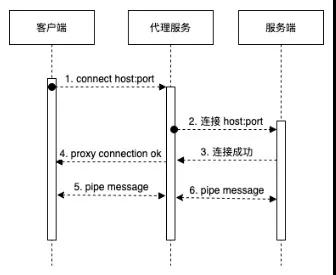
- 代理服务在收到连接请求时,判定:如果是CONNECT请求,需要回应代理连接成功消息到客户端;
- CONNECT请求回应结束后,代理服务需要连接到CONNECT指定的远程服务器,然后直接转发客户端和远程服务通信;
- 代理服务在收到非CONNECT请求时,需要解析出请求的远程服务器,然后直接转发客户端和远程服务通信;
需要注意的点是:
- 通常HTTPS请求,在通过代理前,会发送CONNECT请求;连接成功后,会在信道上进行加密通信的握手协议;因此连接远程的时机是在CONNECT请求收到时,因为此后是加密数据;
- 透明代理在收到CONNECT请求时,不需要传递到远程服务(远程服务不识别此请求);
- 透明代理在收到非CONNECT请求时,要无条件转发;
完整的透明代理的实现不到约300行代码,完整摘录如下:
@Slf4j
 public class SimpleTransProxy {

 public static void main(String[] args) throws IOException {
 int port = 8006;
 ServerSocketChannel localServer = ServerSocketChannel.open();
 localServer.bind(new InetSocketAddress(port));
 Reactor reactor = new Reactor();
 // REACTOR线程
 GlobalThreadPool.REACTOR_EXECUTOR.submit(reactor::run);

 // WORKER单线程调试
 while (localServer.isOpen()) {
 // 此处阻塞等待连接
 SocketChannel remoteClient = localServer.accept();

 // 工作线程
 GlobalThreadPool.WORK_EXECUTOR.submit(new Runnable() {
 @SneakyThrows
 @Override
 public void run() {
 // 代理到远程
 SocketChannel remoteServer = new ProxyHandler().proxy(remoteClient);

 // 透明传输
 reactor.pipe(remoteClient, remoteServer)
 .pipe(remoteServer, remoteClient);
 }
 });
 }
 }
 }

 @Data
 class ProxyHandler {
 private String method;
 private String host;
 private int port;
 private SocketChannel remoteServer;
 private SocketChannel remoteClient;

 /**
 * 原始信息
 */
 private List<ByteBuffer> buffers = new ArrayList<>();
 private StringBuilder stringBuilder = new StringBuilder();

 /**
 * 连接到远程
 * @param remoteClient
 * @return
 * @throws IOException
 */
 public SocketChannel proxy(SocketChannel remoteClient) throws IOException {
 this.remoteClient = remoteClient;
 connect();
 return this.remoteServer;
 }

 public void connect() throws IOException {
 // 解析METHOD, HOST和PORT
 beforeConnected();

 // 链接REMOTE SERVER
 createRemoteServer();

 // CONNECT请求回应,其他请求WRITE THROUGH
 afterConnected();
 }

 protected void beforeConnected() throws IOException {
 // 读取HEADER
 readAllHeader();

 // 解析HOST和PORT
 parseRemoteHostAndPort();
 }

 /**
 * 创建远程连接
 * @throws IOException
 */
 protected void createRemoteServer() throws IOException {
 remoteServer = SocketChannel.open(new InetSocketAddress(host, port));
 }

 /**
 * 连接建立后预处理
 * @throws IOException
 */
 protected void afterConnected() throws IOException {
 // 当CONNECT请求时,默认写入200到CLIENT
 if ("CONNECT".equalsIgnoreCase(method)) {
 // CONNECT默认为443端口,根据HOST再解析
 remoteClient.write(ByteBuffer.wrap("HTTP/1.0 200 Connection Established\r\nProxy-agent: nginx\r\n\r\n".getBytes()));
 } else {
 writeThrouth();
 }
 }

 protected void writeThrouth() {
 buffers.forEach(byteBuffer -> {
 try {
 remoteServer.write(byteBuffer);
 } catch (IOException e) {
 e.printStackTrace();
 }
 });
 }

 /**
 * 读取请求内容
 * @throws IOException
 */
 protected void readAllHeader() throws IOException {
 while (true) {
 ByteBuffer clientBuffer = newByteBuffer();
 int read = remoteClient.read(clientBuffer);
 clientBuffer.flip();
 appendClientBuffer(clientBuffer);
 if (read < clientBuffer.capacity()) {
 break;
 }
 }
 }

 /**
 * 解析出HOST和PROT
 * @throws IOException
 */
 protected void parseRemoteHostAndPort() throws IOException {
 // 读取第一批,获取到METHOD
 method = parseRequestMethod(stringBuilder.toString());

 // 默认为80端口,根据HOST再解析
 port = 80;
 if ("CONNECT".equalsIgnoreCase(method)) {
 port = 443;
 }

 this.host = parseHost(stringBuilder.toString());

 URI remoteServerURI = URI.create(host);
 host = remoteServerURI.getHost();

 if (remoteServerURI.getPort() > 0) {
 port = remoteServerURI.getPort();
 }
 }

 protected void appendClientBuffer(ByteBuffer clientBuffer) {
 buffers.add(clientBuffer);
 stringBuilder.append(new String(clientBuffer.array(), clientBuffer.position(), clientBuffer.limit()));
 }

 protected static ByteBuffer newByteBuffer() {
 // buffer必须大于7,保证能读到method
 return ByteBuffer.allocate(128);
 }

 private static String parseRequestMethod(String rawContent) {
 // create uri
 return rawContent.split("\r\n")[0].split(" ")[0];
 }

 private static String parseHost(String rawContent) {
 String[] headers = rawContent.split("\r\n");
 String host = "host:";
 for (String header : headers) {
 if (header.length() > host.length()) {
 String key = header.substring(0, host.length());
 String value = header.substring(host.length()).trim();
 if (host.equalsIgnoreCase(key)) {
 if (!value.startsWith("http://") && !value.startsWith("https://")) {
 value = "http://" + value;
 }
 return value;
 }
 }
 }
 return "";
 }

 }

 @Slf4j
 @Data
 class Reactor {

 private Selector selector;

 private volatile boolean finish = false;

 @SneakyThrows
 public Reactor() {
 selector = Selector.open();
 }

 @SneakyThrows
 public Reactor pipe(SocketChannel from, SocketChannel to) {
 from.configureBlocking(false);
 from.register(selector, SelectionKey.OP_READ, new SocketPipe(this, from, to));
 return this;
 }

 @SneakyThrows
 public void run() {
 try {
 while (!finish) {
 if (selector.selectNow() > 0) {
 Iterator<SelectionKey> it = selector.selectedKeys().iterator();
 while (it.hasNext()) {
 SelectionKey selectionKey = it.next();
 if (selectionKey.isValid() && selectionKey.isReadable()) {
 ((SocketPipe) selectionKey.attachment()).pipe();
 }
 it.remove();
 }
 }
 }
 } finally {
 close();
 }
 }

 @SneakyThrows
 public synchronized void close() {
 if (finish) {
 return;
 }
 finish = true;
 if (!selector.isOpen()) {
 return;
 }
 for (SelectionKey key : selector.keys()) {
 closeChannel(key.channel());
 key.cancel();
 }
 if (selector != null) {
 selector.close();
 }
 }

 public void cancel(SelectableChannel channel) {
 SelectionKey key = channel.keyFor(selector);
 if (Objects.isNull(key)) {
 return;
 }
 key.cancel();
 }

 @SneakyThrows
 public void closeChannel(Channel channel) {
 SocketChannel socketChannel = (SocketChannel)channel;
 if (socketChannel.isConnected() && socketChannel.isOpen()) {
 socketChannel.shutdownOutput();
 socketChannel.shutdownInput();
 }
 socketChannel.close();
 }
 }

 @Data
 @AllArgsConstructor
 class SocketPipe {

 private Reactor reactor;

 private SocketChannel from;

 private SocketChannel to;

 @SneakyThrows
 public void pipe() {
 // 取消监听
 clearInterestOps();

 GlobalThreadPool.PIPE_EXECUTOR.submit(new Runnable() {
 @SneakyThrows
 @Override
 public void run() {
 int totalBytesRead = 0;
 ByteBuffer byteBuffer = ByteBuffer.allocate(1024);
 while (valid(from) && valid(to)) {
 byteBuffer.clear();
 int bytesRead = from.read(byteBuffer);
 totalBytesRead = totalBytesRead + bytesRead;
 byteBuffer.flip();
 to.write(byteBuffer);
 if (bytesRead < byteBuffer.capacity()) {
 break;
 }
 }
 if (totalBytesRead < 0) {
 reactor.closeChannel(from);
 reactor.cancel(from);
 } else {
 // 重置监听
 resetInterestOps();
 }
 }
 });
 }

 protected void clearInterestOps() {
 from.keyFor(reactor.getSelector()).interestOps(0);
 to.keyFor(reactor.getSelector()).interestOps(0);
 }

 protected void resetInterestOps() {
 from.keyFor(reactor.getSelector()).interestOps(SelectionKey.OP_READ);
 to.keyFor(reactor.getSelector()).interestOps(SelectionKey.OP_READ);
 }

 private boolean valid(SocketChannel channel) {
 return channel.isConnected() && channel.isRegistered() && channel.isOpen();
 }
 }
以上,借鉴NETTY:
- 首先初始化REACTOR线程,然后开启代理监听,当收到代理请求时处理。
- 代理服务在收到代理请求时,首先做代理的预处理,然后又SocketPipe做客户端和远程服务端双向转发。
- 代理预处理,首先读取第一个HTTP请求,解析出METHOD, HOST, PORT。
- 如果是CONNECT请求,发送回应Connection Established,然后连接远程服务端,并返回SocketChannel
- 如果是非CONNECT请求,连接远程服务端,写入原始请求,并返回SocketChannel
- SocketPipe在客户端和远程服务端,做双向的转发;其本身是将客户端和服务端的SocketChannel注册到REACTOR
- REACTOR在监测到READABLE的CHANNEL,派发给SocketPipe做双向转发。
测试
代理的测试比较简单,指向代码后,代理服务监听8006端口,此时:
curl -x 'localhost:8006' http://httpbin.org/get测试HTTP请求

 curl -x 'localhost:8006' https://httpbin.org/get测试HTTPS请求
注意,此时代理服务代理了HTTPS请求,但是并不需要-k选项,指示非安全的代理。因为代理服务本身并没有作为一个中间人,并没有解析出客户端和远程服务端通信的内容。在非透明代理时,需要解决这个问题。
非透明代理,需要解析出客户端和远程服务端传输的内容,并做相应的处理。
当传输为HTTP协议时,SocketPipe传输的数据即为明文的数据,可以拦截后直接做处理。
当传输为HTTPS协议时,SocketPipe传输的有效数据为加密数据,并不能透明处理。
另外,无论是传输的HTTP协议还是HTTPS协议,SocketPipe读到的都为非完整的数据,需要做聚批的处理。
SocketPipe聚批问题,可以采用类似BufferedInputStream对InputStream做Decorate的模式来实现,相对比较简单;详细可以参考NETTY的HttpObjectAggregator;
HTTPS原始请求和结果数据的加密和解密的处理,需要实现的NIO的SOCKET CHANNEL;
考虑到目前JDK自带的NIO的SocketChannel并不支持SSL;已有的SSLSocket是阻塞的OIO。如图:
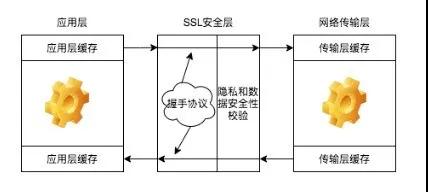
可以看出
- 每次入站数据和出站数据都需要 SSL SESSION 做握手;
- 入站数据做解密,出站数据做加密;
- 握手,数据加密和数据解密是统一的一套状态机;
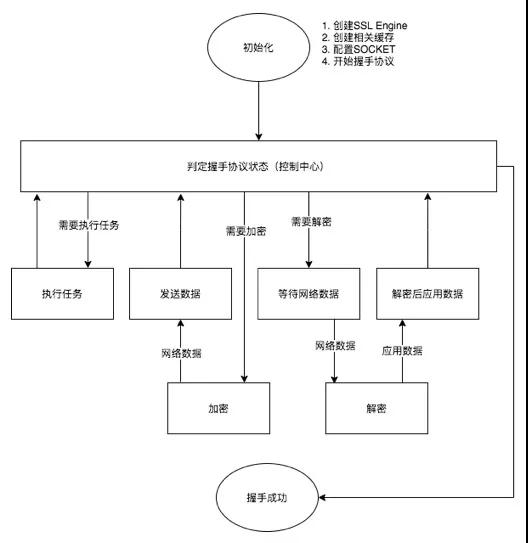
以下,代码实现 SslSocketChannel
public class SslSocketChannel {

 /**
 * 握手加解密需要的四个存储
 */
 protected ByteBuffer myAppData; // 明文
 protected ByteBuffer myNetData; // 密文
 protected ByteBuffer peerAppData; // 明文
 protected ByteBuffer peerNetData; // 密文

 /**
 * 握手加解密过程中用到的异步执行器
 */
 protected ExecutorService executor = Executors.newSingleThreadExecutor();

 /**
 * 原NIO 的 CHANNEL
 */
 protected SocketChannel socketChannel;

 /**
 * SSL 引擎
 */
 protected SSLEngine engine;

 public SslSocketChannel(SSLContext context, SocketChannel socketChannel, boolean clientMode) throws Exception {
 // 原始的NIO SOCKET
 this.socketChannel = socketChannel;

 // 初始化BUFFER
 SSLSession dummySession = context.createSSLEngine().getSession();
 myAppData = ByteBuffer.allocate(dummySession.getApplicationBufferSize());
 myNetData = ByteBuffer.allocate(dummySession.getPacketBufferSize());
 peerAppData = ByteBuffer.allocate(dummySession.getApplicationBufferSize());
 peerNetData = ByteBuffer.allocate(dummySession.getPacketBufferSize());
 dummySession.invalidate();

 engine = context.createSSLEngine();
 engine.setUseClientMode(clientMode);
 engine.beginHandshake();
 }

 /**
 * 参考 https://docs.oracle.com/javase/8/docs/technotes/guides/security/jsse/JSSERefGuide.html
 * 实现的 SSL 的握手协议
 * @return
 * @throws IOException
 */
 protected boolean doHandshake() throws IOException {
 SSLEngineResult result;
 HandshakeStatus handshakeStatus;

 int appBufferSize = engine.getSession().getApplicationBufferSize();
 ByteBuffer myAppData = ByteBuffer.allocate(appBufferSize);
 ByteBuffer peerAppData = ByteBuffer.allocate(appBufferSize);
 myNetData.clear();
 peerNetData.clear();

 handshakeStatus = engine.getHandshakeStatus();
 while (handshakeStatus != HandshakeStatus.FINISHED && handshakeStatus != HandshakeStatus.NOT_HANDSHAKING) {
 switch (handshakeStatus) {
 case NEED_UNWRAP:
 if (socketChannel.read(peerNetData) < 0) {
 if (engine.isInboundDone() && engine.isOutboundDone()) {
 return false;
 }
 try {
 engine.closeInbound();
 } catch (SSLException e) {
 log.debug("收到END OF STREAM,关闭连接.", e);
 }
 engine.closeOutbound();
 handshakeStatus = engine.getHandshakeStatus();
 break;
 }
 peerNetData.flip();
 try {
 result = engine.unwrap(peerNetData, peerAppData);
 peerNetData.compact();
 handshakeStatus = result.getHandshakeStatus();
 } catch (SSLException sslException) {
 engine.closeOutbound();
 handshakeStatus = engine.getHandshakeStatus();
 break;
 }
 switch (result.getStatus()) {
 case OK:
 break;
 case BUFFER_OVERFLOW:
 peerAppData = enlargeApplicationBuffer(engine, peerAppData);
 break;
 case BUFFER_UNDERFLOW:
 peerNetData = handleBufferUnderflow(engine, peerNetData);
 break;
 case CLOSED:
 if (engine.isOutboundDone()) {
 return false;
 } else {
 engine.closeOutbound();
 handshakeStatus = engine.getHandshakeStatus();
 break;
 }
 default:
 throw new IllegalStateException("无效的握手状态: " + result.getStatus());
 }
 break;
 case NEED_WRAP:
 myNetData.clear();
 try {
 result = engine.wrap(myAppData, myNetData);
 handshakeStatus = result.getHandshakeStatus();
 } catch (SSLException sslException) {
 engine.closeOutbound();
 handshakeStatus = engine.getHandshakeStatus();
 break;
 }
 switch (result.getStatus()) {
 case OK :
 myNetData.flip();
 while (myNetData.hasRemaining()) {
 socketChannel.write(myNetData);
 }
 break;
 case BUFFER_OVERFLOW:
 myNetData = enlargePacketBuffer(engine, myNetData);
 break;
 case BUFFER_UNDERFLOW:
 throw new SSLException("加密后消息内容为空,报错");
 case CLOSED:
 try {
 myNetData.flip();
 while (myNetData.hasRemaining()) {
 socketChannel.write(myNetData);
 }
 peerNetData.clear();
 } catch (Exception e) {
 handshakeStatus = engine.getHandshakeStatus();
 }
 break;
 default:
 throw new IllegalStateException("无效的握手状态: " + result.getStatus());
 }
 break;
 case NEED_TASK:
 Runnable task;
 while ((task = engine.getDelegatedTask()) != null) {
 executor.execute(task);
 }
 handshakeStatus = engine.getHandshakeStatus();
 break;
 case FINISHED:
 break;
 case NOT_HANDSHAKING:
 break;
 default:
 throw new IllegalStateException("无效的握手状态: " + handshakeStatus);
 }
 }

 return true;
 }

 /**
 * 参考 https://docs.oracle.com/javase/8/docs/technotes/guides/security/jsse/JSSERefGuide.html
 * 实现的 SSL 的传输读取协议
 * @param consumer
 * @throws IOException
 */
 public void read(Consumer<ByteBuffer> consumer) throws IOException {
 // BUFFER初始化
 peerNetData.clear();
 int bytesRead = socketChannel.read(peerNetData);
 if (bytesRead > 0) {
 peerNetData.flip();
 while (peerNetData.hasRemaining()) {
 peerAppData.clear();
 SSLEngineResult result = engine.unwrap(peerNetData, peerAppData);
 switch (result.getStatus()) {
 case OK:
 log.debug("收到远程的返回结果消息为:" + new String(peerAppData.array(), 0, peerAppData.position()));
 consumer.accept(peerAppData);
 peerAppData.flip();
 break;
 case BUFFER_OVERFLOW:
 peerAppData = enlargeApplicationBuffer(engine, peerAppData);
 break;
 case BUFFER_UNDERFLOW:
 peerNetData = handleBufferUnderflow(engine, peerNetData);
 break;
 case CLOSED:
 log.debug("收到远程连接关闭消息.");
 closeConnection();
 return;
 default:
 throw new IllegalStateException("无效的握手状态: " + result.getStatus());
 }
 }
 } else if (bytesRead < 0) {
 log.debug("收到END OF STREAM,关闭连接.");
 handleEndOfStream();
 }
 }

 public void write(String message) throws IOException {
 write(ByteBuffer.wrap(message.getBytes()));
 }

 /**
 * 参考 https://docs.oracle.com/javase/8/docs/technotes/guides/security/jsse/JSSERefGuide.html
 * 实现的 SSL 的传输写入协议
 * @param message
 * @throws IOException
 */
 public void write(ByteBuffer message) throws IOException {
 myAppData.clear();
 myAppData.put(message);
 myAppData.flip();
 while (myAppData.hasRemaining()) {
 myNetData.clear();
 SSLEngineResult result = engine.wrap(myAppData, myNetData);
 switch (result.getStatus()) {
 case OK:
 myNetData.flip();
 while (myNetData.hasRemaining()) {
 socketChannel.write(myNetData);
 }
 log.debug("写入远程的消息为: {}", message);
 break;
 case BUFFER_OVERFLOW:
 myNetData = enlargePacketBuffer(engine, myNetData);
 break;
 case BUFFER_UNDERFLOW:
 throw new SSLException("加密后消息内容为空.");
 case CLOSED:
 closeConnection();
 return;
 default:
 throw new IllegalStateException("无效的握手状态: " + result.getStatus());
 }
 }
 }

 /**
 * 关闭连接
 * @throws IOException
 */
 public void closeConnection() throws IOException {
 engine.closeOutbound();
 doHandshake();
 socketChannel.close();
 executor.shutdown();
 }

 /**
 * END OF STREAM(-1)默认是关闭连接
 * @throws IOException
 */
 protected void handleEndOfStream() throws IOException {
 try {
 engine.closeInbound();
 } catch (Exception e) {
 log.error("END OF STREAM 关闭失败.", e);
 }
 closeConnection();
 }

 }
以上:
- 基于 SSL 协议,实现统一的握手动作;
- 分别实现读取的解密,和写入的加密方法;
- 将 SslSocketChannel 实现为 SocketChannel的Decorator;
SslSocketChannel测试服务端
基于以上封装,简单测试服务端如下:
@Slf4j
 public class NioSslServer {

 public static void main(String[] args) throws Exception {
 NioSslServer sslServer = new NioSslServer("127.0.0.1", 8006);
 sslServer.start()
 // 使用 curl -vv -k 'https://localhost:8006' 连接
 }

 private SSLContext context;

 private Selector selector;

 public NioSslServer(String hostAddress, int port) throws Exception {
 // 初始化SSL Context
 context = serverSSLContext();

 // 注册监听器
 selector = SelectorProvider.provider().openSelector();
 ServerSocketChannel serverSocketChannel = ServerSocketChannel.open();
 serverSocketChannel.configureBlocking(false);
 serverSocketChannel.socket().bind(new InetSocketAddress(hostAddress, port));
 serverSocketChannel.register(selector, SelectionKey.OP_ACCEPT);
 }

 public void start() throws Exception {

 log.debug("等待连接中.");

 while (true) {
 selector.select();
 Iterator<SelectionKey> selectedKeys = selector.selectedKeys().iterator();
 while (selectedKeys.hasNext()) {
 SelectionKey key = selectedKeys.next();
 selectedKeys.remove();
 if (!key.isValid()) {
 continue;
 }
 if (key.isAcceptable()) {
 accept(key);
 } else if (key.isReadable()) {
 ((SslSocketChannel)key.attachment()).read(buf->{});
 // 直接回应一个OK
 ((SslSocketChannel)key.attachment()).write("HTTP/1.1 200 OK\r\nContent-Type: text/plain\r\n\r\nOK\r\n\r\n");
 ((SslSocketChannel)key.attachment()).closeConnection();
 }
 }
 }
 }

 private void accept(SelectionKey key) throws Exception {
 log.debug("接收新的请求.");

 SocketChannel socketChannel = ((ServerSocketChannel)key.channel()).accept();
 socketChannel.configureBlocking(false);

 SslSocketChannel sslSocketChannel = new SslSocketChannel(context, socketChannel, false);
 if (sslSocketChannel.doHandshake()) {
 socketChannel.register(selector, SelectionKey.OP_READ, sslSocketChannel);
 } else {
 socketChannel.close();
 log.debug("握手失败,关闭连接.");
 }
 }
 }
以上:
- 基于 SSL 协议,实现统一的握手动作;
- 分别实现读取的解密,和写入的加密方法;
- 将 SslSocketChannel 实现为 SocketChannel的Decorator;
SslSocketChannel测试服务端
基于以上封装,简单测试服务端如下:
@Slf4j
 public class NioSslServer {

 public static void main(String[] args) throws Exception {
 NioSslServer sslServer = new NioSslServer("127.0.0.1", 8006);
 sslServer.start();
 // 使用 curl -vv -k 'https://localhost:8006' 连接
 }

 private SSLContext context;

 private Selector selector;

 public NioSslServer(String hostAddress, int port) throws Exception {
 // 初始化SSL Context
 context = serverSSLContext();

 // 注册监听器
 selector = SelectorProvider.provider().openSelector();
 ServerSocketChannel serverSocketChannel = ServerSocketChannel.open();
 serverSocketChannel.configureBlocking(false);
 serverSocketChannel.socket().bind(new InetSocketAddress(hostAddress, port));
 serverSocketChannel.register(selector, SelectionKey.OP_ACCEPT);
 }

 public void start() throws Exception {

 log.debug("等待连接中.");

 while (true) {
 selector.select();
 Iterator<SelectionKey> selectedKeys = selector.selectedKeys().iterator();
 while (selectedKeys.hasNext()) {
 SelectionKey key = selectedKeys.next();
 selectedKeys.remove();
 if (!key.isValid()) {
 continue;
 }
 if (key.isAcceptable()) {
 accept(key);
 } else if (key.isReadable()) {
 ((SslSocketChannel)key.attachment()).read(buf->{});
 // 直接回应一个OK
 ((SslSocketChannel)key.attachment()).write("HTTP/1.1 200 OK\r\nContent-Type: text/plain\r\n\r\nOK\r\n\r\n");
 ((SslSocketChannel)key.attachment()).closeConnection();
 }
 }
 }
 }

 private void accept(SelectionKey key) throws Exception {
 log.debug("接收新的请求.");

 SocketChannel socketChannel = ((ServerSocketChannel)key.channel()).accept();
 socketChannel.configureBlocking(false);

 SslSocketChannel sslSocketChannel = new SslSocketChannel(context, socketChannel, false);
 if (sslSocketChannel.doHandshake()) {
 socketChannel.register(selector, SelectionKey.OP_READ, sslSocketChannel);
 } else {
 socketChannel.close();
 log.debug("握手失败,关闭连接.");
 }
 }
 }
以上:
由于是NIO,简单的测试需要用到NIO的基础组件Selector进行测试;
首先初始化ServerSocketChannel,监听8006端口;
接收到请求后,将SocketChannel封装为SslSocketChannel,注册到Selector;
接收到数据后,通过SslSocketChannel做read和write;
以上:
- 客户端的封装测试,是为了验证封装 SSL 协议双向都是OK的
- 在后文的非透明上游代理中,会同时使用 SslSocketChannel做服务端和客户端
- 以上封装与服务端封装类似,不同的是初始化 SocketChannel,做connect而非bind
基于以上服务端封装,简单测试客户端如下:
@Slf4j :
 public class NioSslClient {

 public static void main(String[] args) throws Exception {
 NioSslClient sslClient = new NioSslClient("httpbin.org", 443);
 sslClient.connect();
 // 请求 'https://httpbin.org/get'
 }

 private String remoteAddress;

 private int port;

 private SSLEngine engine;

 private SocketChannel socketChannel;

 private SSLContext context;

 /**
 * 需要远程的HOST和PORT
 * @param remoteAddress
 * @param port
 * @throws Exception
 */
 public NioSslClient(String remoteAddress, int port) throws Exception {
 this.remoteAddress = remoteAddress;
 this.port = port;

 context = clientSSLContext();
 engine = context.createSSLEngine(remoteAddress, port);
 engine.setUseClientMode(true);
 }

 public boolean connect() throws Exception {
 socketChannel = SocketChannel.open();
 socketChannel.configureBlocking(false);
 socketChannel.connect(new InetSocketAddress(remoteAddress, port));
 while (!socketChannel.finishConnect()) {
 // 通过REACTOR,不会出现等待情况
 //log.debug("连接中..");
 }

 SslSocketChannel sslSocketChannel = new SslSocketChannel(context, socketChannel, true);
 sslSocketChannel.doHandshake();

 // 握手完成后,开启SELECTOR
 Selector selector = SelectorProvider.provider().openSelector();
 socketChannel.register(selector, SelectionKey.OP_READ, sslSocketChannel);

 // 写入请求
 sslSocketChannel.write("GET /get HTTP/1.1\r\n"
 + "Host: httpbin.org:443\r\n"
 + "User-Agent: curl/7.62.0\r\n"
 + "Accept: */*\r\n"
 + "\r\n");

 // 读取结果
 while (true) {
 selector.select();
 Iterator<SelectionKey> selectedKeys = selector.selectedKeys().iterator();
 while (selectedKeys.hasNext()) {
 SelectionKey key = selectedKeys.next();
 selectedKeys.remove();
 if (key.isValid() && key.isReadable()) {
 ((SslSocketChannel)key.attachment()).read(buf->{
 log.info("{}", new String(buf.array(), 0, buf.position()));
 });
 ((SslSocketChannel)key.attachment()).closeConnection();
 return true;
 }
 }
 }
 }
 }
总结
以上:
- 非透明代理需要拿到完整的请求数据,可以通过 Decorator模式,聚批实现;
- 非透明代理需要拿到解密后的HTTPS请求数据,可以通过SslSocketChannel对原始的SocketChannel做封装实现;
- 最后,拿到请求后,做相应的处理,最终实现非透明的代理。
透明上游代理相比透明代理要简单,区别是:
- 透明代理需要响应 CONNECT请求,透明上游代理不需要,直接转发即可;
- 透明的上游代理,只是一个简单的SocketChannel管道;确定下游的代理服务端,连接转发请求;
只需要对透明代理做以上简单的修改,即可实现透明的上游代理。
非透明的上游代理,相比非透明的代理要复杂一些。

以上,分为四个组件:客户端,代理服务(ServerHandler),代理服务(ClientHandler),服务端
- 如果是HTTP的请求,数据直接通过 客户端<->ServerHandler<->ClientHandler<->服务端,代理网关只需要做简单的请求聚批,就可以应用相应的管理策略;
- 如果是HTTPS请求,代理作为客户端和服务端的中间人,只能拿到加密的数据;因此,代理网关需要作为HTTPS的服务方与客户端通信;然后作为HTTPS的客户端与服务端通信;
- 代理作为HTTPS服务方时,需要考虑到其本身是个非透明的代理,需要实现非透明代理相关的协议;
- 代理作为HTTPS客户端时,需要考虑到其下游是个透明的代理,真正的服务方是客户端请求的服务方;
本文需要构建的是非透明上游代理,以下采用NETTY框架给出详细的设计实现。上文将统一代理网关分为两大部分,ServerHandler和ClientHandler,以下
- 介绍代理网关服务端相关实现;
- 介绍代理网关客户端相关实现;
主。要包括
- 初始化代理网关服务端
- 初始化服务端处理器
- 服务端协议升级与处理
初始化代理网关服务
public void start() {
 HookedExecutors.newSingleThreadExecutor().submit(() ->{
 log.info("开始启动代理服务器,监听端口:{}", auditProxyConfig.getProxyServerPort());
 EventLoopGroup bossGroup = new NioEventLoopGroup(auditProxyConfig.getBossThreadCount());
 EventLoopGroup workerGroup = new NioEventLoopGroup(auditProxyConfig.getWorkThreadCount());
 try {
 ServerBootstrap b = new ServerBootstrap();
 b.group(bossGroup, workerGroup)
 .channel(NioServerSocketChannel.class)
 .handler(new LoggingHandler(LogLevel.DEBUG))
 .childHandler(new ServerChannelInitializer(auditProxyConfig))
 .bind(auditProxyConfig.getProxyServerPort()).sync().channel().closeFuture().sync();
 } catch (InterruptedException e) {
 log.error("代理服务器被中断.", e);
 Thread.currentThread().interrupt();
 } finally {
 bossGroup.shutdownGracefully();
 workerGroup.shutdownGracefully();
 }
 });
 }
代理网关初始化相对简单,
bossGroup线程组,负责接收请求
workerGroup线程组,负责处理接收的请求数据,具体处理逻辑封装在ServerChannelInitializer中。
代理网关服务的请求处理器在 ServerChannelInitializer中定义为:
@Override
 protected void initChannel(SocketChannel ch) throws Exception {
 ch.pipeline()
 .addLast(new HttpRequestDecoder())
 .addLast(new HttpObjectAggregator(auditProxyConfig.getMaxRequestSize()))
 .addLast(new ServerChannelHandler(auditProxyConfig));
 }
首先解析HTTP请求,然后做聚批的处理,最后ServerChannelHandler实现代理网关协议;
代理网关协议:
- 判定是否是CONNECT请求,如果是,会存储CONNECT请求;暂停读取,发送代理成功的响应,并在回应成功后,升级协议;
- 升级引擎,本质上是采用SslSocketChannel对原SocketChannel做透明的封装;
- 最后根据CONNECT请求连接远程服务端;
详细实现为:
@Override
 public void channelRead(ChannelHandlerContext ctx, Object msg) throws Exception {
 FullHttpRequest request = (FullHttpRequest)msg;

 try {
 if (isConnectRequest(request)) {
 // CONNECT 请求,存储待处理
 saveConnectRequest(ctx, request);

 // 禁止读取
 ctx.channel().config().setAutoRead(false);

 // 发送回应
 connectionEstablished(ctx, ctx.newPromise().addListener(future -> {
 if (future.isSuccess()) {
 // 升级
 if (isSslRequest(request) && !isUpgraded(ctx)) {
 upgrade(ctx);
 }

 // 开放消息读取
 ctx.channel().config().setAutoRead(true);
 ctx.read();
 }
 }));

 } else {
 // 其他请求,判定是否已升级
 if (!isUpgraded(ctx)) {

 // 升级引擎
 upgrade(ctx);
 }

 // 连接远程
 connectRemote(ctx, request);
 }
 } finally {
 ctx.fireChannelRead(msg);
 }
 }
代理网关服务端需要连接远程服务,进入代理网关客户端部分。
代理网关客户端初始化:
/**
 * 初始化远程连接
 * @param ctx
 * @param httpRequest
 */
 protected void connectRemote(ChannelHandlerContext ctx, FullHttpRequest httpRequest) {
 Bootstrap b = new Bootstrap();
 b.group(ctx.channel().eventLoop()) // use the same EventLoop
 .channel(ctx.channel().getClass())
 .handler(new ClientChannelInitializer(auditProxyConfig, ctx, safeCopy(httpRequest)));

 // 动态连接代理
 FullHttpRequest originRequest = ctx.channel().attr(CONNECT_REQUEST).get();
 if (originRequest == null) {
 originRequest = httpRequest;
 }
 ChannelFuture cf = b.connect(new InetSocketAddress(calculateHost(originRequest), calculatePort(originRequest)));
 Channel cch = cf.channel();
 ctx.channel().attr(CLIENT_CHANNEL).set(cch);
 }
以上:
- 复用代理网关服务端的workerGroup线程组;
- 请求和结果的处理封装在ClientChannelInitializer;
- 连接的远程服务端的HOST和PORT在服务端收到的请求中可以解析到。
代理网关客户端的处理器的初始化逻辑:
@Override
 protected void initChannel(SocketChannel ch) throws Exception {
 SocketAddress socketAddress = calculateProxy();
 if (!Objects.isNull(socketAddress)) {
 ch.pipeline().addLast(new HttpProxyHandler(calculateProxy(), auditProxyConfig.getUserName(), auditProxyConfig
 .getPassword()));
 }
 if (isSslRequest()) {
 String host = host();
 int port = port();
 if (StringUtils.isNoneBlank(host) && port > 0) {
 ch.pipeline().addLast(new SslHandler(sslEngine(host, port)));
 }
 }
 ch.pipeline().addLast(new ClientChannelHandler(clientContext, httpRequest));
 }
以上:
如果下游是代理,那么会采用HttpProxyHandler,经由下游代理与远程服务端通信;
如果当前需要升级为SSL协议,会对SocketChannel做透明的封装,实现SSL通信。
最后,ClientChannelHandler只是简单消息的转发;唯一的不同是,由于代理网关拦截了第一个请求,此时需要将拦截的请求,转发到服务端。
代理网关实现可能面临的问题:
代理通常面临的问题是OOM。本文在实现代理网关时保证内存中缓存时当前正在处理的HTTP/HTTPS请求体。内存使用的上限理论上为实时处理的请求数量*请求体的平均大小,HTTP/HTTPS的请求结果,直接使用堆外内存,零拷贝转发。
性能问题不应提早考虑。本文使用NETTY框架实现的代理网关,内部大量使用堆外内存,零拷贝转发,避免了性能问题。
代理网关一期上线后曾面临一个长连接导致的性能问题,
CLIENT和SERVER建立TCP长连接后(比如,TCP心跳检测),通常要么是CLIENT关闭TCP连接,或者是SERVER关闭;
如果双方长时间占用TCP连接资源而不关闭,就会导致SOCKET资源泄漏;现象是:CPU资源爆满,处理空闲连接;新连接无法建立;
使用IdleStateHandler定时监控空闲的TCP连接,强制关闭;解决了该问题。
本文聚焦于统一代理网关的核心,详细介绍了代理相关的技术原理。
代理网关的管理部分,可以在ServerHandler部分维护,也可以在ClientHandler部分维护;
- ServerHandler可以拦截转换请求
- ClientHanlder可控制请求的出口
注:本文使用Netty的零拷贝;存储请求以解析处理;但并未实现对RESPONSE的处理;也就是RESPONSE是直接通过网关,此方面避免了常见的代理实现,内存泄漏OOM相关问题;
最后,本文实现代理网关后,针对代理的资源和流经代理网关的请求做了相应的控制,主要包括:
- 当遇到静态资源的请求时,代理网关会直接请求远程服务端,不会通过下游代理
- 当请求HEADER中包含地域标识时,代理网关会尽力保证请求打入指定的地域代理,经由地域代理访问远程服务端
本文参考https://docs.oracle.com/javase/8/docs/technotes/guides/security/jsse/JSSERefGuide.html实现 SslSocketChannel,以透明处理HTTP和HTTPS协议。
© 版权声明
文章版权归作者所有,未经允许请勿转载。