
文章目录
- DeepDream是一种艺术性的图像修改技术,主要是基于训练好的卷积神经网络CNN进行图片的生成。 在生成图片时,神经网络是冻结的,也就是网络的权重不再更新,只需要更新输入的图片。常用的预训练卷积网络包括Google的Inception、VGG网络和ResNet网络等。 DeePDream的基本步骤: 获取输入图片 将图片输入网络,得到所希望可视化的神经元的输出值 计算神经元输出值对图片各像素的梯度 使用梯度下降不断更新图片 重复第2、3、4步,直到满足所设定的条件 下面是使用Keras实现DeepDream的大致过程:
-
- In [1]: # ---------------from tensorflow import kerasimport matplotlib.pyplot as plt%matplotlib inlinebase_image_path = keras.utils.get_file( "coast.jpg", origin="https://img-datasets.s3.amazonaws.com/coast.jpg")plt.axis("off")plt.imshow(keras.utils.load_img(base_image_path))plt.show() 上面是Keras自带的一张海岸线的图片。下面就是对这张图进行变化。
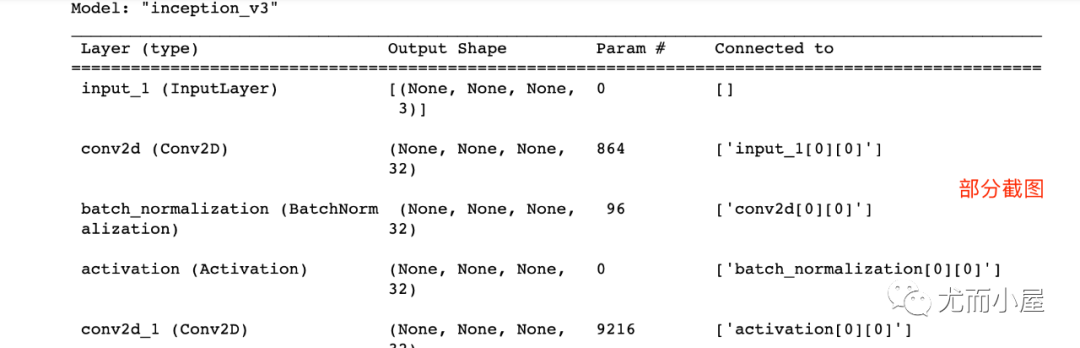
- In [2]: # 使用Inception V3实现from keras.applications import inception_v3# 使用预训练的ImageNet权重来加载模型model = inception_v3.InceptionV3(weights="imagenet", # 构建不包含全连接层的Inceptino include_top=False)Downloading data from https://storage.googleapis.com/tensorflow/keras-applications/inception_v3/inception_v3_weights_tf_dim_ordering_tf_kernels_notop.h587916544/87910968 [==============================] - 74s 1us/step87924736/87910968 [==============================] - 74s 1us/step In [3]: model.summary()
- In [4]: # 层的名称 + 系数:该层对需要最大化的损失的贡献大小 layer_settings = {"mixed4":1.0, "mixed5":1.5, "mixed6":2.0, "mixed7":2.5}outputs_dict = dict( [ (layer.name, layer.output) # 层的名字 + 该层的输出 for layer in [model.get_layer(name) for name in layer_settings.keys()] ])outputs_dict Out[4]: {'mixed4': <KerasTensor: shape=(None, None, None, 768) dtype=float32 (created by layer 'mixed4')>, 'mixed5': <KerasTensor: shape=(None, None, None, 768) dtype=float32 (created by layer 'mixed5')>, 'mixed6': <KerasTensor: shape=(None, None, None, 768) dtype=float32 (created by layer 'mixed6')>, 'mixed7': <KerasTensor: shape=(None, None, None, 768) dtype=float32 (created by layer 'mixed7')>} In [5]: # 特征提取feature_extractor = keras.Model(inputs=model.inputs, outputs=outputs_dict)feature_extractor Out[5]: <keras.engine.functional.Functional at 0x15b5ff0d0>
- In [6]: def compute_loss(image): features = feature_extractor(image) # 特征提取 loss = tf.zeros(shape=()) # 损失初始化 for name in features.keys(): # 遍历层 coeff = layer_settings[name] # 某个层的系数 activation = features[name] # 某个层的激活函数 #为了避免出现边界伪影,损失中仅包含非边界的像素 loss += coeff * tf.reduce_mean(tf.square(activation[:, 2:-2, 2:-2, :])) # 将该层的L2范数添加到loss中; return loss
- In [7]: import tensorflow as tf@tf.functiondef gradient_ascent_step(image, lr): # lr--->learning_rate 学习率 with tf.GradientTape() as tape: tape.watch(image) loss = compute_loss(image) # 调用计算损失方法 grads = tape.gradient(loss, image) # 梯度更新 grads = tf.math.l2_normalize(grads) image += lr * grads return loss, image def gradient_ascent_loop(image, iterations, lr, max_loss=None): for i in range(iterations): loss, image = gradient_ascent_step(image, lr) if max_loss is not None and loss > max_loss: break print(f"第{i}步的损失值是{loss:.2f}") return image
-
- In [8]: import numpy as nparray = np.array([[1,2,3], [4,5,6]] )array Out[8]: array([[1, 2, 3], [4, 5, 6]]) In [9]: array.shape Out[9]: (2, 3) In [10]: array1 = np.expand_dims(array,axis=0)array1 Out[10]: array([[[1, 2, 3], [4, 5, 6]]]) In [11]: array1.shape Out[11]: (1, 2, 3) In [12]: array2 = np.expand_dims(array,axis=1)array2 Out[12]: array([[[1, 2, 3]], [[4, 5, 6]]]) In [13]: array2.shape Out[13]: (2, 1, 3) In [14]: array3 = np.expand_dims(array,axis=-1)array3 Out[14]: array([[[1], [2], [3]], [[4], [5], [6]]]) In [15]: array3.shape Out[15]: (2, 3, 1)
- np.clip( array, min(array), max(array), out=None): In [16]: array = np.array([1,2,3,4,5,6])np.clip(array, 2, 5) # 输出长度和原数组相同 Out[16]: array([2, 2, 3, 4, 5, 5]) In [17]: array = np.arange(18).reshape((6,3))array Out[17]: array([[ 0, 1, 2], [ 3, 4, 5], [ 6, 7, 8], [ 9, 10, 11], [12, 13, 14], [15, 16, 17]]) In [18]: np.clip(array, 5, 15) Out[18]: array([[ 5, 5, 5], [ 5, 5, 5], [ 6, 7, 8], [ 9, 10, 11], [12, 13, 14], [15, 15, 15]])
- In [19]: step = 20. # 梯度上升的步长num_octave = 3 # 运行梯度上升的尺度个数octave_scale = 1.4 # 两个尺度间的比例大小iterations = 30 # 在每个尺度上运行梯度上升的步数max_loss = 15. # 损失值若大于15,则中断梯度上升过程
- In [20]: import numpy as npdef preprocess_image(image_path): # 预处理 img = keras.utils.load_img(image_path) # 导入图片 img = keras.utils.img_to_array(img) # 转成数组 img = np.expand_dims(img, axis=0) # 增加数组维度;见上面解释(x,y) ---->(1,x,y) img = keras.applications.inception_v3.preprocess_input(img) return imgdef deprocess_image(img): # 图片压缩处理 img = img.reshape((img.shape[1], img.shape[2], 3)) img /= 2.0 img += 0.5 img *= 255. # np.clip:截断功能,保证数组中的取值在0-255之间 img = np.clip(img, 0, 255).astype("uint8") return img
- In [21]: # step = 20. # 梯度上升的步长# num_octave = 3 # 运行梯度上升的尺度个数# octave_scale = 1.4 # 两个尺度间的比例大小# iterations = 30 # 在每个尺度上运行梯度上升的步数# max_loss = 15.0 # 损失值若大于15,则中断梯度上升过程original_img = preprocess_image(base_image_path) # 预处理函数original_shape = original_img.shape[1:3]print(original_img.shape) # 四维图像print(original_shape) # 第2和3维度的值(1, 900, 1200, 3)(900, 1200) In [22]: successive_shapes = [original_shape]for i in range(1, num_octave): shape = tuple([int(dim / (octave_scale ** i)) for dim in original_shape]) successive_shapes.append(shape)successive_shapes = successive_shapes[::-1] # 翻转shrunk_original_img = tf.image.resize(original_img, successive_shapes[0])img = tf.identity(original_img)for i, shape in enumerate(successive_shapes): print(f"Processing octave {i} with shape {shape}") # resize img = tf.image.resize(img, shape) img = gradient_ascent_loop( # 梯度上升函数调用 img, iteratinotallow=iterations, lr=step, max_loss=max_loss ) # resize upscaled_shrunk_original_img = tf.image.resize(shrunk_original_img, shape) same_size_original = tf.image.resize(original_img, shape) lost_detail = same_size_original - upscaled_shrunk_original_img img += lost_detail shrunk_original_img = tf.image.resize(original_img, shape)keras.utils.save_img("dream.png", deprocess_image(img.numpy())) 结果为: Processing octave 0 with shape (459, 612)第0步的损失值是0.80第1步的损失值是1.07第2步的损失值是1.44第3步的损失值是1.82......第26步的损失值是11.44第27步的损失值是11.72第28步的损失值是12.03第29步的损失值是12.49 同时在本地生成了新图片,看下效果: 再看一眼原图:相对比之下,新图有点梦幻的味道!
DeepDream是一种艺术性的图像修改技术,主要是基于训练好的卷积神经网络CNN进行图片的生成。
在生成图片时,神经网络是冻结的,也就是网络的权重不再更新,只需要更新输入的图片。常用的预训练卷积网络包括Google的Inception、VGG网络和ResNet网络等。
DeePDream的基本步骤:
- 获取输入图片
- 将图片输入网络,得到所希望可视化的神经元的输出值
- 计算神经元输出值对图片各像素的梯度
- 使用梯度下降不断更新图片
重复第2、3、4步,直到满足所设定的条件
下面是使用Keras实现DeepDream的大致过程:
In [1]:
# ---------------
from tensorflow import keras
import matplotlib.pyplot as plt
%matplotlib inline

base_image_path = keras.utils.get_file(
 "coast.jpg",
 origin="https://img-datasets.s3.amazonaws.com/coast.jpg")

plt.axis("off")
plt.imshow(keras.utils.load_img(base_image_path))
plt.show()
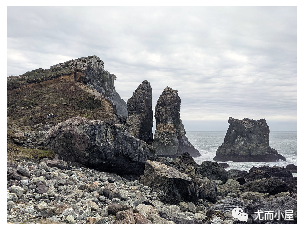
上面是Keras自带的一张海岸线的图片。下面就是对这张图进行变化。
In [2]:
# 使用Inception V3实现
from keras.applications import inception_v3

# 使用预训练的ImageNet权重来加载模型
model = inception_v3.InceptionV3(weights="imagenet", # 构建不包含全连接层的Inceptino
 include_top=False)
Downloading data from https://storage.googleapis.com/tensorflow/keras-applications/inception_v3/inception_v3_weights_tf_dim_ordering_tf_kernels_notop.h5
87916544/87910968 [==============================] - 74s 1us/step
87924736/87910968 [==============================] - 74s 1us/step
In [3]:
model.summary()
In [4]:
# 层的名称 + 系数:该层对需要最大化的损失的贡献大小

layer_settings = {"mixed4":1.0,
 "mixed5":1.5,
 "mixed6":2.0,
 "mixed7":2.5}

outputs_dict = dict(
 [
 (layer.name, layer.output) # 层的名字 + 该层的输出
 for layer in [model.get_layer(name) for name in layer_settings.keys()]
 ]
)

outputs_dict
Out[4]:
{'mixed4': <KerasTensor: shape=(None, None, None, 768) dtype=float32 (created by layer 'mixed4')>,
 'mixed5': <KerasTensor: shape=(None, None, None, 768) dtype=float32 (created by layer 'mixed5')>,
 'mixed6': <KerasTensor: shape=(None, None, None, 768) dtype=float32 (created by layer 'mixed6')>,
 'mixed7': <KerasTensor: shape=(None, None, None, 768) dtype=float32 (created by layer 'mixed7')>}
In [5]:
# 特征提取

feature_extractor = keras.Model(inputs=model.inputs, outputs=outputs_dict)
feature_extractor
Out[5]:
<keras.engine.functional.Functional at 0x15b5ff0d0>
In [6]:
def compute_loss(image):
 features = feature_extractor(image) # 特征提取
 loss = tf.zeros(shape=()) # 损失初始化

 for name in features.keys(): # 遍历层
 coeff = layer_settings[name] # 某个层的系数
 activation = features[name] # 某个层的激活函数
 #为了避免出现边界伪影,损失中仅包含非边界的像素
 loss += coeff * tf.reduce_mean(tf.square(activation[:, 2:-2, 2:-2, :])) # 将该层的L2范数添加到loss中;
 return loss
In [7]:
import tensorflow as tf

@tf.function
def gradient_ascent_step(image, lr): # lr--->learning_rate 学习率
 with tf.GradientTape() as tape:
 tape.watch(image)
 loss = compute_loss(image) # 调用计算损失方法
 grads = tape.gradient(loss, image) # 梯度更新
 grads = tf.math.l2_normalize(grads)
 image += lr * grads
 return loss, image

def gradient_ascent_loop(image, iterations, lr, max_loss=None):
 for i in range(iterations):
 loss, image = gradient_ascent_step(image, lr)
 if max_loss is not None and loss > max_loss:
 break
 print(f"第{i}步的损失值是{loss:.2f}")

 return image
In [8]:
import numpy as np

array = np.array([[1,2,3],
 [4,5,6]]
 )
array
Out[8]:
array([[1, 2, 3],
 [4, 5, 6]])
In [9]:
array.shape
Out[9]:
(2, 3)
In [10]:
array1 = np.expand_dims(array,axis=0)
array1
Out[10]:
array([[[1, 2, 3],
 [4, 5, 6]]])
In [11]:
array1.shape
Out[11]:
(1, 2, 3)
In [12]:
array2 = np.expand_dims(array,axis=1)
array2
Out[12]:
array([[[1, 2, 3]],

 [[4, 5, 6]]])
In [13]:
array2.shape
Out[13]:
(2, 1, 3)
In [14]:
array3 = np.expand_dims(array,axis=-1)
array3
Out[14]:
array([[[1],
 [2],
 [3]],

 [[4],
 [5],
 [6]]])
In [15]:
array3.shape
Out[15]:
(2, 3, 1)
np.clip(
 array,
 min(array),
 max(array),
 out=None):
array,
min(array),
max(array),
out=None):
In [16]:
array = np.array([1,2,3,4,5,6])

np.clip(array, 2, 5) # 输出长度和原数组相同
Out[16]:
array([2, 2, 3, 4, 5, 5])
In [17]:
array = np.arange(18).reshape((6,3))
array
Out[17]:
array([[ 0, 1, 2],
 [ 3, 4, 5],
 [ 6, 7, 8],
 [ 9, 10, 11],
 [12, 13, 14],
 [15, 16, 17]])
In [18]:
np.clip(array, 5, 15)
Out[18]:
array([[ 5, 5, 5],
 [ 5, 5, 5],
 [ 6, 7, 8],
 [ 9, 10, 11],
 [12, 13, 14],
 [15, 15, 15]])
In [19]:
step = 20. # 梯度上升的步长
num_octave = 3 # 运行梯度上升的尺度个数
octave_scale = 1.4 # 两个尺度间的比例大小
iterations = 30 # 在每个尺度上运行梯度上升的步数
max_loss = 15. # 损失值若大于15,则中断梯度上升过程
In [20]:
import numpy as np

def preprocess_image(image_path): # 预处理
 img = keras.utils.load_img(image_path) # 导入图片
 img = keras.utils.img_to_array(img) # 转成数组
 img = np.expand_dims(img, axis=0) # 增加数组维度;见上面解释(x,y) ---->(1,x,y)
 img = keras.applications.inception_v3.preprocess_input(img)
 return img


def deprocess_image(img): # 图片压缩处理
 img = img.reshape((img.shape[1], img.shape[2], 3))
 img /= 2.0
 img += 0.5
 img *= 255.
 # np.clip:截断功能,保证数组中的取值在0-255之间
 img = np.clip(img, 0, 255).astype("uint8")
 return img
In [21]:
# step = 20. # 梯度上升的步长
# num_octave = 3 # 运行梯度上升的尺度个数
# octave_scale = 1.4 # 两个尺度间的比例大小
# iterations = 30 # 在每个尺度上运行梯度上升的步数
# max_loss = 15.0 # 损失值若大于15,则中断梯度上升过程

original_img = preprocess_image(base_image_path) # 预处理函数
original_shape = original_img.shape[1:3]

print(original_img.shape) # 四维图像
print(original_shape) # 第2和3维度的值
(1, 900, 1200, 3)
(900, 1200)
In [22]:
successive_shapes = [original_shape]

for i in range(1, num_octave):
 shape = tuple([int(dim / (octave_scale ** i)) for dim in original_shape])
 successive_shapes.append(shape)
successive_shapes = successive_shapes[::-1] # 翻转

shrunk_original_img = tf.image.resize(original_img, successive_shapes[0])

img = tf.identity(original_img)
for i, shape in enumerate(successive_shapes):
 print(f"Processing octave {i} with shape {shape}")
 # resize
 img = tf.image.resize(img, shape)
 img = gradient_ascent_loop( # 梯度上升函数调用
 img,
 iteratinotallow=iterations,
 lr=step,
 max_loss=max_loss
 )
 # resize
 upscaled_shrunk_original_img = tf.image.resize(shrunk_original_img, shape)
 same_size_original = tf.image.resize(original_img, shape)

 lost_detail = same_size_original - upscaled_shrunk_original_img
 img += lost_detail
 shrunk_original_img = tf.image.resize(original_img, shape)

keras.utils.save_img("dream.png", deprocess_image(img.numpy()))
结果为:
Processing octave 0 with shape (459, 612)
第0步的损失值是0.80
第1步的损失值是1.07
第2步的损失值是1.44
第3步的损失值是1.82
......
第26步的损失值是11.44
第27步的损失值是11.72
第28步的损失值是12.03
第29步的损失值是12.49
同时在本地生成了新图片,看下效果:
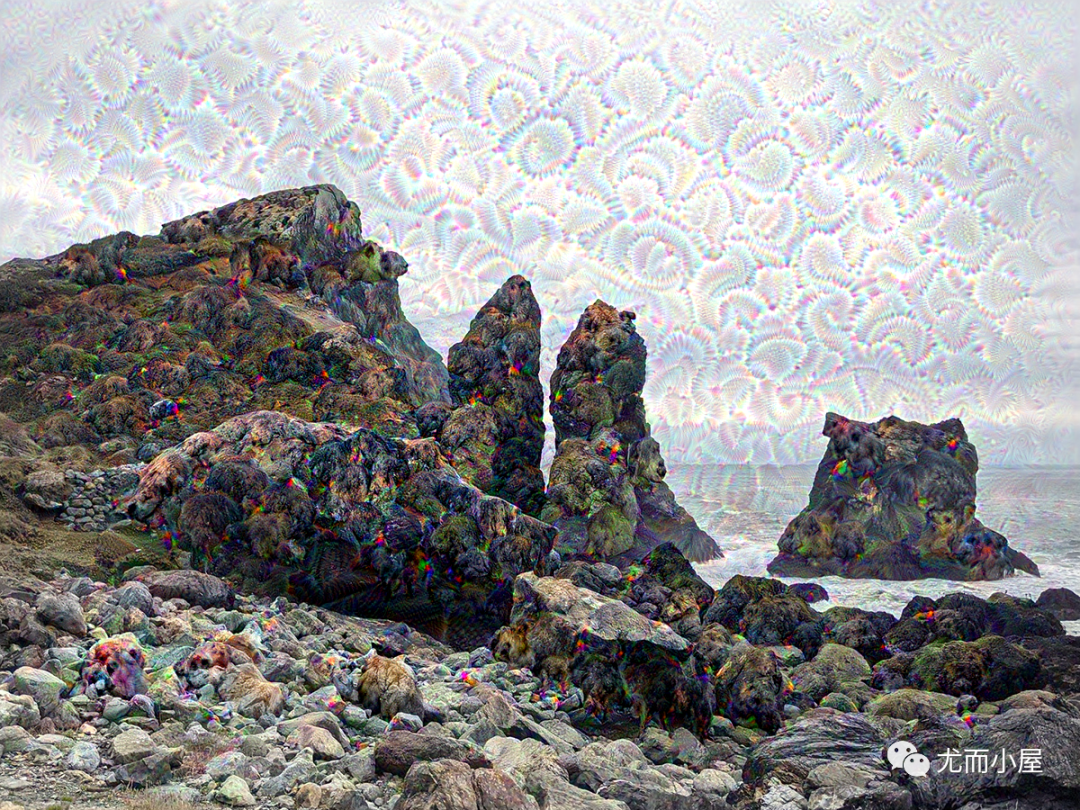
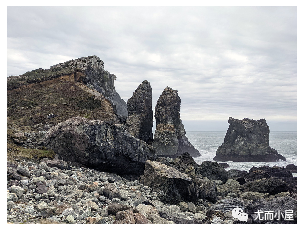
再看一眼原图:相对比之下,新图有点梦幻的味道!
© 版权声明
文章版权归作者所有,未经允许请勿转载。








