文章目录
- 自从大家使用QQ、微信、邮件等网络平台交流以后,大家对纸这种介质和书信这种通讯方式可能都比较陌生了。可别觉得书信是一个过时的东西,它可是80后的情怀,90后的回忆,00后的新宠,是经典的代名词。今天就想实现把这些古老的元素融入到新时代的产物当中。
- 工具:DevEc Studio 3.0 Beta3 主要用到知识:animation,Options,keyframes 官方API链接:动画效果
- 信件由信封上部分、信封主体和信纸三部分组成,首先通过css实现将三个部分组合成信封的样式,接下来根据animation组件方法中的播放或取消方法来实现信件弹出或收回的动画效果,并在信件展开的同时,使用定时器实现模拟读取文字的效果。
- 调整信封上下两个部分的位置,并调整信封和信纸三个部分的层级。 在点击信件之后,通过id属性标识获取组件对象并调用animate组件方法,给不同id对象调用对应的动画方法。 对信封两个部分传入展开后的新位置,同时传入信纸新的height值和bottom值。 使用定时器实现模拟读文字效果 判断是折叠信封时,调用animate组件的cancel()方法,实现信封收回的效果。
- Options属性说明。 参数 类型 默认值 说明 duration number 0 指定当前动画的运行时长(单位毫秒)。 easing string linear 描述动画的时间曲线,支持类型见表4 easing有效值说明。 delay number 0 设置动画执行的延迟时间(默认值表示无延迟)。 iterations number | string 1 设置动画执行的次数。<br />number表示固定次数,Infinity枚举表示无限次数播放。 direction string normal 指定动画的播放模式:<br />normal:动画正向循环播放;<br />reverse:动画反向循环播放;<br />alternate:动画交替循环播放,奇数次正向播放,偶数次反向播放;<br />alternate-reverse:动画反向交替循环播放,奇数次反向播放,偶数次正向播放。 fill string none 指定动画开始和结束的状态:<br />none:在动画执行之前和之后都不会应用任何样式到目标上。<br />forwards:在动画结束后,目标将保留动画结束时的状态(在最后一个关键帧中定义)。<br />backwards6+:动画将在animation-delay期间应用第一个关键帧中定义的值。当animation-direction为"normal"或"alternate"时应用from关键帧中的值,当animation-direction为"reverse"或"alternate-reverse"时应用to关键帧中的值。<br />both:动画将遵循forwards和backwards的规则,从而在两个方向上扩展动画属性。 keyframes 属性说明。 属性 类型 说明 frames Array<Style> 用于设置动画样式的对象列表。Style类型说明请见变2 Style类型说明。 Style类型说明。 参数 类型 默认值 说明 width number - 动画执行过程中设置到组件上的宽度值 height number - 动画执行过程中设置到组件上的高度值 backgroundColor <color> none 动画执行过程中设置到组件上的背景颜色 opacity number 1 设置到组件上的透明度(介于0到1之间)。 backgroundPosition string - 格式为”x y“,单位为百分号或者px。<br />第一个值是水平位置,第二个值是垂直位置<br />如果仅规定了一个值,另一个值为50%。 transformOrigin string ‘center center’ 变换对象的中心点。<br />第一个参数表示x轴的值,可以设置为left、center、right、长度值或百分比值。<br />第二个参数表示y轴的值,可以设置为top、center、bottom、长度值或百分比值。 transform Transform - 设置到变换对象上的类型 offset number - -offset值(如果提供)必须在0.0到1.0(含)之间,并以升序排列。<br />-若只有两帧,可以不填offset。<br />-若超过两帧,offset必填。 animation对象方法说明。 方法 参数 说明 play - 组件播放动画 finish - 组件完成动画 pause - 组件暂停动画 cancel - 组件取消动画 reverse - 组件倒播动画
-
- <div class="wrap" > <div class="letter"> <image class="envelopeHead" id="envelopeHead" src="common/images/before.png" style="bottom: {{headerBottom}}px"></image> <image class="envelope" id="envelope" src="common/images/after.png" style="bottom: {{envelopeBottom}}px"></image> <div class="paper" id="paper" onclick="fold" style="bottom: {{paperBottom}}px;height:{{paperHeight}}px"> <text class="title">{{ title }}</text> <text class="content">{{content}}</text> </div> </div></div>
- .wrap { justify-content: center; align-items: center; flex-direction: column; width: 100%; height: 100%; background-color: #dce6f2;}.letter{ height: 450px; position: relative; top: 0px;}/*信封口样式*/.envelopeHead { position: absolute; bottom: 250px; left: 15px; width: 330px; height: 200px; z-index: 1;}/*信封样式*/.envelope{ bottom: 150px; position: absolute; left: 15px; width: 330px; height: 200px; z-index: 3;}/*信纸样式*/.paper{ position: absolute; width: 290px; left: 35px; justify-content: flex-start; background-color: #f7f2ec; bottom: 150px; z-index: 2; flex-direction: column; padding: 0 10px;}/* 称呼*/.title{ font-size: 26px; text-shadow: 0 1px 0 #ede8d9; height:60px; width: 100%;}/*信件内容*/.content{ font-size: 26px; text-shadow: 0 1px 0 #ede8d9; width: 100%; line-height:40px;}
- import prompt from '@system.prompt';export default { data: { title: "致各位小伙伴:", content: "", message: "展信悦!欢迎大家来到Harmony OS社区!", headerBottom: 240, paperBottom: 150, envelopeBottom: 150, paperHeight: 170, animation: '', animation2: '', animation3: '', number: 1 }, onInit() { }, onShow() { var options = { duration: 150, easing: 'ease-in-out', delay: 0, fill: 'forwards', iterations: 2, direction: 'normal', }; var frames = [ { transform: { translate: '0px 120px' }, opacity: 1.0, offset: 1.0, height: '350px', 'bottom': 0 }]; var framesHead = [ { transform: { translate: '0px 120px' }, opacity: 1.0, offset: 1.0, }]; var framesEnvelope = [ { transform: { translate: '0px 120px' }, opacity: 1.0, offset: 1.0, } ]; this.animationPaper = this.$element('paper').animate(frames, options); this.animationHead = this.$element('envelopeHead').animate(framesHead, options); this.animationEnvelope = this.$element('envelope').animate(framesEnvelope, options); }, fold() { // 判断是否是展开信纸 if (this.number % 2 === 1) { // 展开信纸 this.animationPaper.play(); this.animationHead.play(); this.animationEnvelope.play(); for (var index = 0; index < 8; index++) { this.content += " " } var num = 0 var timer = setInterval(() => { if (num < this.message.length) { this.content += this.message[num] num++ }else{ this.timer = null; } }, 150) } else { // 收回信纸 this.animationPaper.cancel(); this.animationHead.cancel(); this.animationEnvelope.cancel(); this.content = ""; } this.number++ }}
- 该篇是通过鸿蒙动画实现的一个小练习,目前我们已经可以借助各种特效功能把实体产品的操作体验模拟到网页上,使得页面看起来更加人性化,更具亲和力。 想了解更多关于开源的内容,请访问: 51CTO 开源基础软件社区 https://ost.51cto.com。

自从大家使用QQ、微信、邮件等网络平台交流以后,大家对纸这种介质和书信这种通讯方式可能都比较陌生了。可别觉得书信是一个过时的东西,它可是80后的情怀,90后的回忆,00后的新宠,是经典的代名词。今天就想实现把这些古老的元素融入到新时代的产物当中。
- 工具:DevEc Studio 3.0 Beta3
- 主要用到知识:animation,Options,keyframes
- 官方API链接:动画效果
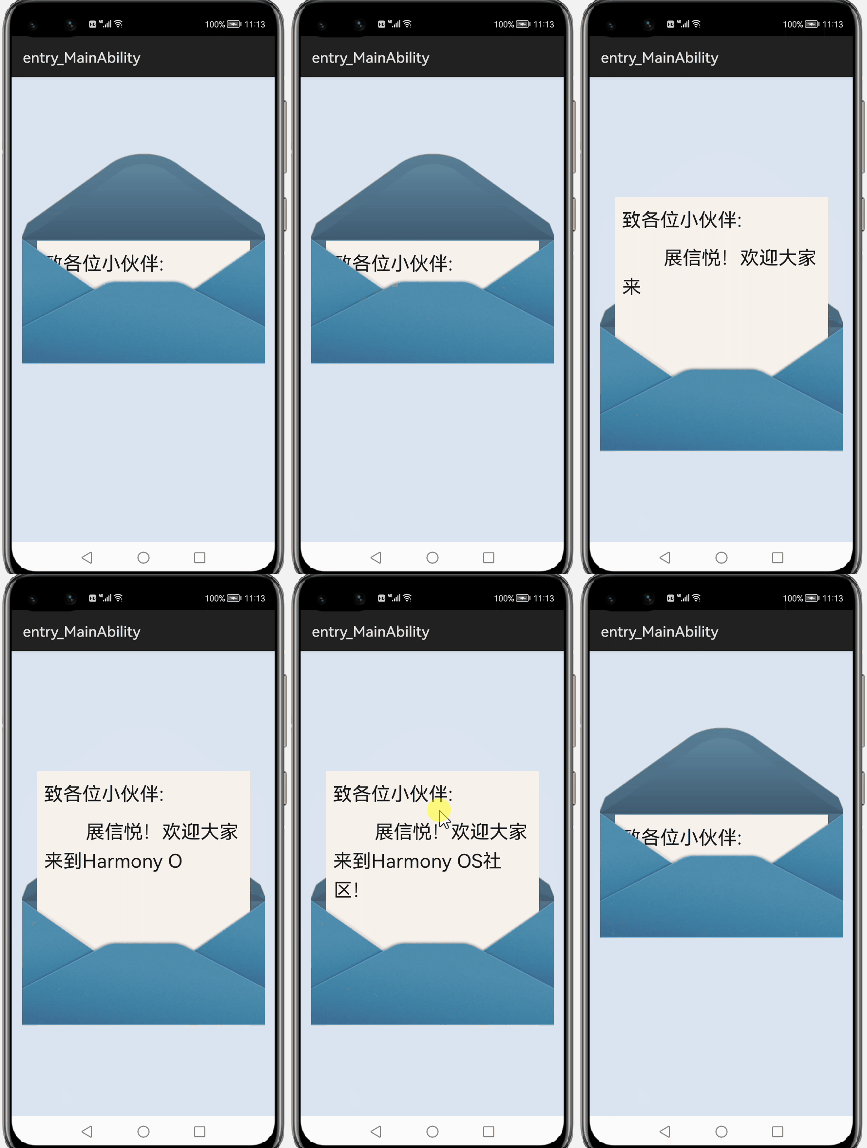
信件由信封上部分、信封主体和信纸三部分组成,首先通过css实现将三个部分组合成信封的样式,接下来根据animation组件方法中的播放或取消方法来实现信件弹出或收回的动画效果,并在信件展开的同时,使用定时器实现模拟读取文字的效果。
- 调整信封上下两个部分的位置,并调整信封和信纸三个部分的层级。
- 在点击信件之后,通过id属性标识获取组件对象并调用animate组件方法,给不同id对象调用对应的动画方法。
- 对信封两个部分传入展开后的新位置,同时传入信纸新的height值和bottom值。
- 使用定时器实现模拟读文字效果
- 判断是折叠信封时,调用animate组件的cancel()方法,实现信封收回的效果。
Options属性说明。
|
参数 |
类型 |
默认值 |
说明 |
|
duration |
number |
0 |
指定当前动画的运行时长(单位毫秒)。 |
|
easing |
string |
linear |
描述动画的时间曲线,支持类型见表4 easing有效值说明。 |
|
delay |
number |
0 |
设置动画执行的延迟时间(默认值表示无延迟)。 |
|
iterations |
number | string |
1 |
设置动画执行的次数。<br />number表示固定次数,Infinity枚举表示无限次数播放。 |
|
direction |
string |
normal |
指定动画的播放模式:<br />normal:动画正向循环播放;<br />reverse:动画反向循环播放;<br />alternate:动画交替循环播放,奇数次正向播放,偶数次反向播放;<br />alternate-reverse:动画反向交替循环播放,奇数次反向播放,偶数次正向播放。 |
|
fill |
string |
none |
指定动画开始和结束的状态:<br />none:在动画执行之前和之后都不会应用任何样式到目标上。<br />forwards:在动画结束后,目标将保留动画结束时的状态(在最后一个关键帧中定义)。<br />backwards6+:动画将在animation-delay期间应用第一个关键帧中定义的值。当animation-direction为"normal"或"alternate"时应用from关键帧中的值,当animation-direction为"reverse"或"alternate-reverse"时应用to关键帧中的值。<br />both:动画将遵循forwards和backwards的规则,从而在两个方向上扩展动画属性。 |
keyframes 属性说明。
|
属性 |
类型 |
说明 |
|
frames |
Array<Style> |
用于设置动画样式的对象列表。Style类型说明请见变2 Style类型说明。 |
Style类型说明。
|
参数 |
类型 |
默认值 |
说明 |
|
width |
number |
- |
动画执行过程中设置到组件上的宽度值 |
|
height |
number |
- |
动画执行过程中设置到组件上的高度值 |
|
backgroundColor |
<color> |
none |
动画执行过程中设置到组件上的背景颜色 |
|
opacity |
number |
1 |
设置到组件上的透明度(介于0到1之间)。 |
|
backgroundPosition |
string |
- |
格式为”x y“,单位为百分号或者px。<br />第一个值是水平位置,第二个值是垂直位置<br />如果仅规定了一个值,另一个值为50%。 |
|
transformOrigin |
string |
‘center center’ |
变换对象的中心点。<br />第一个参数表示x轴的值,可以设置为left、center、right、长度值或百分比值。<br />第二个参数表示y轴的值,可以设置为top、center、bottom、长度值或百分比值。 |
|
transform |
Transform |
- |
设置到变换对象上的类型 |
|
offset |
number |
- |
-offset值(如果提供)必须在0.0到1.0(含)之间,并以升序排列。<br />-若只有两帧,可以不填offset。<br />-若超过两帧,offset必填。 |
animation对象方法说明。
|
方法 |
参数 |
说明 |
|
play |
- |
组件播放动画 |
|
finish |
- |
组件完成动画 |
|
pause |
- |
组件暂停动画 |
|
cancel |
- |
组件取消动画 |
|
reverse |
- |
组件倒播动画 |
<div class="wrap" >
 <div class="letter">
 <image class="envelopeHead" id="envelopeHead" src="common/images/before.png" style="bottom: {{headerBottom}}px"></image>
 <image class="envelope" id="envelope" src="common/images/after.png" style="bottom: {{envelopeBottom}}px"></image>
 <div class="paper" id="paper" onclick="fold" style="bottom: {{paperBottom}}px;height:{{paperHeight}}px">
 <text class="title">{{ title }}</text>
 <text class="content">{{content}}</text>
 </div>
 </div>
</div>
<div class="letter">
<image class="envelopeHead" id="envelopeHead" src="common/images/before.png" style="bottom: {{headerBottom}}px"></image>
<image class="envelope" id="envelope" src="common/images/after.png" style="bottom: {{envelopeBottom}}px"></image>
<div class="paper" id="paper" onclick="fold" style="bottom: {{paperBottom}}px;height:{{paperHeight}}px">
<text class="title">{{ title }}</text>
<text class="content">{{content}}</text>
</div>
</div>
</div>
.wrap {
 justify-content: center;
 align-items: center;
 flex-direction: column;
 width: 100%;
 height: 100%;
 background-color: #dce6f2;
}
.letter{
 height: 450px;
 position: relative;
 top: 0px;
}
/*信封口样式*/
.envelopeHead {
 position: absolute;
 bottom: 250px;
 left: 15px;
 width: 330px;
 height: 200px;
 z-index: 1;
}
/*信封样式*/
.envelope{
 bottom: 150px;
 position: absolute;
 left: 15px;
 width: 330px;
 height: 200px;
 z-index: 3;
}
/*信纸样式*/
.paper{
 position: absolute;
 width: 290px;
 left: 35px;
 justify-content: flex-start;
 background-color: #f7f2ec;
 bottom: 150px;
 z-index: 2;
 flex-direction: column;
 padding: 0 10px;
}
/* 称呼*/
.title{
 font-size: 26px;
 text-shadow: 0 1px 0 #ede8d9;
 height:60px;
 width: 100%;
}
/*信件内容*/
.content{
 font-size: 26px;
 text-shadow: 0 1px 0 #ede8d9;
 width: 100%;
 line-height:40px;
}
justify-content: center;
align-items: center;
flex-direction: column;
width: 100%;
height: 100%;
background-color: #dce6f2;
}
.letter{
height: 450px;
position: relative;
top: 0px;
}
/*信封口样式*/
.envelopeHead {
position: absolute;
bottom: 250px;
left: 15px;
width: 330px;
height: 200px;
z-index: 1;
}
/*信封样式*/
.envelope{
bottom: 150px;
position: absolute;
left: 15px;
width: 330px;
height: 200px;
z-index: 3;
}
/*信纸样式*/
.paper{
position: absolute;
width: 290px;
left: 35px;
justify-content: flex-start;
background-color: #f7f2ec;
bottom: 150px;
z-index: 2;
flex-direction: column;
padding: 0 10px;
}
/* 称呼*/
.title{
font-size: 26px;
text-shadow: 0 1px 0 #ede8d9;
height:60px;
width: 100%;
}
/*信件内容*/
.content{
font-size: 26px;
text-shadow: 0 1px 0 #ede8d9;
width: 100%;
line-height:40px;
}
import prompt from '@system.prompt';
export default {
 data: {
 title: "致各位小伙伴:",
 content: "",
 message: "展信悦!欢迎大家来到Harmony OS社区!",
 headerBottom: 240,
 paperBottom: 150,
 envelopeBottom: 150,
 paperHeight: 170,
 animation: '',
 animation2: '',
 animation3: '',
 number: 1
 },
 onInit() {
 },
 onShow() {
 var options = {
 duration: 150,
 easing: 'ease-in-out',
 delay: 0,
 fill: 'forwards',
 iterations: 2,
 direction: 'normal',
 };
 var frames = [
 {
 transform: {
 translate: '0px 120px'
 },
 opacity: 1.0,
 offset: 1.0,
 height: '350px',
 'bottom': 0
 }];
 var framesHead = [
 {
 transform: {
 translate: '0px 120px'
 },
 opacity: 1.0,
 offset: 1.0,
 }];
 var framesEnvelope = [
 {
 transform: {
 translate: '0px 120px'
 },
 opacity: 1.0,
 offset: 1.0,
 }
 ];
 this.animationPaper = this.$element('paper').animate(frames, options);
 this.animationHead = this.$element('envelopeHead').animate(framesHead, options);
 this.animationEnvelope = this.$element('envelope').animate(framesEnvelope, options);
 },
 fold() {
 // 判断是否是展开信纸
 if (this.number % 2 === 1) {
 // 展开信纸
 this.animationPaper.play();
 this.animationHead.play();
 this.animationEnvelope.play();
 for (var index = 0; index < 8; index++) {
 this.content += " "
 }
 var num = 0
 var timer = setInterval(() => {
 if (num < this.message.length) {
 this.content += this.message[num]
 num++
 }else{
 this.timer = null;
 }
 }, 150)
 } else {
 // 收回信纸
 this.animationPaper.cancel();
 this.animationHead.cancel();
 this.animationEnvelope.cancel();
 this.content = "";
 }
 this.number++
 }
}
export default {
data: {
title: "致各位小伙伴:",
content: "",
message: "展信悦!欢迎大家来到Harmony OS社区!",
headerBottom: 240,
paperBottom: 150,
envelopeBottom: 150,
paperHeight: 170,
animation: '',
animation2: '',
animation3: '',
number: 1
},
onInit() {
},
onShow() {
var options = {
duration: 150,
easing: 'ease-in-out',
delay: 0,
fill: 'forwards',
iterations: 2,
direction: 'normal',
};
var frames = [
{
transform: {
translate: '0px 120px'
},
opacity: 1.0,
offset: 1.0,
height: '350px',
'bottom': 0
}];
var framesHead = [
{
transform: {
translate: '0px 120px'
},
opacity: 1.0,
offset: 1.0,
}];
var framesEnvelope = [
{
transform: {
translate: '0px 120px'
},
opacity: 1.0,
offset: 1.0,
}
];
this.animationPaper = this.$element('paper').animate(frames, options);
this.animationHead = this.$element('envelopeHead').animate(framesHead, options);
this.animationEnvelope = this.$element('envelope').animate(framesEnvelope, options);
},
fold() {
// 判断是否是展开信纸
if (this.number % 2 === 1) {
// 展开信纸
this.animationPaper.play();
this.animationHead.play();
this.animationEnvelope.play();
for (var index = 0; index < 8; index++) {
this.content += " "
}
var num = 0
var timer = setInterval(() => {
if (num < this.message.length) {
this.content += this.message[num]
num++
}else{
this.timer = null;
}
}, 150)
} else {
// 收回信纸
this.animationPaper.cancel();
this.animationHead.cancel();
this.animationEnvelope.cancel();
this.content = "";
}
this.number++
}
}
该篇是通过鸿蒙动画实现的一个小练习,目前我们已经可以借助各种特效功能把实体产品的操作体验模拟到网页上,使得页面看起来更加人性化,更具亲和力。
© 版权声明
文章版权归作者所有,未经允许请勿转载。








